


WhatsApp automation is a powerful tool for businesses in the UAE, where 79.6% of social media users actively use WhatsApp. It helps manage high volumes of customer interactions, ensures faster response times, and boosts customer satisfaction. With 98% message open rates, businesses can automate routine tasks like FAQs, lead routing, and appointment scheduling. Here’s how to get started:
- Choose the Right Tools: Use the WhatsApp Business API for advanced features like AI chatbots, integrations with CRMs, and unlimited user access.
- Meet UAE Regulations: Comply with Meta’s verification process and UAE data protection laws, ensuring user consent and data transparency.
- Set Up Automation: Create message templates, configure webhooks, and use Business Solution Providers (BSPs) for smooth integration.
- Optimise Campaigns: Use tools like WAConversionTracking to link WhatsApp conversations with ad campaigns for better ROI.
Automation not only saves time but also drives better engagement and conversions, making it a must-have for UAE businesses.
Complete Guide to WhatsApp Business Automation
Requirements for Setting Up WhatsApp Business Automation in the UAE
To successfully automate messages through WhatsApp in the UAE, you'll need to prepare specific accounts, tools, and permissions while ensuring compliance with Meta's verification process and UAE regulations.
Accounts and Tools You'll Need
First, create a Meta Business Portfolio (previously known as Business Manager). This account is essential as it will manage your WhatsApp Business Account (WABA). You'll also need a valid UAE phone number. If this number is already registered on WhatsApp, you must delete the existing account before migrating it to the API.
When choosing an API, you have two main options: the WhatsApp Cloud API or the On-Premises API. The Cloud API is known for its reliability and automatic updates, handling up to 80 messages per second. Alternatively, you can opt for the On-Premises API hosted by a Business Solution Provider like SleekFlow, respond.io, or 360dialog. Many businesses in the UAE prefer working with such providers to simplify the technical setup.
Next, link a valid credit card to your Meta Business Manager account. Make sure the currency is set to either USD or AED, as this cannot be changed later. Meta offers 1,000 free conversations per month, but beyond that, charges are based on a 24-hour conversation window rather than per message.
Once your accounts and tools are set up, you'll need to meet specific regulatory and verification requirements in the UAE.
Meeting UAE Regulatory Requirements
Your business website must meet Meta's verification criteria by being accessible, displaying your company logo, and using an email domain that matches your business name. The display name you choose for WhatsApp must also align with UAE branding guidelines and Meta's policies.
Under Federal Decree Law No. 45 of 2021 - the UAE's Personal Data Protection Law - you are required to obtain clear and explicit consent from users before using their data for automated messaging. Additionally, you must document the purpose of data collection, how it's processed, and its retention period. These records should be readily available for UAE Data Office inspections. If your automation involves large-scale handling of sensitive data, appointing a Data Protection Officer is mandatory.
It's important to note that WhatsApp voice and video calls are currently restricted in the UAE by the Telecommunications and Digital Government Regulatory Authority. Only licensed providers like BOTIM and C'ME are authorised to offer VoIP services. Therefore, do not attempt to automate voice or video calls through WhatsApp. This could lead to regulatory issues.
How to Set Up WhatsApp Automation: Step-by-Step
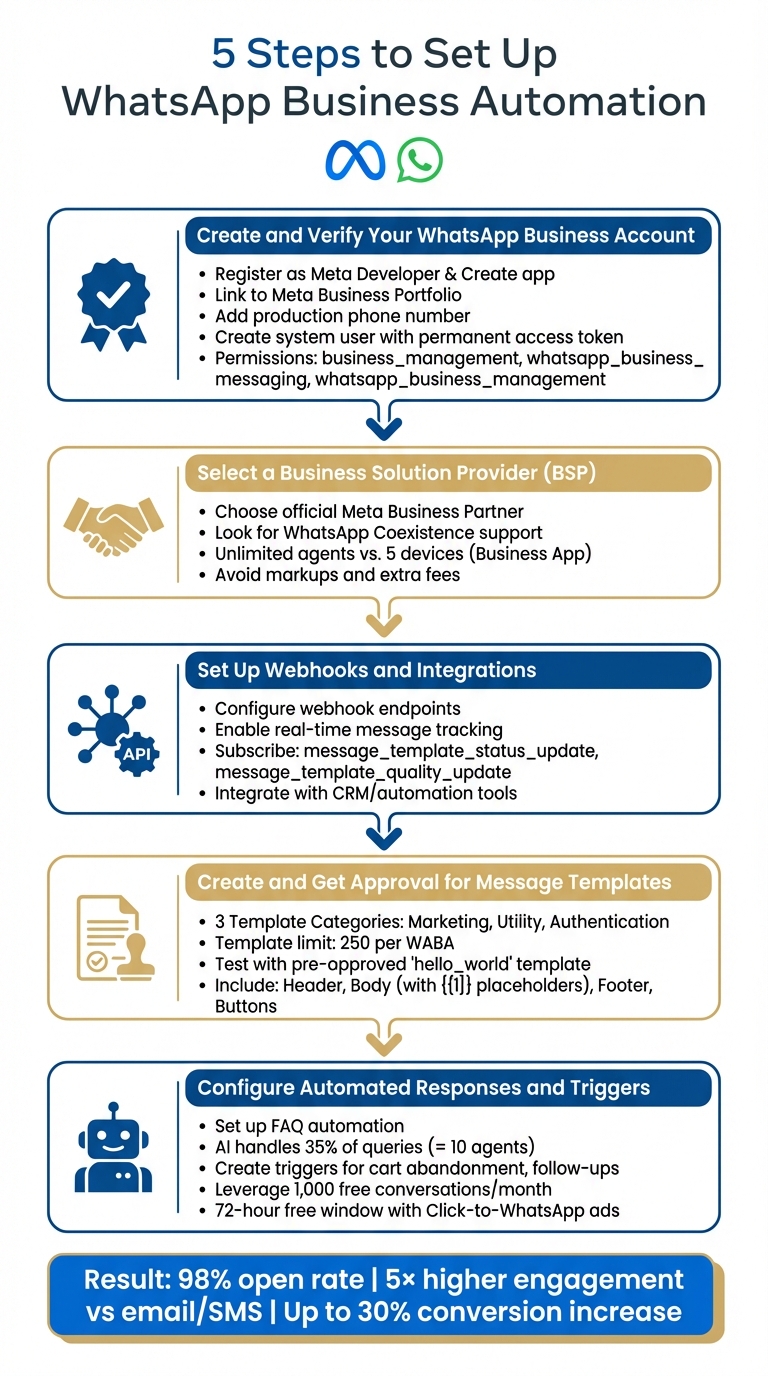
5-Step WhatsApp Business Automation Setup Guide for UAE
Step 1: Create and Verify Your WhatsApp Business Account
To get started, register as a Meta Developer and create a Meta developer app via the Meta App Dashboard. Choose the "Connect with customers through WhatsApp" option and link it to your Meta Business Portfolio. Then, head to the WhatsApp "API Setup" section to add your production phone number and set up your WhatsApp Business Account (WABA).
Looking for an easier method? Use Embedded Signup through a Business Solution Provider (BSP) like respond.io. Log in to Facebook, grant the necessary permissions, and either create or select your Meta Business Portfolio and WABA directly within the BSP's interface.
If you’re in the UAE, verify your local number. If you don’t have one, Meta provides free Virtual Phone Numbers (555 numbers) that auto-verify without needing an OTP.
Key Step: In Business Settings, create a system user and generate a permanent access token with the proper permissions: business_management, whatsapp_business_messaging, and whatsapp_business_management.
Finally, choose a Business Solution Provider to help you integrate these settings smoothly.
Step 2: Select a Business Solution Provider (BSP)
Pick an official Meta Business Partner that supports WhatsApp Coexistence - this lets you use both the WhatsApp Business App and API on the same number. Look for BSPs that don’t add markups or extra setup and maintenance fees.
Studies show that API broadcasts and automated routing can dramatically improve lead conversions and operational efficiency.
| Feature | WhatsApp Business App | WhatsApp Business API |
|---|---|---|
| Target Audience | Micro to small businesses | Medium to large enterprises |
| User Limit | 5 devices | Unlimited agents |
| Broadcast Limit | 256 contacts | Unlimited (tier-based) |
| Automation | Basic (Greeting/Away) | Advanced (AI, Workflows) |
When evaluating BSPs, go for platforms that offer a ready-to-use interface. As respond.io points out:
"WhatsApp API is designed for medium to large companies that want to use WhatsApp with multiple users... it does not come with an interface to send and receive messages".
Step 3: Set Up Webhooks and Integrations
Once your account is ready, configure webhooks and integrations to enable real-time message tracking. Set up webhook endpoints to get instant notifications for message statuses (sent, delivered, read) and incoming messages. Use your BSP’s platform or the Meta Developer portal to set up the webhook with a callback URL and verification token.
Webhooks are essential for automation - they allow your system to respond instantly to customer messages. Without them, you won’t get updates on new conversations or message deliveries. Integrate your webhook with tools like respond.io to create chatbot workflows and automation sequences.
Subscribe to message_template_status_update and message_template_quality_update webhooks to monitor template approvals and quality scores automatically. This helps you avoid disruptions if Meta flags a template due to user complaints.
Step 4: Create and Get Approval for Message Templates
Message templates are mandatory for business-initiated messages or any messages sent beyond the 24-hour customer service window. Templates generally fall into three categories: Marketing (e.g., promotions), Utility (e.g., order updates), and Authentication (e.g., OTPs).
Design your template with these elements:
- An optional header (text or media)
- Body text with dynamic placeholders (e.g.,
{{1}}for personalisation) - An optional footer
- Interactive buttons like Quick Reply or Call-to-Action
Submit your templates via Meta Business Suite or your BSP’s platform for review.
| Template Category | Primary Purpose | Common Examples |
|---|---|---|
| Marketing | Boost sales or engagement | Promotions, newsletters |
| Utility | Transaction updates | Order confirmations, shipping alerts |
| Authentication | Verify user identity | OTPs, security codes |
Before submitting custom templates, test your integration with the pre-approved hello_world template. Meta reviews templates for compliance with its messaging policies, assigning statuses like "Pending", "Approved", "Rejected", or "Paused". Keep in mind, each WABA is limited to 250 templates.
Step 5: Configure Automated Responses and Triggers
Set up automated responses for FAQs, lead qualification, and appointment scheduling. AI chatbots can handle up to 35% of queries, which is equivalent to the workload of 10 support agents. This allows your team to focus on complex issues while maintaining fast response times.
You can also create triggers for specific customer actions, such as sending abandoned cart reminders or follow-ups after purchases. For instance, EMAX Beauté, a beauty services provider in Kuala Lumpur, used respond.io's WhatsApp API to implement lifecycle tracking and auto-assign tasks, resulting in an 18× increase in appointment bookings.
Leverage Click-to-WhatsApp ads and Facebook Page CTAs to extend the free service window to 72 hours. Each WABA gets 1,000 free service conversations per month, shared across all numbers. Plan your workflows to make the most of these free conversations while keeping customer engagement high.
sbb-itb-0a82e4d
Tracking WhatsApp Conversions to Improve Your UAE Ad Campaigns
If you're running Google Ads or Meta campaigns in the UAE without tracking WhatsApp conversions, you're likely wasting valuable ad spend. You're paying for clicks, but without knowing which ads are driving real customer interactions through WhatsApp chats, it's hard to measure success. Simply counting button clicks as conversions doesn’t cut it - it doesn’t reflect actual WhatsApp engagement. That’s where WAConversionTracking comes in, offering a solution to capture genuine WhatsApp conversations as conversions.
How WAConversionTracking Boosts Campaign Performance
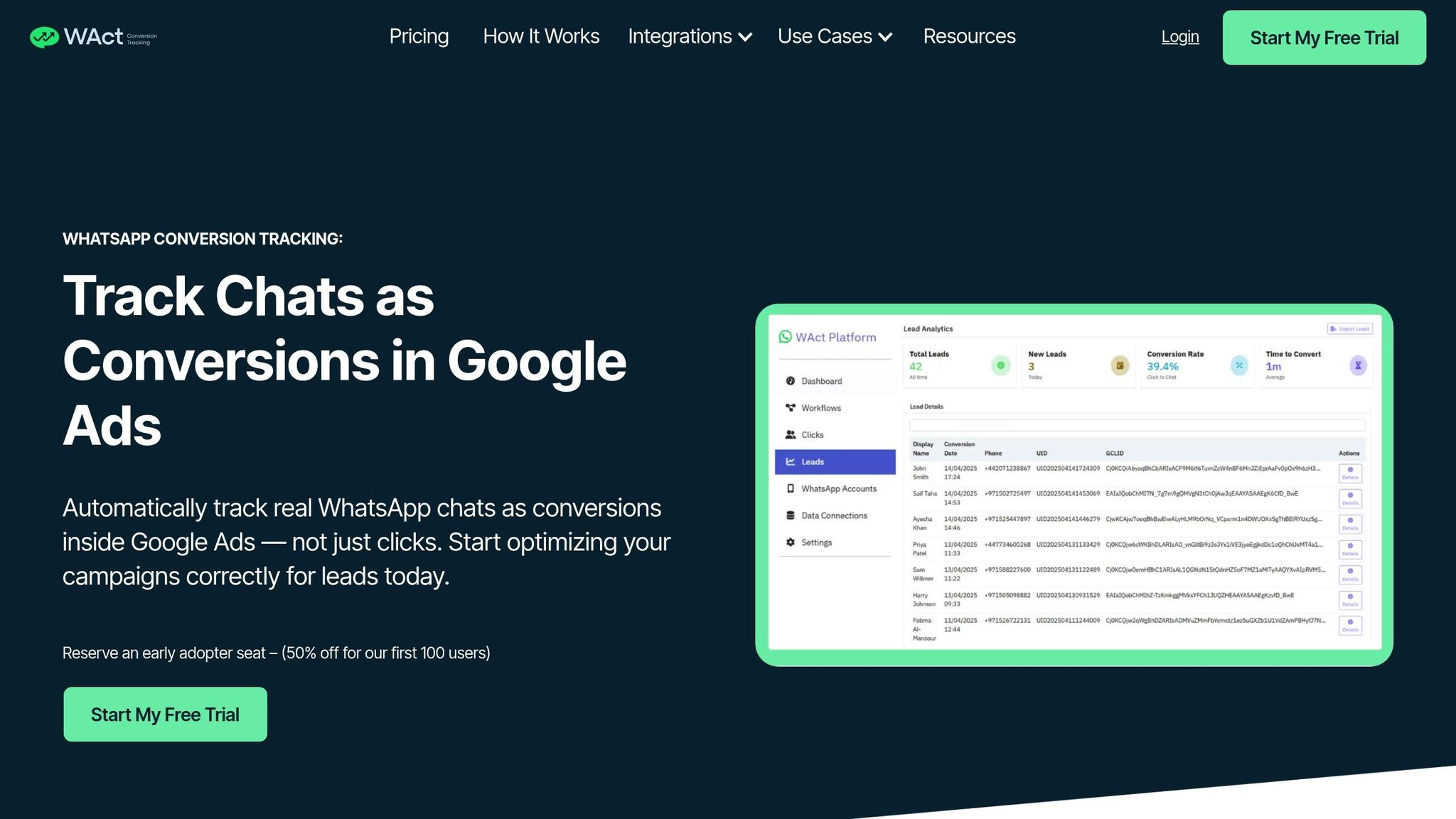
WAConversionTracking takes the guesswork out of your ad campaigns by recording real WhatsApp chats as conversions and syncing that data directly to Google Ads. It uses "Workflows" to connect your WhatsApp account, Google Ads account, and a data sheet (like Google Sheets), ensuring precise attribution. When a user clicks on an ad and initiates a WhatsApp conversation, the system captures the GCLID and UTM parameters, then uploads the conversion data back to Google Ads.
This is crucial because Google's Smart Bidding algorithms rely on accurate conversion data to optimise your campaigns. Instead of focusing on clicks alone, your ads will now target users who actually engage in conversations. For example, JU Productions saw a 47.2% drop in cost per qualified lead with automated tracking, while Automax® experienced a 10% rise in total conversions.
You can either use the Button Generator to create a WhatsApp button with integrated tracking or add the tracking script to your existing button to maintain your branding. Before launching your campaigns, use the "Testing Your Setup" feature to confirm that clicks are being properly recorded in both Google Ads and your connected Google Sheet.
Manual Tracking vs. Automated Tracking
Here’s a side-by-side look at manual tracking versus automated tracking with WAConversionTracking:
| Feature | Manual Tracking (Agent Logs) | WAConversionTracking (Automated) |
|---|---|---|
| Accuracy | Low; prone to human error | High; captures every interaction automatically |
| Data Attribution | Challenging to link chats to specific ad clicks | Seamlessly connects WhatsApp chats to ad data |
| Setup Complexity | No technical setup but requires ongoing staff training | Easy; install a script or use a pre-built button |
| Time Efficiency | Low; manual logging is time-consuming | High; real-time syncing to Sheets/Ads |
| Browser Restrictions | Limited by privacy settings and cookies | Unaffected; uses server-to-server tracking (CAPI) |
Automated tracking, powered by CAPI (server-to-server tracking), overcomes browser privacy restrictions and cuts spam leads by up to 60%. This ensures ad platforms focus on genuine prospects - those who are actually interested in your business - rather than casual clickers.
How to Adapt WhatsApp Automation for UAE Customers
Formatting Messages for UAE Audiences
When crafting automated messages for customers in the UAE, it's essential to align with local conventions. For example, always use the DD/MM/YYYY date format for communications like appointment confirmations or delivery updates. A date like "15/03/2026" is far more intuitive for UAE residents than "03/15/2026." Similarly, prices should include the AED symbol, and measurements should use the metric system - think kilometres, kilograms, and Celsius for temperature.
For phone numbers in Call-to-Action buttons, format them as 97150XXXXXXX, skipping the plus sign for clarity. If you're including reference numbers or coupon codes, display them in monospace using three backticks for better readability.
Avoid using URL shorteners like bit.ly in your templates, as WhatsApp won't approve them. Stick to links from your official business domain to ensure compliance and approval.
These small adjustments help ensure your messages are clear, professional, and culturally appropriate.
Writing Messages That Respect Local Customs
Beyond technical details, your automated messages should reflect the cultural diversity and traditions of the UAE. Since the UAE is home to a multilingual population, ensure your automation supports both Arabic and English for broader accessibility. Set away messages that account for the local Monday-to-Friday workweek and prayer times, and provide clear response timeframes, such as "within 2 hours."
Make your greetings more personal by acknowledging significant local events like Eid Al Fitr, Eid Al Adha, and UAE National Day. At the same time, steer clear of topics or content that are sensitive or prohibited, such as references to alcohol, gambling, or anything that could be considered threatening. These are not only against Meta’s policies but also culturally inappropriate.
For more complex queries - especially those requiring cultural sensitivity or negotiations - ensure your automation can seamlessly hand off the conversation to a human agent. This approach balances efficiency with respect for local customs and expectations.
Conclusion
This guide has explored how WhatsApp automation can simplify customer interactions in the UAE. Instead of manually addressing every query, businesses can implement workflows that deliver instant responses, automatically qualify leads, and direct conversations to the right team members.
The results speak for themselves: businesses using automated WhatsApp campaigns report up to a 98% open rate and a 5x higher engagement rate compared to email or SMS. For example, some have experienced a 30% increase in conversions and an 18× jump in appointment bookings.
Automation goes beyond just saving time - it also provides valuable data to refine ad campaigns. Tools like WAConversionTracking offer precise conversion insights, enabling better ad performance. Companies like JU Productions saw a 47.2% reduction in cost per qualified lead by combining Conversions API (CAPI) with WhatsApp automation, while Automax® achieved a 10% boost in conversions after optimising ad delivery with CAPI.
While AI agents and chatbots are excellent for handling repetitive tasks and initial inquiries, it's essential to allow seamless handovers to human agents for more complex or culturally sensitive conversations. This hybrid approach ensures automation aligns with the UAE's cultural expectations while maintaining the speed and efficiency customers value.
Start small by automating basic responses, and gradually expand to include more sophisticated workflows. Always ensure a smooth transition to human support for sensitive or intricate cases. This balance of instant automation and personal interaction not only reduces acquisition costs but also drives higher conversion rates and enhances customer satisfaction at every stage of the journey.
FAQs
How can I set up WhatsApp automation for my business in the UAE?
To get started with automating WhatsApp for your UAE-based business, the first step is to register on the WhatsApp Business Platform. Make sure to verify your business using an Emirates ID and a local +971 phone number. After registration, integrate the API with an automation platform like respond.io to streamline your workflows.
Set up automated messages to enhance customer communication. For example, create a Greeting message to welcome new customers, such as: “Welcome to [Your Company]! How can we assist you today?” Additionally, configure an Away message for after-hours, keeping in mind typical UAE business timings (Sunday-Thursday, 09:00-18:00 GMT+4).
To capture leads effectively, use tools that pull customer details from ads or website interactions. Ensure the data aligns with UAE standards, such as dates in the DD/MM/YYYY format and monetary amounts like AED 1,250.00. Before going live, test your workflows in sandbox mode to ensure everything is functioning as expected. Use British-English spelling (e.g., “optimise”) and fine-tune your setup based on feedback. Once launched, keep an eye on performance and make adjustments to maintain smooth and effective customer engagement.
How can I ensure my WhatsApp automation complies with UAE regulations?
To ensure your WhatsApp automation meets UAE regulations, here are a few steps to keep in mind:
- Get clear consent from customers before sending any messages. Make sure your communication adheres to WhatsApp's Business Policy and UAE-specific rules.
- Maintain electronic records of all conversations, including metadata and timestamps in the format
dd/MM/yyyy HH:mm. This is crucial, as UAE laws recognise electronic communications as valid legal evidence. - Steer clear of spam or unsolicited messages, and avoid sharing content that might be culturally or politically sensitive in the UAE. Always prioritise customer privacy and follow data protection standards when handling personal information.
By sticking to these guidelines, you can stay compliant and deliver a smooth customer experience through WhatsApp automation.
What advantages does WAConversionTracking offer for WhatsApp ad campaigns?
WAConversionTracking offers businesses a dedicated solution for WhatsApp, making it easier to track the effectiveness of their paid ad campaigns. Unlike generic tools, it connects clicks on Meta ads directly to WhatsApp conversations, providing detailed conversion data rather than relying on broad click-through rates. This helps marketers measure return on ad spend (ROAS), pinpoint the best-performing ads or audiences, and allocate budgets more effectively.
The tool works effortlessly with the WhatsApp Business API, allowing for automatic syncing of data with CRMs or analytics platforms. This eliminates the need for manual updates, streamlining lead management, automating follow-ups, and improving sales tracking. With this setup, businesses can respond faster to leads, enhance customer satisfaction, and gain instant visibility into their sales progress.
Moreover, WAConversionTracking adheres to UAE data privacy laws and WhatsApp's policies, ensuring businesses remain compliant while maintaining customer trust. By offering precise tracking, seamless integration, and regulatory alignment, this tool transforms how businesses approach WhatsApp ad campaigns in the UAE.




