


UTM parameters are essential for accurately tracking LinkedIn Ads performance. Without them, your paid traffic may appear as generic "linkedin.com" referral traffic in Google Analytics 4 (GA4), leading to poor attribution and wasted ad spend. Here's what you need to know:
- What are UTM Parameters? Tags added to URLs to identify traffic sources, campaigns, and ad creatives.
- Why use them? They ensure LinkedIn Ads traffic is correctly categorized as "Paid Social" in GA4, helping you measure Return on Ad Spend (ROAS) effectively.
- Key parameters to include:
utm_source(e.g., linkedin)utm_medium(e.g., paid_social)utm_campaign(e.g., product_launch)utm_term(e.g., audience targeting)utm_content(e.g., ad creative variations)
- Dynamic tokens: Use LinkedIn’s tokens (e.g.,
{{CAMPAIGN_NAME}}) to automate tracking and simplify setup. - Avoid errors: Stick to lowercase, use standard values, and never tag internal links.
Proper UTM tracking not only improves data accuracy but also ensures you can optimize ad performance and reduce wasted ad budgets. Tools like WAConversionTracking can further enhance tracking by linking LinkedIn clicks to WhatsApp conversions, providing deeper insights into lead generation.
Key takeaway: UTM parameters are vital for precise LinkedIn Ads tracking, enabling better decisions and higher ROI.
LinkedIn Ads UTM Tracking Parameters (What They Are and How to Set Up)
How to Set Up UTM Parameters for LinkedIn Ads
LinkedIn Ads UTM Parameters: 5 Core Parameters Explained
Setting up UTM parameters for LinkedIn Ads involves understanding the five key parameters and knowing where to include them. LinkedIn's dynamic tokens can also simplify the process. Here's a breakdown of how to do it right.
The 5 Core UTM Parameters
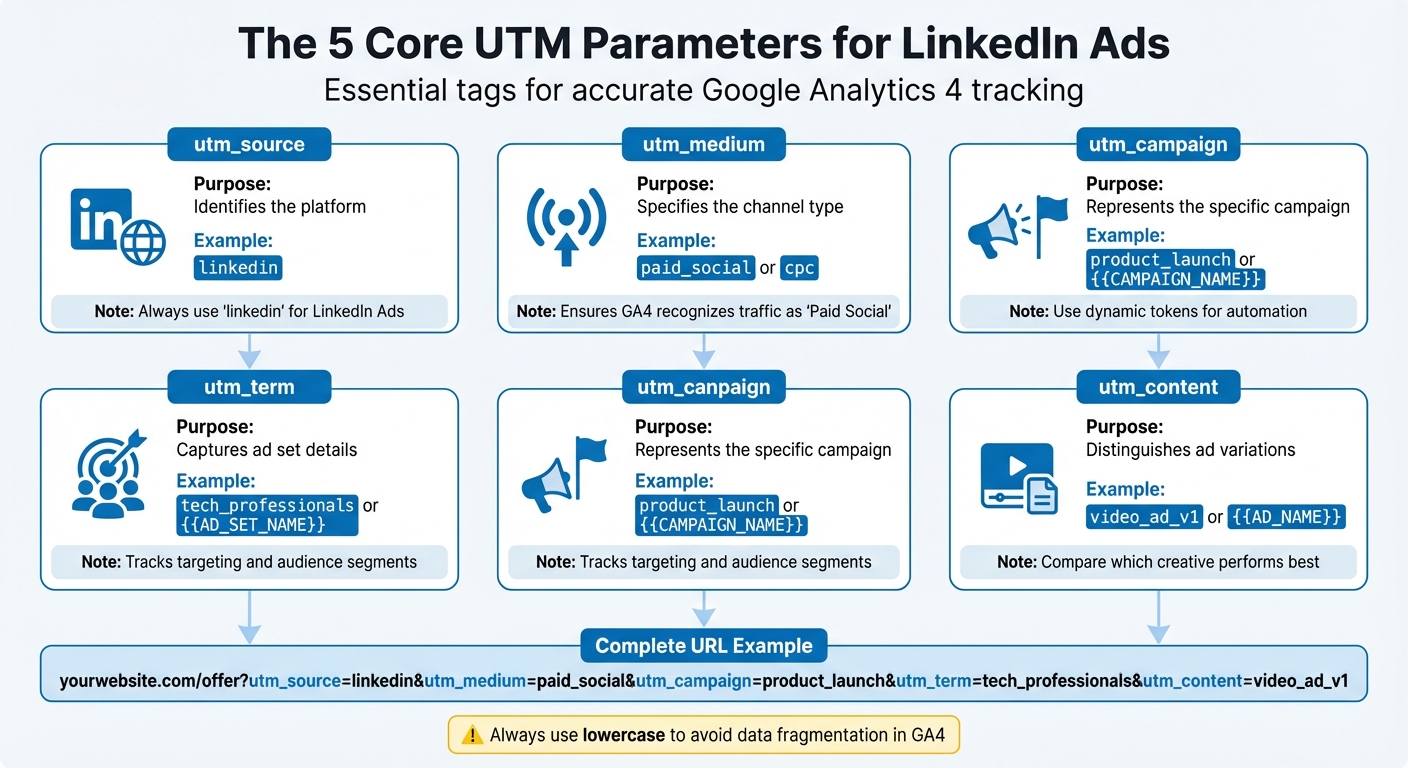
Every LinkedIn ad URL should include five key parameters to help Google Analytics 4 (GA4) track your traffic accurately. Here's what each parameter does:
- utm_source: Identifies the platform. For LinkedIn Ads, this is always
linkedin. - utm_medium: Specifies the channel type. Use
paid_socialorcpcto ensure GA4 recognises your traffic as "Paid Social" instead of generic referral traffic. - utm_campaign: Represents the specific campaign you're running.
- utm_term: Captures ad set details (previously called campaigns before LinkedIn's October 2025 hierarchy update).
- utm_content: Distinguishes between ad variations, so you can track which creative performs best.
Here’s an example of a complete URL with all parameters:
yourwebsite.com/offer?utm_source=linkedin&utm_medium=paid_social&utm_campaign=product_launch&utm_term=tech_professionals&utm_content=video_ad_v1
| UTM Parameter | Purpose | LinkedIn Example |
|---|---|---|
utm_source |
Identifies the platform | linkedin |
utm_medium |
Identifies the channel type | paid_social or cpc |
utm_campaign |
Identifies the specific campaign | product_launch or {{CAMPAIGN_NAME}} |
utm_term |
Specifies the ad set or targeting | tech_professionals or {{AD_SET_NAME}} |
utm_content |
Differentiates ad variations | video_ad_v1 or {{AD_NAME}} |
Adding UTM Parameters in LinkedIn Campaign Manager
UTM parameters can be added at the account, campaign, or ad level. The account-level approach is the most efficient because it automatically applies your UTM structure to all ads in your account, reducing manual work.
To set this up, go to "Account Assets" in Campaign Manager, select "Insight Tag", and paste your UTM template into the URL parameters field. Use an ampersand (&) to separate parameters, and start the first parameter with a question mark (?). For example:
utm_source=linkedin&utm_medium=paid_social&utm_campaign={{CAMPAIGN_NAME}}
For campaign-level or ad-level tracking, open the campaign or ad settings, find the "Website URL" field, and append your parameters to the destination URL. Always preview your ad to confirm the UTM parameters are correct.
Pro Tips:
- Stick to lowercase letters for parameter values (e.g.,
utm_source=linkedin, notLinkedIn) to avoid GA4 treating them as separate sources. - Replace spaces with hyphens or underscores to maintain clean URLs.
Using LinkedIn's Dynamic UTM Tokens
Dynamic tokens make tracking more accurate by automatically inserting campaign names, ad set details, and creative IDs into your UTM parameters. For example, using utm_campaign={{CAMPAIGN_NAME}} ensures LinkedIn fills in the actual campaign name when someone clicks your ad.
LinkedIn updated its campaign hierarchy in October 2025, introducing new token names:
- Campaign (formerly Campaign Group):
{{CAMPAIGN_NAME}} - Ad Set (formerly Campaign):
{{AD_SET_NAME}} - Ad (formerly Creative):
{{AD_NAME}}
These tokens must be in ALL CAPS and enclosed in double curly brackets. Lowercase letters or single brackets won’t work.
"Adding URL tracking parameters at the account level is by far the best way to add UTM parameters to your LinkedIn Ads. It's much quicker and easier to set up, and helps ensure you have accurate, consistent data."
– Aaron Beashel, Founder, Attributer
Here’s an example of a URL using dynamic tokens:
yourwebsite.com/landing?utm_source=linkedin&utm_medium=paid_social&utm_campaign={{CAMPAIGN_NAME}}&utm_term={{AD_SET_NAME}}&utm_content={{AD_NAME}}
When someone clicks your ad, LinkedIn replaces these tokens with the actual values.
Important Notes:
- Dynamic UTM tracking doesn’t work for Conversation Ads, Lead Generation Form Ads, or Message Ads. For these formats, you’ll need to manually add static parameters.
Tracking and Analyzing LinkedIn Ads with UTM Parameters
Connecting UTM Data to Google Analytics
Once your LinkedIn UTM parameters are set up, you can dive into tracking and analysing campaign performance using GA4. This process builds on your UTM setup to deliver actionable insights into how your LinkedIn Ads are performing.
Since Google Analytics 4 doesn’t have a direct link with LinkedIn Ads, UTM parameters are crucial for accurate tracking. Without them, you risk 25–30% of your traffic being misattributed as "Direct", which can skew your data and make it harder to measure ROI effectively.
In GA4, once your UTM parameters are in place, they’re automatically mapped to specific dimensions. For example:
utm_sourcebecomes "Session source"utm_mediumbecomes "Session medium"utm_campaignbecomes "Session campaign"
To get a clear view of your LinkedIn traffic, head to GA4’s Traffic Acquisition report and filter by "Session source/medium" using terms like "linkedin / cpc" or "linkedin / paid_social".
Key difference to note: The "User Acquisition" report focuses on the first source that brought a user to your site, while the "Traffic Acquisition" report reflects the source of the current session. For campaign performance, rely on the Traffic Acquisition report.
If you’re using custom UTM parameters (like utm_region or utm_influencer), you’ll need to manually create event-scoped custom dimensions in GA4’s Admin settings. Without this step, GA4 won’t recognise or process this additional data.
Now, let’s break down the key metrics that matter most.
Key Metrics to Track
- Sessions: This metric shows the number of LinkedIn clicks, giving you an idea of your campaign’s reach.
-
Engagement Rate: This tells you how well your traffic is interacting with your content. A low engagement rate could mean your ad copy and landing page aren’t aligned. Use the
utm_contentparameter to compare different ad creatives and pinpoint which ones drive better engagement. - Conversions: These directly connect your LinkedIn ad spend to tangible results like form submissions, demo requests, or purchases. For reference, the average LinkedIn Ads conversion rate is about 6.1%.
-
Return on Ad Spend (ROAS): By importing LinkedIn cost data using the
utm_idparameter, you can see the financial returns on your campaigns. Without proper UTM tracking, calculating ROAS becomes guesswork. -
Bounce Rate: Analysing bounce rates for specific
utm_contenttags can reveal if there’s a disconnect between your ad’s promise and the landing page experience.
To ensure your data remains accurate, it’s important to avoid some common UTM tracking mistakes.
Common UTM Tracking Mistakes to Avoid
- Always use lowercase for UTM values: GA4 treats "LinkedIn", "linkedin", and "LINKEDIN" as separate sources, which fragments your data.
"UTM parameters are the plumbing of digital marketing – invisible when working, but catastrophic when broken."
– Dan McGaw, CEO, McGaw.io
- Never tag internal links: Adding UTMs to internal links (like a homepage banner linking to a product page) can overwrite the original session source. This misattribution corrupts your conversion data and makes it harder to track the real source of traffic.
-
Stick to standard medium values: Non-standard values can lead to traffic being categorised as "Unassigned" in GA4. Use
paid_socialorcpcfor LinkedIn Ads to align with GA4’s default channel groupings. - Avoid spaces in UTM values: Use hyphens or underscores instead.
-
Don’t delete the auto-appended
li_fat_idparameter: This parameter is essential for LinkedIn’s conversion tracking and algorithm optimisation. While GA4 ignores this parameter, it’s critical for LinkedIn’s internal tracking.
It’s a good idea to schedule a 30-minute monthly audit of your GA4 setup. Look for duplicate source/medium values or unexpected spikes in "Unassigned" traffic. Since 94% of websites have UTM errors, these audits can save you from wasting an average of AED 30,800 in ad spend per month. Regular checks ensure your data stays clean and actionable.
sbb-itb-0a82e4d
UTM Naming Conventions Best Practices
Creating a Standard Naming System
Having a standard naming system for your UTM parameters is a game-changer for consistent and accurate tracking. The rule is simple: always use lowercase. Why? Because Google Analytics sees "LinkedIn", "linkedin", and "LINKEDIN" as entirely different sources. A single mistake in capitalisation can disrupt your reports and skew ROI calculations - potentially reducing tracking accuracy by up to 15%.
A good naming format is one that’s both easy to understand and consistent over time. For instance, a structure like [date]-[region]-[product]-[goal] works well. An example might look like 2026_02-uae-crm_software-demo_requests. Stick to using hyphens or underscores to separate words, as spaces in URLs are converted to '%20', which can clutter your links.
To ensure everyone is on the same page, document your system in a centralised playbook. Clearly define approved values for parameters like utm_source, utm_medium, and campaign names. This is critical because research shows that about 30% of campaigns lack proper UTM tagging, leading to inaccurate metrics in roughly 20% of cases. Standardising your approach can improve attribution accuracy by 29%.
"Mistakes in UTM parameters are permanent, which is why consistency in naming is so important."
– Dan McGaw, Founder, UTM.io
For LinkedIn campaigns, consistency is especially important. Stick to utm_medium values like paid-social or cpc that align with GA4’s default channel groupings. Using non-standard terms can cause traffic to appear in the 'Unassigned' category of your reports, making it harder to track performance accurately.
LinkedIn Ads UTM Naming Examples
Here’s an example of a well-structured LinkedIn UTM string:
https://yoursite.com/landing-page?utm_source=linkedin&utm_medium=paid-social&utm_campaign=q1_product_launch&utm_term=finance_directors&utm_content=video_ad_v2
This URL makes it clear that the traffic came from LinkedIn's paid social ads, was part of a Q1 product launch campaign, targeted finance directors, and used the second version of a video ad.
If you’re running A/B tests for different ad creatives, use the utm_content parameter to distinguish between versions. For example, you might use labels like carousel_ad, single_image_ad, or video_testimonial. This method allows you to compare performance without needing separate campaigns.
Including timeframes in campaign names - like ramadan_campaign_mar_2026 or black_friday_nov_2026 - can make year-over-year comparisons much easier. Avoid vague labels like "campaign_A" or "test_1", as they provide little context.
Tools for Managing UTM Parameters
To minimise errors and maintain consistency, consider using tools designed for UTM management. These tools can simplify the process and ensure your naming conventions are followed.
- Google’s Campaign URL Builder: A free and easy-to-use tool for creating UTM-tagged URLs. However, manual input increases the risk of typos and inconsistencies.
- UTM.io: Ideal for teams managing multiple campaigns, offering templates, bulk link generation, and dropdown menus that enforce your naming rules automatically.
- Linkutm: Provides features for tracking link performance and managing UTM libraries across departments.
Automating as much as possible is key. Shortened links generated through these tools not only look cleaner but can also boost click-through rates by 34% compared to long, UTM-heavy URLs. This is especially useful for LinkedIn ads, where space is limited.
Finally, make regular audits part of your workflow. These reviews can help you spot duplicate tags, unexpected spikes in "Unassigned" traffic, or errors in parameter entries, ensuring your tracking remains accurate and reliable.
Advanced UTM Tracking with WAConversionTracking
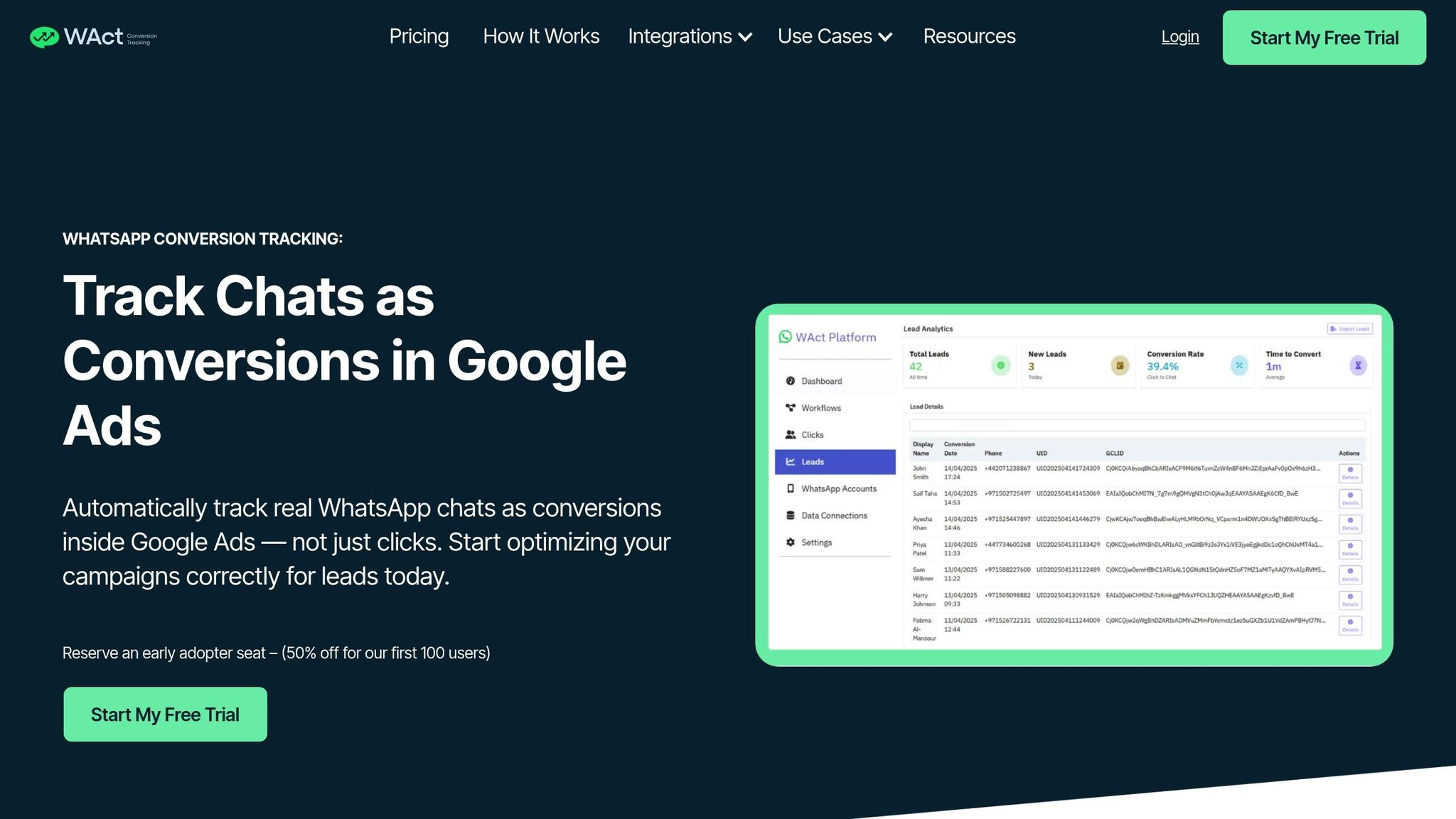
Building on standard UTM tracking practices, tools like WAConversionTracking take attribution to the next level by linking LinkedIn ad clicks directly to WhatsApp conversations.
How WAConversionTracking Works
WAConversionTracking bridges the gap between LinkedIn ad clicks and WhatsApp chats by automating the conversion tracking process. Here’s how it works:
- When a user clicks on your LinkedIn ad and lands on your page, the system captures all UTM parameters and GCLIDs from the URL.
- A unique tracking code (UID) is then generated and attached to a pre-filled WhatsApp message. This happens when the visitor clicks the chat button on your site.
- Once the user sends the message, WAConversionTracking uses the WhatsApp Business API to detect the incoming chat. It matches the UID to the original session's UTM data and triggers a conversion in Google Ads automatically.
This seamless process ensures that every WhatsApp interaction is properly attributed. Additionally, the system pushes the lead details - such as utm_source, utm_medium, and utm_campaign - to your CRM or Google Sheets. This eliminates the common issue where 25–30% of traffic is incorrectly classified as "Direct" due to poorly captured UTM parameters.
To function, WAConversionTracking requires access to the WhatsApp Business API, which is available through providers like Meta Cloud API, 360dialog, or Twilio. The standard WhatsApp Business app doesn’t support programmatic access, making these API integrations essential for automating incoming chat tracking.
Manual UTM Tracking vs. WAConversionTracking
| Feature | Manual UTM Tracking | WAConversionTracking |
|---|---|---|
| Conversion Metric | Tracks button clicks (Click ≠ Lead) | Tracks actual initiated chats |
| Data Accuracy | High risk of "Direct" misattribution | Captures GCLID and UTM data automatically |
| CRM Integration | Manual lead entry required | Automatic lead entry into CRM/Sheets |
| Optimisation | Limited insight into effective keywords | Enables smart bidding with real lead data |
| Setup | Requires manual tagging | Quick setup with a tracking script |
"Click ≠ Lead. You have no idea who actually started a chat, which keyword triggered the lead, or which campaigns are working." – WAConversionTracking
Manual tracking often relies on tedious spreadsheets and guesswork, leading to misattribution and wasted ad budgets. WAConversionTracking eliminates these inefficiencies with automation.
Improving LinkedIn Ads ROI with WAConversionTracking
WAConversionTracking doesn’t just track conversions; it feeds accurate data back into LinkedIn's and Google’s bidding algorithms, helping you optimise for actual WhatsApp leads - not just clicks. This shift enables smarter bidding strategies, reducing your cost per acquisition (CPA) while boosting your return on ad spend (ROAS).
With LinkedIn Ads revenue projected to grow to $9.7 billion (around AED 35.6 billion) by 2026 and $11.3 billion (around AED 41.5 billion) by 2027, accurate attribution is no longer a luxury - it’s a necessity for staying competitive.
Real-world examples show the impact of this approach:
- Nissan Saudi Arabia saw a 138% increase in leads after introducing a verified WhatsApp channel with automated tracking.
- Flamingo improved its conversion rate by 11% and boosted its Net Promoter Score (NPS) by 21% using a self-service WhatsApp chatbot.
To get the most out of WAConversionTracking, use LinkedIn’s dynamic UTM tokens (like CAMPAIGN_ID and CREATIVE_ID) in your Campaign Manager tracking templates. This ensures the tool captures detailed ad data automatically. For those interested, WAConversionTracking is currently offering a 50% discount for the first 100 early adopters, making it an affordable way to eliminate attribution blind spots and optimise ad performance.
Conclusion
UTM parameters play a crucial role in accurately attributing LinkedIn Ads traffic. Without them, around 25–30% of traffic could show up as "Direct" in GA4. This happens because LinkedIn's internal tracking identifier (li_fat_id) isn’t compatible with GA4.
Here’s what you need to keep in mind: always use lowercase to prevent data inconsistencies, take advantage of dynamic tokens like {{CAMPAIGN_NAME}} to simplify tagging, and only apply UTMs to external links. Also, setting your utm_medium to "paid_social" ensures GA4 categorises your traffic correctly.
"Algorithms guess, but UTMs tell the truth." – Dan McGaw, Founder and CEO, UTM.io
Accurate tracking doesn't stop here. For businesses using WhatsApp for lead generation, tools like WAConversionTracking offer a smarter approach. Instead of just tracking button clicks, it captures actual initiated chats. It also integrates GCLID and UTM data into Google Ads and automatically syncs lead details with your CRM or Google Sheets. This enables better bidding strategies and helps reduce wasted ad spend.
When UTMs are implemented correctly, they turn raw data into actionable insights. Combine that with tools like WAConversionTracking, and your LinkedIn Ads can become a reliable driver of measurable results. You’ll know exactly which campaigns, creatives, and audiences contribute to real business success.
FAQs
Which UTM values should I standardise for LinkedIn Ads?
To keep your UTM values consistent for LinkedIn Ads, stick to clear naming conventions for utm_source, utm_medium, and utm_campaign. This helps prevent data inconsistencies and ensures accurate tracking. Always use lowercase letters and hyphens instead of spaces.
Examples:
- utm_source: Use "linkedin".
- utm_medium: Options like "paid-social" or "cpc" work well.
- utm_campaign: Go for descriptive names such as "q1-product-launch" or "brand-awareness".
Avoid capital letters and special characters to maintain clean, reliable data.
Why is my LinkedIn traffic showing as Direct or Referral in GA4?
When LinkedIn traffic shows up as Direct or Referral in GA4, it's often because UTM parameters are missing or not set up correctly. Without proper tagging - like utm_source=linkedin and utm_medium=cpc - GA4 struggles to assign the traffic to the right campaigns, defaulting it to these generic categories.
To improve tracking accuracy, make sure to use consistent UTM parameters for all your LinkedIn ads. Relying solely on LinkedIn’s automatic parameters might not give you the level of campaign-specific attribution you need.
How do I track WhatsApp leads from LinkedIn Ads, not just clicks?
To monitor WhatsApp leads generated from LinkedIn Ads beyond just clicks, include UTM parameters in your WhatsApp click-to-chat links. These parameters allow you to pinpoint the source, campaign, and content driving traffic. By examining these UTM parameters in your analytics tools, you can evaluate the performance of your leads.
For more detailed tracking, you could manually log interactions or leverage tools like WAConversionTracking. These solutions help capture and analyse WhatsApp conversions, giving you a clearer picture of your campaign's impact.




