


WhatsApp chat assets in Google Ads allow UAE businesses to connect with customers instantly via WhatsApp, directly from search ads. Here’s why they matter and how they work:
- WhatsApp Integration: Adds a messaging button to your ads, opening a pre-filled WhatsApp chat for users.
- Cost: No extra fees beyond normal ad clicks.
- Effectiveness in UAE: High online engagement, with up to 40% conversion rates and 3× return on ad spend reported.
- Setup Requirements: Verified Google Ads account, WhatsApp Business number, and compliance with Google's policies.
- Performance Tracking: Google tracks conversation starts; tools like WAConversionTracking can measure actual leads and sales.
- Best Practices: Use bilingual messages, fast replies, and specific starter messages tailored to UAE audiences.
WhatsApp chat assets simplify customer interactions, reduce lead costs, and boost conversions, making them a practical tool for UAE businesses.
Google Ads Message Assets with WhatsApp
How WhatsApp Chat Assets Work in Google Ads
You can now add WhatsApp chat assets to your Google Ads campaigns, enabling a dedicated messaging button to appear alongside your ad's headline, description, and URL. All you need is your active WhatsApp Business number, a pre-filled starter message (up to 140 characters), and a clear call-to-action. This setup makes it easier for users to interact with your business instantly - perfect for the UAE's fast-moving digital landscape.
When users see your ad, they can either click the headline to visit your website or tap the WhatsApp button to open a chat with your pre-written message already in place. This seamless interaction eliminates the need for manual form-filling or making phone calls, streamlining communication in a way that aligns with the UAE's fast-paced environment.
Where WhatsApp Chat Assets Appear
WhatsApp chat assets are available for Search and Performance Max campaigns. In Google search results, the WhatsApp button is prominently displayed within the ad unit, replacing other extensions to ensure it grabs attention.
These message ads are designed to reach a broad audience. They are available globally on Android devices and in 52 countries on iOS, including major markets like the UAE, India, Saudi Arabia, the UK, Germany, Malaysia, and Singapore. By 2025, Google expanded its support to include messaging platforms like SMS, Facebook Messenger, and Zalo. However, WhatsApp remains the preferred platform in the UAE.
Business Message Assets in Google Ads
Google refers to these features as "Business Message Assets" in its API. You can link them at the account, campaign, or ad group level, with Google prioritising the lowest level (Ad Group, then Campaign, followed by Account). Only one active message asset can run at a time, so selecting the right messaging channel is crucial.
Once approved, Google automatically creates a "Leads from Messages" conversion goal to track initiated conversations. To get the best results, set "Leads" as your campaign objective and use conversion-focused bidding strategies like Maximise Conversions or Target CPA. Keep in mind that message assets are still in beta, so their availability may depend on factors like your country, ad account eligibility, and compliance with Google’s policies.
Setting Up WhatsApp Chat Assets
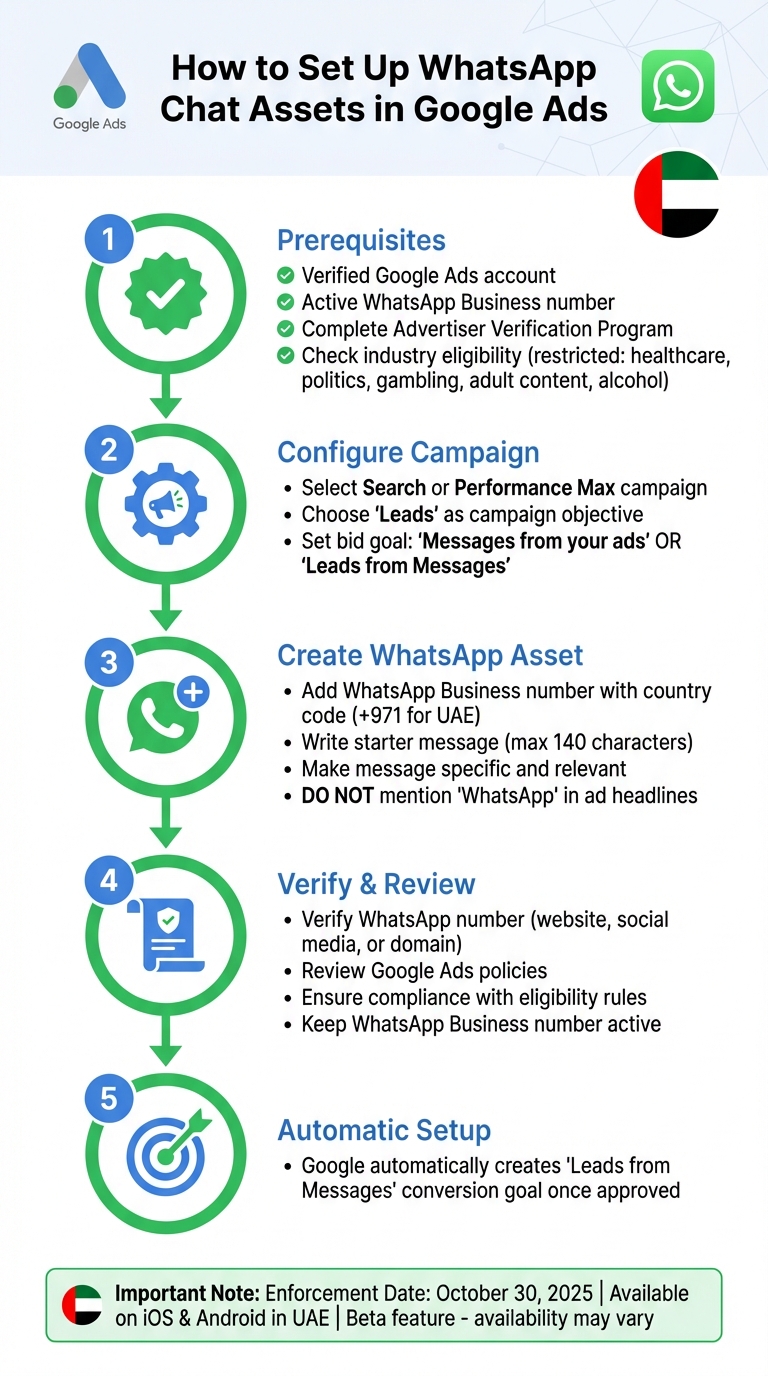
How to Set Up WhatsApp Chat Assets in Google Ads: Step-by-Step Guide
Properly setting up WhatsApp chat assets is key to maximising the performance of your ads in the UAE. Let’s break down what you need to know.
Requirements for Using WhatsApp Chat Assets
To use WhatsApp chat assets, you’ll need two things: a verified Google Ads account and an active, verified WhatsApp Business number. Additionally, you must complete Google's Advertiser Verification Program to confirm your business identity.
Keep in mind that only certain industries are eligible. Restricted sectors include healthcare, politics, gambling, adult content, alcohol promotion, and any businesses that misuse personal data or violate trademark policies. If you’re a new advertiser, your message asset impressions may face temporary limits until positive user interactions are confirmed.
"If you're a new advertiser to Google, your message asset impressions may be temporarily limited until you have accumulated positive user interactions." – Google Ads Support
How to Create a WhatsApp Chat Asset
Here’s how you can create a WhatsApp chat asset in your Google Ads account:
- Start by selecting a Search or Performance Max campaign.
- Choose Leads as your campaign objective.
- Set your bid goal to either Messages from your ads or Leads from Messages.
When adding your message asset, include your WhatsApp Business number with the correct country code (e.g., +971 for the UAE). Write a clear and engaging starter message (up to 140 characters) that will appear pre-filled when users click the WhatsApp button. Be careful not to mention "WhatsApp" in your ad headlines, as this violates Google’s policies.
Once your message asset is approved, Google will automatically create a "Leads from Messages" conversion goal. While these features are still in beta, they are fully supported on iOS and Android devices in the UAE, provided your account meets Google’s eligibility criteria.
Finally, review Google’s policies and eligibility rules to ensure your assets are delivered without issues.
Policy and Eligibility Rules
On 30 September 2025, Google introduced updated requirements for message assets, with enforcement beginning on 30 October 2025. These rules emphasise that all message assets must directly relate to the advertised company. To comply, verify your WhatsApp Business number through your website, social media accounts, or domain ownership.
Each WhatsApp Business number only needs to be verified once. If verification fails or if your assets violate Google’s policies, they won’t run. To avoid disruptions, keep your WhatsApp Business number active and ensure your starter message and ad content comply with Google Ads policies. Avoid misleading claims or prohibited content to maintain smooth operations.
sbb-itb-0a82e4d
Performance and Optimisation of WhatsApp Chat Assets
Once your assets are set up and comply with policies, the next step is to evaluate their performance and fine-tune them for better results.
Key Metrics for WhatsApp Chat Assets
To ensure your WhatsApp chat assets are driving actual leads - not just clicks - it's essential to monitor the right metrics. When the campaign objective is set to "Leads", Google Ads automatically creates a "Leads from Messages" conversion goal. This tracks users who start a WhatsApp conversation after clicking on your ad.
Beyond the usual metrics like impressions, clicks, and click-through rate (CTR), you should focus on messaging conversations. This metric counts the number of unique users who initiate a chat. Additionally, cost-per-click (CPC) and cost-per-conversion offer insights into how efficiently your ad budget is being spent.
Post-click WhatsApp data can provide even deeper insights. For instance, WhatsApp messages boast an open rate of up to 98%, far surpassing email open rates of 20–30%. Click-through rates for WhatsApp Business API template messages vary widely, from 15% to 80%, with e-commerce typically seeing rates between 40% and 60%. The average response rate is 45%, but delays of more than 10 minutes can reduce conversion rates by as much as 20%.
Pros and Cons of WhatsApp Chat Assets
| Advantages | Disadvantages |
|---|---|
| Extremely high engagement - 98% open rate compared to email | Limited tracking - Google Ads only measures conversation starts, not actual outcomes. |
| Faster response times - instant messaging reduces friction for leads. | Requires active monitoring - delayed replies can lower conversions by up to 20%. |
| Lower cost per qualified lead - Mercedes Benz Turkey achieved a 78% reduction in cost per lead with Click to WhatsApp. | Advanced features need WhatsApp Business API, which may involve additional setup. |
| Higher conversion rates - Baro Cosmetics reported a 700% increase in conversions over email. | - |
| Mobile-friendly - users stay within WhatsApp, a platform they already trust. | - |
Improving Performance with WAConversionTracking
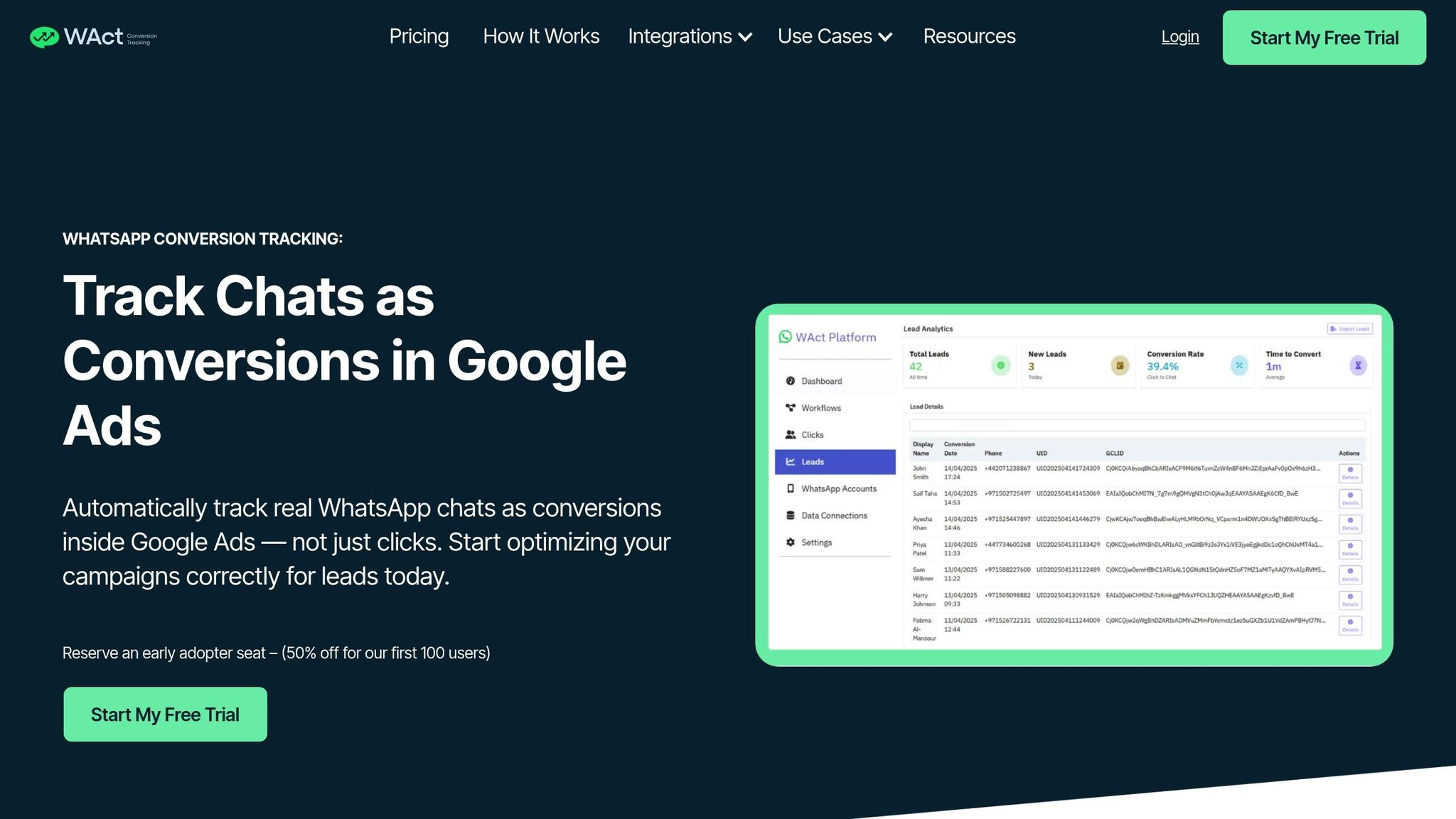
While standard metrics provide a general overview, true performance insights come from tracking actual conversations. Google Ads can track WhatsApp button clicks but doesn't measure sent messages, leads, or purchases. This is where WAConversionTracking steps in, bridging the gap by tracking actual WhatsApp chats as conversions instead of just button clicks.
Building on the earlier conversion goal setup, WAConversionTracking offers precise attribution for real customer interactions. It captures GCLID and UTM parameters from every WhatsApp conversation and reports this data back to Google Ads as conversions. This lets Smart Bidding algorithms optimise for users who genuinely interact with your ads. Plus, WAConversionTracking integrates seamlessly with Google Sheets and CRMs - no developer required - and runs smoothly once configured.
For advertisers in the UAE managing multiple campaigns, this level of tracking is invaluable. It allows you to pinpoint which keywords, ad groups, and audiences are driving genuine leads and sales through WhatsApp. Instead of relying solely on clicks, you'll have a clear understanding of how your ad budget (in AED) translates into qualified leads and revenue. These insights can help refine your WhatsApp chat asset strategy for the UAE market.
Best Practices for WhatsApp Chat Assets in the UAE
Matching Assets to UAE User Behaviour
In the UAE, bilingual communication is not just preferred - it’s essential. With over 8 million WhatsApp users in the country, offering both Arabic and English ensures you can connect with a broader audience. You can either set up separate chat assets for each language or train your team to handle enquiries in both languages effectively.
Speed is equally critical. Customers in the UAE expect replies within minutes, especially during peak hours, which typically fall between 9:00 AM and 10:00 PM Gulf Standard Time. If your team can’t monitor chats during these times, automated greeting messages can bridge the gap. These messages should acknowledge the enquiry and promise a quick follow-up.
Cultural sensitivity is another key factor. Train your team to use polite and respectful language in both Arabic and English. Address customers by their names whenever possible and steer clear of slang or overly casual expressions. For high-value or complex enquiries, consider escalating the conversation from text to a voice call. This approach often leads to better conversion rates.
Optimising Messages and Chat Flows
Your starter message - the text users see when they click on your ad - should feel tailored and relevant. Avoid generic greetings like "Hello, I'm interested." Instead, craft messages that directly reference the product or service. For example, if your ad promotes villa rentals in Dubai Marina, a message like "Hi, I’d like to know more about the 3-bedroom villas in Dubai Marina" feels more engaging and specific.
To ensure a smooth transition from ad to chat, align your responses with any offers mentioned in the ad. For instance, if your ad promises "Free consultation" or "Same-day delivery", your chat responses should immediately address these offers. Customers in the UAE value professionalism and personalised communication, so any mismatch between your ad and chat can impact trust and conversion rates.
These small but impactful adjustments lay the groundwork for better campaign performance.
Analysing and Improving Results
To refine your strategy, review your messaging metrics weekly alongside cost-per-conversion data. This helps you identify which campaigns are driving meaningful engagement. Experiment with different starter messages tailored to specific goals - one focusing on pricing questions and another on product details - and compare their effectiveness.
Segmenting your audience by location within the UAE can also yield valuable insights. For example, a chat asset promoting air conditioning services may perform differently in Abu Dhabi versus Sharjah due to varying customer needs and competition. Tools like WAConversionTracking can help you link WhatsApp chats to specific keywords and audiences, allowing you to allocate your AED budget more effectively based on what’s working.
Additionally, test different ad placements. Performance Max campaigns distribute chat assets across Search, Display, and YouTube, but Search campaigns often deliver more qualified leads for service-based businesses. Monitor which placements generate high-quality conversations that convert into sales, and adjust your strategy accordingly.
Conclusion
WhatsApp chat assets are proving to be a game-changer for advertisers in the UAE. They allow businesses to connect directly with customers in real-time, catering to the local preference for messaging over phone calls. By enabling conversations to start right from Search and Performance Max campaigns, these tools help smooth out the buyer's journey, making it easier for customers to engage.
However, one big hurdle is tracking what happens after a chat begins. While Google Ads can show when a conversation starts, it doesn’t provide insights into what follows. Without this follow-up data, it becomes tricky to identify which keywords, audiences, or campaigns are bringing in quality leads. This lack of clarity makes it harder to optimise AED budgets effectively or to train Smart Bidding algorithms with accurate conversion data.
This is where WAConversionTracking steps in. It fills the gap by capturing the entire customer journey, from the initial ad click to the chat and, ultimately, to the sale. By automatically attributing chats as conversions, it offers performance marketers and small businesses a clear picture of what’s driving results. For marketers managing multiple clients or businesses with limited budgets, this kind of tracking turns WhatsApp from just a messaging tool into a measurable revenue generator.
In the UAE, where speed, bilingual communication, and cultural awareness are crucial, combining WhatsApp chat assets with proper tracking, tailored messaging, and ongoing optimisation can create a system that not only meets customer expectations but also delivers measurable results. Whether your monthly budget is AED 3,000 or significantly more, understanding which conversations lead to sales can make the difference between guessing and real growth.
FAQs
How can WhatsApp chat assets boost conversions in Google Ads for businesses in the UAE?
WhatsApp chat assets are a game-changer for businesses in the UAE, offering instant and personalised communication with potential customers. Given WhatsApp's immense popularity and trust in the region, this feature allows businesses to connect with users on a platform they already rely on daily.
By providing a direct and hassle-free way for users to ask questions, get details, or even make purchase decisions, businesses can attract high-intent leads. This approach not only strengthens customer relationships but also boosts engagement and increases the chances of turning casual clicks into meaningful conversions - all through a platform that's both familiar and convenient for UAE audiences.
How can I set up WhatsApp chat assets in Google Ads?
To begin using WhatsApp chat assets in Google Ads, make sure you have an active WhatsApp Business account with a verified phone number. Additionally, your Google Ads account must comply with all policies, meet eligibility criteria, and complete the advertiser verification process.
When creating your campaign, choose 'Leads' as your campaign goal. You can then select either the Search or Performance Max campaign type. To add a WhatsApp chat asset, go to the Assets tab or include it during the campaign setup process. You'll need to provide your WhatsApp number and a pre-written starter message to engage with potential customers effectively.
How can I measure the performance of WhatsApp chat assets in my Google Ads campaigns?
To gauge how well your WhatsApp chat assets are performing in Google Ads, focus on key metrics like clicks, conversions, and message engagement rates. These figures, available in the Google Ads reporting dashboard, give you a clear picture of how effectively your ads are encouraging interactions through WhatsApp.
For a deeper understanding, consider linking your campaign data to tools like Google Analytics 4 or your CRM system. This integration allows you to track offline conversions and customer interactions, giving you a more complete view of how your campaigns contribute to lead generation and customer engagement.




