


GCLID (Google Click Identifier) is a unique tracking parameter automatically added to your ad URLs by Google Ads when someone clicks on your ad. It helps link ad clicks to conversions, allowing businesses to measure the performance of campaigns, keywords, and ads. This data is essential for improving ad targeting, tracking ROI, and optimising Smart Bidding strategies.
Key points:
- Purpose: Tracks ad clicks and connects them to conversions like purchases or sign-ups.
- How it works: GCLID is added to URLs, stored in cookies, and sent back to Google Ads when a conversion occurs.
- Setup: Enable auto-tagging in Google Ads to activate GCLID tracking.
- Cross-device tracking: Links user actions across devices for better attribution.
- WhatsApp integration: GCLID can track WhatsApp conversations as conversions, especially useful for UAE businesses.
What is gclid? What is Google Click ID? Gclid Example, How to Use gclid and how gclid works
sbb-itb-0a82e4d
How GCLID Works
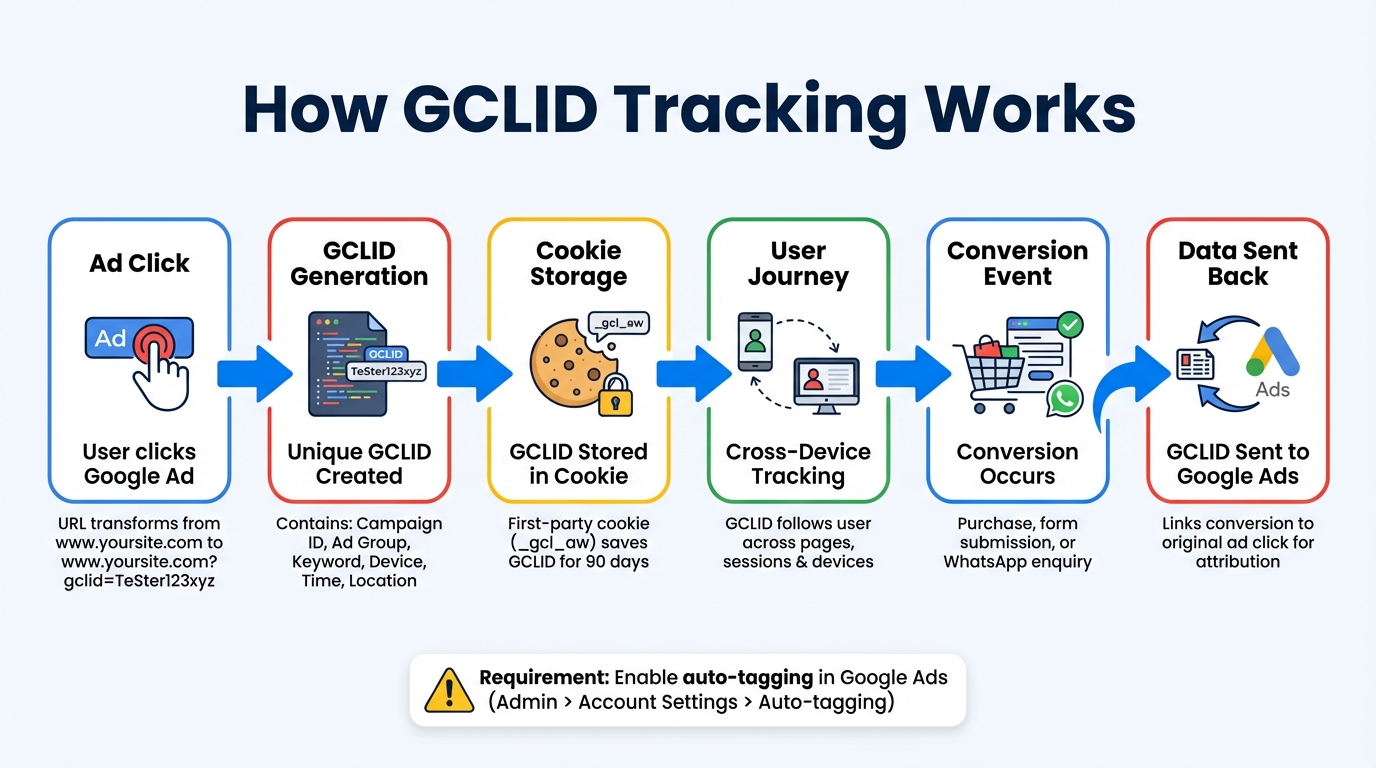
How GCLID Tracking Works: From Ad Click to Conversion
Every time someone clicks on your Google ad, a unique identifier called the Google Click Identifier (GCLID) is automatically added to your landing page URL. This identifier is crucial for connecting ad clicks to measurable results. For example, a simple URL like "www.yoursite.com" transforms into something like "www.yoursite.com?gclid=TeSter123xyz." Think of the GCLID as a digital fingerprint, helping you trace conversions back to the exact ad click that triggered them.
Behind this unique string lies a wealth of metadata, including details like campaign ID, ad group, keyword, creative, match type, device type, time, and location. Google compresses all this information into a single parameter, which stays with the user as they navigate through your site.
Once the user arrives at your page, tracking scripts recognise the GCLID in the URL and save it in a first-party cookie (usually named _gcl_aw) on your domain. This cookie ensures the GCLID remains intact as the user continues browsing. When a conversion happens - whether it's a purchase, a form submission, or even a WhatsApp enquiry - the tag retrieves the GCLID and sends it back to Google Ads, creating a direct link between the conversion and the original ad click. This process is the backbone of auto-tagging and ensures seamless tracking throughout the user journey.
Enabling Auto-Tagging in Google Ads
To activate GCLID generation, you need to enable auto-tagging in your Google Ads account. Here's how: go to Admin > Account Settings > Auto-tagging and tick the box that says, "Tag the URL that people click through from my ad." Without auto-tagging, GCLIDs won't be generated, which can disrupt conversion tracking and limit the effectiveness of Smart Bidding strategies - essential tools for optimising campaign performance.
Tracking GCLID Across User Journeys
The GCLID doesn't just work for a single page visit; it follows users across multiple pages, sessions, and even devices. This capability is key for advanced analytics and optimisation. For instance, if a user clicks your ad on their mobile device but completes a purchase later on their desktop, the GCLID ensures the two actions are connected - provided the user is signed into their Google account. Google uses this data to enable reliable cross-device attribution.
The GCLID retention period is 90 days, meaning conversions can still be attributed weeks or even months after the initial click.
However, tracking can fail if your website isn't set up correctly. Issues like server-side redirects, third-party click trackers, or URL rewrites can strip the GCLID from the URL. To avoid this, make sure the Google tag or Conversion Linker is deployed on every page of your site - not just landing or conversion pages. Also, remember that the GCLID is case-sensitive. Even a slight change in its capitalisation can cause errors like "(not set)" in your Google Analytics reports. By ensuring proper configuration, you can maintain accurate conversion tracking and attribution.
GCLID's Role in Conversion Attribution
GCLID isn't just a technical tracking tool - it’s a key player in conversion attribution, connecting ad clicks directly to measurable outcomes. Its true strength lies in bridging the gap between your ad spend and actual business performance. Without GCLID, you’d be left guessing which campaigns, keywords, or ads are delivering results. With it, you gain precise, click-level data that reveals exactly where your conversions are coming from. This level of detail is essential for refining campaigns and making informed, data-driven decisions in the UAE market.
Linking Clicks to Conversions
When a conversion happens, the stored GCLID is sent back to Google Ads. Google then decodes this identifier to match the conversion with its originating campaign. This detailed tracking feeds into Smart Bidding strategies, providing the real-time signals needed for effective optimisation.
"Think of it like a digital fingerprint - each GCLID is completely unique to a specific ad click, letting you trace conversions back to the exact ad, keyword, and campaign that generated them." - Amanda Pell, WhatConverts
If GCLID tracking fails, your reporting accuracy takes a hit, and your bidding algorithms lose the critical data they rely on to perform well. Beyond online activity, GCLID also supports tracking offline and cross-device conversions.
Supporting Offline and Cross-Device Tracking
GCLID isn’t limited to online interactions - it can also link digital ad clicks to offline sales. For businesses that rely on phone calls, in-person meetings, or lengthy sales cycles, capturing the GCLID is crucial. By saving the GCLID in your CRM when leads submit forms, you can later upload it back to Google Ads once an offline sale is completed. This creates a full attribution loop, tying final revenue back to the original ad click, provided the conversion happens within the attribution window.
For users signed into their Google accounts, GCLID enables cross-device tracking by associating the identifier with their account. Advertisers using enhanced conversions for leads - combining GCLID data with hashed first-party details like emails or phone numbers - report a median 10% boost in conversions compared to standard offline imports. This method ensures more reliable reporting and allows Google’s algorithms to optimise for the entire customer journey, not just single-device interactions.
Using GCLID to Track WhatsApp Conversions
In the UAE, WhatsApp has become a go-to platform for businesses to connect with customers. However, linking WhatsApp conversations to specific Google Ads campaigns has often been tricky. Instead of just tracking button clicks, this method creates a direct connection between ad clicks and WhatsApp chats, giving businesses a clearer view of how their ad spend translates into real customer interactions. By capturing the GCLID (Google Click Identifier), you can bridge the gap between ad clicks and WhatsApp conversations, ensuring accurate attribution and better marketing insights.
Capturing GCLID in WhatsApp Chats
To start, you’ll need to implement a script on your website that extracts and stores the GCLID from the URL. Enable auto-tagging in Google Ads, and make sure the GCLID is stored for up to 90 days to align with Google’s attribution window. When users click a “Click-to-WhatsApp” button, ensure the stored GCLID is linked to their phone number before they leave your site.
For users transitioning to WhatsApp, you can embed a hidden <input> field to capture the GCLID seamlessly. In cases where users skip filling out a form and go straight to WhatsApp, attach a unique tracking ID to their WhatsApp message. This tracking ID acts as the bridge, connecting the ad click to the resulting conversation.
Before uploading any data to Google Ads, normalise and hash phone numbers using SHA-256 encryption (in E.164 format, such as +971501234567 for UAE numbers). This step is essential for enabling Enhanced Conversions for Leads. Once you’ve captured the GCLID, integrate it with your WhatsApp Business API to complete the tracking process.
Integrating GCLID with WhatsApp Business API
For automated tracking, you’ll need to use the WhatsApp Business API. API providers like Meta Cloud API, 360dialog, or Twilio can help detect when tracked messages are received and match them to the original GCLID.
Here’s how it works: when a user sends a WhatsApp message containing your tracking ID, the API identifies it. Your system then pairs the tracking ID with the stored GCLID and session data, and this information is uploaded as an offline conversion to Google Ads.
Tools like WAConversionTracking simplify this process. They can generate tracking scripts with a single click, automatically capturing GCLID and UTM parameters, and uploading conversion data directly to Google Ads. This automation not only saves time but also ensures Smart Bidding receives precise data to optimise for actual conversations, giving you more accurate results without heavy developer involvement.
Optimising Paid Ads with GCLID and WAConversionTracking
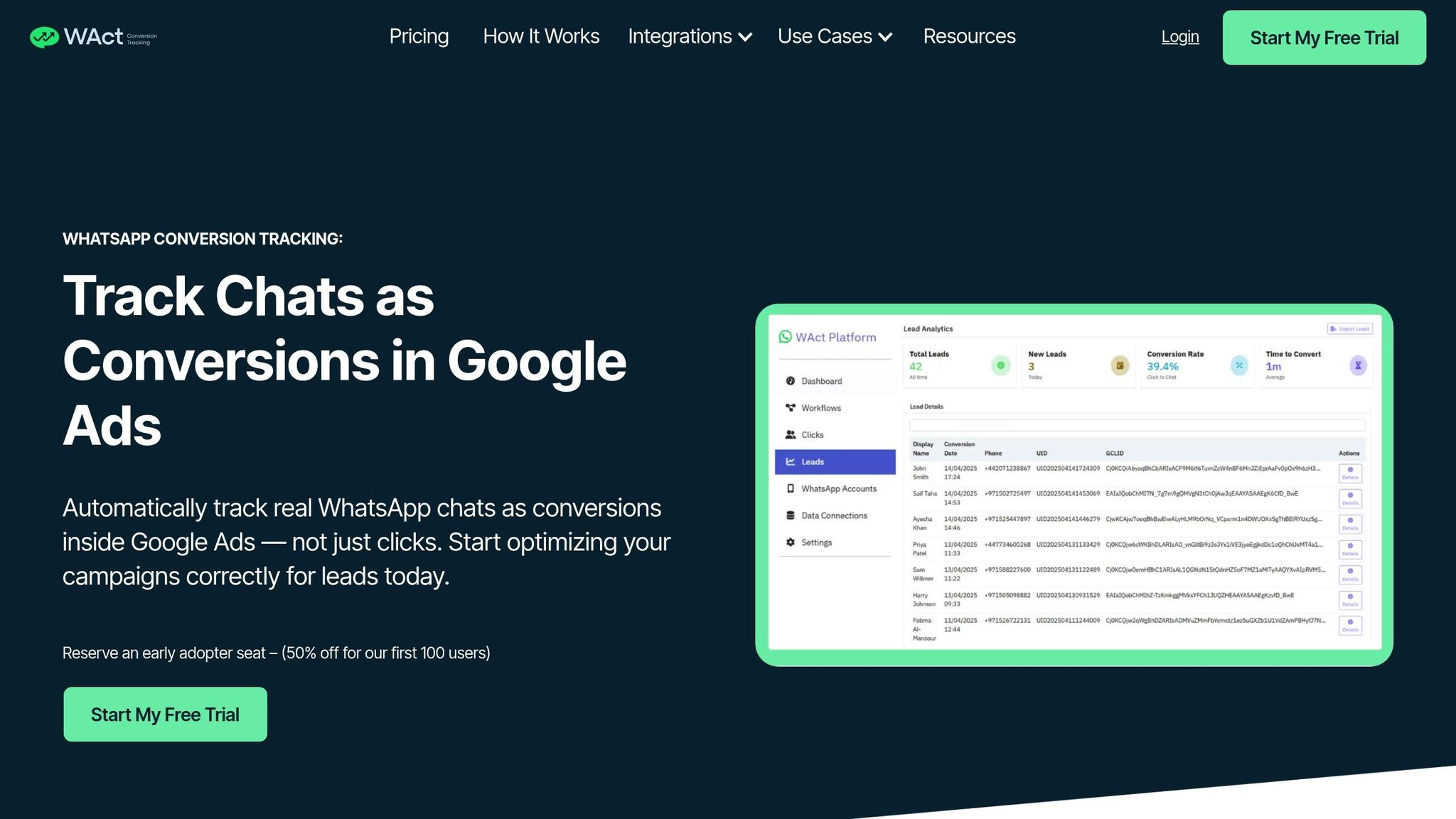
Once you've set up GCLID tracking for WhatsApp, the next step is to feed this data into Google Ads to fine-tune your campaigns. WAConversionTracking simplifies this process by converting WhatsApp chats into actionable conversion signals. These signals help Google Ads' Smart Bidding feature make smarter decisions, connecting WhatsApp interactions directly to your advertising efforts.
Setting Up WAConversionTracking for GCLID Capture
The setup is simple and doesn't require technical expertise. Start by enabling auto-tagging in your Google Ads account. You'll also need access to the WhatsApp Business API, which can be obtained through providers like Meta Cloud API, 360dialog, or Twilio. Note that the standard WhatsApp Business app doesn't support programmatic tracking of incoming messages.
"The WhatsApp Business API is currently the only way to automatically track and read incoming chats. It allows your system to detect when a user sends a message that contains a tracking ID (UID), which we use to match with the original Google Ads click (GCLID) and trigger a conversion." - WAConversionTracking
To connect WhatsApp, Google Ads, and your tracking data, you can create a WAConversionTracking workflow. Choose between two options: a pre-built WhatsApp button with integrated tracking (quick setup but limited customisation) or a custom button using a tracking script (takes longer but allows for more flexibility). Ensure the tracking script is added to all relevant pages to capture every conversion.
After setting up a new conversion action in Google Ads, wait 4–6 hours before uploading your first conversions. This ensures the data appears correctly in your reports. Use the "Testing Your Setup" feature to confirm that your WhatsApp button is logging leads accurately using a WhatsApp lead tracking planner before ramping up your ad spend.
Why Automating Conversion Uploads Matters
Manually tracking conversions often falls short, as it only captures button clicks and overlooks actual message interactions. WAConversionTracking eliminates this issue by automatically detecting when a tracked message is received and uploading it to Google Ads as an offline conversion. This ensures your campaigns are optimised with accurate, actionable data.
Once configured, the system runs continuously. When a user sends a WhatsApp message containing a tracking ID, it matches the message with the GCLID and uploads the conversion in real time. This seamless data integration allows you to pinpoint which keywords and campaigns lead to meaningful conversations, helping you cut out low-value traffic and allocate your budget more effectively.
By focusing on real chats instead of just clicks, you can reduce wasted ad spend on keywords that generate curiosity but fail to engage users. Additionally, combining this data with hashed phone numbers in the E.164 format (e.g., +971501234567 for UAE numbers) enhances attribution accuracy, especially when using Enhanced Conversions for Leads.
WAConversionTracking Plans at a Glance
WAConversionTracking offers three subscription options to cater to different business needs:
- Basic Plan: Tracks WhatsApp chats as conversions, uploads data to Google Ads, and integrates with CRMs and Google Sheets.
- Advanced Plan: Includes enhanced URL tracking and deeper CRM integrations.
- Enterprise Plan: Designed for large-scale businesses, featuring a scalable setup for handling high message volumes.
All plans require access to the WhatsApp Business API. To encourage early adoption, WAConversionTracking is offering a 50% discount for the first 100 users. This makes it easier for businesses to test the platform and evaluate its impact on their advertising campaigns.
| Feature | Pre-built WhatsApp Button | Tracking Script (Custom Button) |
|---|---|---|
| Setup Effort | Low; ready-made button provided | Medium; requires integration with existing code |
| Customisation | Limited to pre-set designs | High; works with your existing site design |
| Tracking Logic | Built-in automatically | Requires manual script attachment |
| Setup Time | Approximately 10 minutes | Slightly longer depending on site complexity |
These tools and plans make it easier to bridge the gap between ad clicks and meaningful customer interactions, setting the stage for smarter, data-driven advertising.
Conclusion
GCLID plays a critical role in accurate conversion tracking. Without it, attributing conversions becomes a guessing game, making it difficult to base advertising decisions on reliable data.
For businesses in the UAE using WhatsApp to connect with customers, linking messages to ad clicks is essential for measuring interactions effectively. WAConversionTracking simplifies this by capturing the GCLID from WhatsApp chats and uploading it as an offline conversion. This process ties each WhatsApp enquiry back to its corresponding ad click, ensuring your bidding algorithms optimise for meaningful conversations rather than just button clicks. The integration feeds precise data into Google Ads, improving the performance of Smart Bidding strategies.
"If your GCLID tracking isn't working right, nothing else in your Google Ads reporting can be trusted." - AttributionApp
This system creates a detailed view of the customer journey, connecting every ad click to a WhatsApp conversation. You'll gain insights into which keywords drive quality leads, allowing you to eliminate wasted spending and focus your budget on top-performing campaigns. Accurate conversion data fed back into Google’s Smart Bidding system fosters a self-improving cycle, where each conversion refines and enhances campaign performance.
Whether you're a small business or a large enterprise, this integration helps you identify the keywords and campaigns that deliver profitable results. It’s a quick setup, but the potential for boosting your advertising ROI is immense. By aligning precise data with actionable insights, you can make smarter, more profitable advertising decisions.
FAQs
How do I check if my GCLID is being captured correctly?
To make sure your GCLID is being captured properly, confirm it's being recorded and tied to your conversions. Double-check your tracking setup, use Google Ads diagnostics, or review your CRM or analytics tools to ensure GCLIDs are collected and matched correctly. This step ensures your tracking data is both complete and dependable.
Why is my GCLID showing as “(not set)” in analytics or reports?
If you see “(not set)” instead of a GCLID in your analytics or reports, it usually means the GCLID parameter is missing. This can happen for a few reasons: it might get lost during redirects, or your Google Ads account might not be properly linked with Google Analytics. When this happens, it can disrupt accurate data tracking and attribution.
Can I attribute WhatsApp chats to Google Ads without the WhatsApp Business API?
Yes, it's possible to link WhatsApp chats to Google Ads by using GCLID (Google Click Identifier) and tools like WAConversionTracking. This setup lets you track and attribute leads from WhatsApp directly, even if you're not using the WhatsApp Business API. It's a smart approach to fine-tune your ad campaigns and accurately measure conversions.




