


Want to drive more sales and connect directly with customers? A WhatsApp marketing funnel is a powerful way to move potential buyers from awareness to purchase - all within WhatsApp. This strategy is especially effective in the UAE, where WhatsApp dominates communication and boasts an 80% open rate within 5 minutes. Here's how it works:
- Start with Click-to-WhatsApp ads on platforms like Instagram or Facebook to initiate conversations.
- Automate engagement with chatbots and welcome messages to qualify leads quickly.
- Share product catalogues directly in chat for easy browsing and informed decisions.
- Close sales fast using payment links and exclusive offers.
- Retain customers with loyalty rewards and post-purchase updates.
With WhatsApp Business API, UAE businesses can scale their efforts, offering features like automated responses, bilingual support (Arabic and English), and seamless integration with tools like Meta Commerce Manager. Whether you're in real estate, retail, or automotive, this approach reduces costs, speeds up conversions, and keeps customers engaged.
Ready to optimise your marketing funnel? Follow these steps to set up the API, drive traffic, and nurture leads effectively.

5-Step WhatsApp Marketing Funnel Implementation Guide for UAE Businesses
Step 1: Set Up WhatsApp Business API
Install and Configure WhatsApp Business
The WhatsApp Business API is the go-to solution for UAE businesses aiming to scale beyond the basic app. It offers features like green tick verification, support for multiple users, and chatbot integration - key elements for creating a streamlined marketing funnel. To get started, you'll need Admin access to Meta Business Manager, a valid business website, and a phone number not already linked to WhatsApp. If your number is currently connected to the free WhatsApp Business App, you'll need to delete that account before migrating to the API.
You can choose between two options: WhatsApp Cloud API, hosted by Meta with a 99.9% uptime, or On-Premises API, provided by a Business Solution Provider (BSP) and capable of handling up to 250 messages per second. Most UAE businesses prefer the Cloud API for its reliability. When setting up your profile, make sure to configure business hours and automated messages using the DD/MM/YYYY format and metric units to match local standards. Set the backend billing currency to USD to avoid technical issues with message credits, even though your customer-facing catalogue will display prices in AED. Keep in mind, WhatsApp voice and video calls are restricted in the UAE under TDRA regulations.
Once the initial setup is complete, move on to building your product catalogue in Meta Commerce Manager.
Add Your Product or Service Catalogue
Through the Meta Commerce Manager, API users can seamlessly manage their product catalogues, which integrate directly with their WhatsApp Business Account. This enables "Conversational Commerce", allowing customers to browse, ask questions, and even make purchases - all within the chat. To create a catalogue, select "Add Catalogue" in Meta Commerce Manager and choose the "E-commerce" option. Products can be added manually (ideal for small inventories), uploaded in bulk using CSV or XML files, or synced automatically via Shopify or WooCommerce using Meta Pixel.
For the UAE market, it’s essential to provide bilingual product descriptions in Arabic and English, and display all prices clearly in AED to meet local expectations and build trust. Use high-quality images with neutral backgrounds for a professional look. Group related products into categories like "Best Sellers" or "New Arrivals" to make targeted recommendations during chatbot interactions. With WhatsApp messages in the UAE achieving open rates above 90% and click-through rates between 20–30%, a well-organised catalogue can significantly increase customer engagement.
After setting up your catalogue, the next step is to connect with a BSP to activate your API.
Connect with a WhatsApp BSP
To access the API, you’ll need to work with a Business Solution Provider (BSP) such as SleekFlow or respond.io. Most BSPs offer an "Embedded Signup" process, where you link your Facebook account, select or create a Meta Business Portfolio, and set up your WhatsApp Business Account (WABA) directly through the BSP's platform. You’ll also need to grant the BSP permissions to manage your WhatsApp Business account and handle billing.
Meta now provides free Virtual Phone Numbers (555 business numbers) during the signup process. These numbers are auto-verified, eliminating the need for a physical SIM card if preferred.
There are costs involved: BSPs charge a service fee (around $29 USD for each additional number), and Meta applies conversation fees. In the UAE, Marketing conversations cost approximately AED 0.16 each, while Utility or Authentication conversations are about AED 0.084. The silver lining? Every WABA gets 1,000 free service-initiated conversations per month. To avoid issues during Meta Business Verification - often required for higher messaging limits - make sure your website includes your company name or logo and uses a matching email domain.
Step 2: Drive Traffic to WhatsApp
Use Click-to-WhatsApp Ads
Click-to-WhatsApp ads on Facebook and Instagram feature a "Send Message" button that instantly opens a chat window. In the UAE, customers often prefer direct messaging over filling out forms or sending emails when they have questions, need to confirm details, or want to negotiate. These ads can be created using the WhatsApp Business App for simpler campaigns or through Meta Ads Manager for advanced targeting and scaling options.
For campaigns in Dubai, typical budgets fall between AED 3,000 and AED 10,000 per month. Meta charges based on clicks or initiated conversations - not per individual message exchanged. To get the best results, create separate ad versions in English and Arabic to cater to the UAE's diverse audience. Short vertical videos with subtitles and clear text highlighting WhatsApp as the call to action work especially well. Also, ensure your team responds to messages within minutes during working hours.
In 2026, JU Productions used respond.io and the Meta Conversions API to optimise their WhatsApp ad campaigns. By sending purchase events back to Meta, they helped the algorithm focus on high-converting leads, cutting the cost per qualified lead by 47.2%. Similarly, Automax® tracked the full customer lifecycle - from ad clicks to final sales - using the same tools, boosting overall conversions by 10%.
"In the UAE, many buying journeys start on Instagram or Facebook and move quickly into chat. Customers want to ask questions, confirm details, send screenshots and sometimes negotiate." – Viral Agency
To track performance, include unique reference tags (e.g., ref=campaign_name) in your ads. Additionally, AI chat agents or automated templates can collect basic information, like names and intent, before handing the conversation off to a human agent. This seamless transition ensures users flow smoothly into your WhatsApp funnel.
Add Website Widgets and QR Codes
Adding a WhatsApp widget to your website turns casual browsers into instant chat leads. Scanning a QR code or clicking the widget also serves as a valid opt-in, allowing you to send promotional content within WhatsApp's policy guidelines. Use automated welcome messages or AI-powered replies to ensure users get an immediate response when they engage.
Clear calls-to-action (CTAs) like "Get Discount", "Shop Now", or "RSVP" can drive higher engagement. Make sure your visuals - whether on website widgets or promotional materials with QR codes - grab attention within the first three seconds to avoid being overlooked. Promote WhatsApp QR codes across various touchpoints, such as websites, newsletters, press releases, or even printed materials.
Between 2023 and 2024, Qobolak, an education placement company in the Gulf region, sent 49,800 WhatsApp broadcast messages over eight months. By using WhatsApp for event updates and promotions, they increased lead conversions by 95%. In Mexico, a supermarket chain printed QR codes on store signs and receipts, directing customers to WhatsApp chats and growing their marketing database by 70%.
To track leads effectively, add unique reference tags (e.g., wa.me/number?text=ref=website_widget) to different widgets. Always test your WhatsApp buttons or QR codes to ensure they open the app correctly and that leads are being tracked in your CRM or analytics tool. Pairing widgets with wa.me links can further expand your reach.
Create wa.me Links
wa.me links offer a straightforward way to give users direct access to WhatsApp via social media profiles, email signatures, or digital campaigns. Customise these links with pre-filled text to indicate the user's intent. To track traffic sources, include a reference parameter in your link (e.g., ref=campaign_name) for precise CRM tracking.
Combine wa.me links with eye-catching visuals to grab attention within three seconds. Connect these links to automated systems like AI agents or auto-replies so users receive immediate responses when they reach out. With 80% of WhatsApp messages viewed within five minutes - compared to email open rates of just 15% - this strategy is highly effective.
In Indonesia, Vyatta, a tech accessory brand, tested ads directing traffic to their online store versus Click-to-WhatsApp ads. The WhatsApp-focused ads delivered five times more purchases at 79% lower costs per purchase. In Germany, SNOCKS used an exit-intent popup offering discounts to visitors who opted into WhatsApp. This approach grew their subscriber base to 100,000 and generated over €1 million in revenue in under a year.
"Through WhatsApp, we can provide personal attention that gives customers the confidence to move forward with big-ticket purchases at a broader scale." – Wilson Salomón Rojas Jimenez, Customer Service Operations Coordinator, Multicenter
Leverage exit-intent popups on your website to capture users about to leave. Offer discounts or assistance via a WhatsApp link to turn these potential losses into leads. A/B test different pre-filled messages and CTAs like "Get Discount" versus "Shop Now" to find out which performs better.
Step 3: Engage and Nurture Leads
Use Chatbots for Automation
Chatbots are your 24/7 assistants, handling greetings, FAQs, and basic lead qualification seamlessly. In the UAE, where an impressive 79.6% of social media users are active on WhatsApp, automated responses ensure no potential lead is left hanging. These AI-driven tools can gather structured information like names, email addresses, and purchase intentions, updating your CRM instantly.
To make the most of chatbots, design them specifically for messaging platforms rather than recycling email or live chat scripts. Use rich media - like images, videos, or even audio - to make interactions more dynamic. Configure your bots to ask focused questions and categorise leads (e.g., "Real Estate Lead" or "Free Consultation") for better organisation. Always ensure users can easily switch to a human agent if the bot can't address their query or if they request one.
The UAE-based automotive retailer Automax demonstrated the power of chatbots between 2024 and 2025. Using respond.io's AI Agents, they managed 6,000–8,000 WhatsApp leads monthly. By automating initial interactions and routing qualified leads to their sales team, Automax saw a 42.5× ROI from over 80,000 broadcasts and boosted ad conversions by 10%. Similarly, in Germany, Maggi launched "Kim", a WhatsApp-based virtual cooking assistant, which received over 200,000 messages within eight weeks and achieved a 4.2× increase in ad recall compared to traditional ads.
Before sending automated messages, ensure compliance with UAE regulations by securing opt-ins through forms, QR codes, or click-to-chat ads. To cater to the UAE's diverse audience, offer bots that support multiple languages, particularly English and Arabic. After initial interactions, focus on broadcast messaging to drive conversions.
Send Broadcast Messages and Offers
Once chatbots have engaged your leads, targeted broadcast messages can turn interest into action. These messages allow you to share promotions, updates, or reminders with specific audience segments. On WhatsApp, 80% of messages are read within five minutes - a stark contrast to email's average open rate of 15%. Segment your leads based on interest or location (e.g., "VIP", "Frequent Buyers", or regions like Dubai or Abu Dhabi) to ensure relevance.
Interactive features like CTA buttons (e.g., "Get Discount", "Shop Now", "RSVP") or list messages make it easy for recipients to act immediately. Personalising messages with customer details - such as their name, past inquiries, or order history - can build trust and improve conversions. Always present offers in AED to maintain local relevance.
To avoid overwhelming your audience, schedule reminders strategically - one at the start of a promotion and another just before it ends. Keep in mind that Meta limits businesses to two marketing template messages within a 24-hour window unless the customer responds. Case studies from the UAE show that targeted WhatsApp offers can significantly boost engagement.
For instance, WhatsApp abandoned cart messages have been known to recover up to 60% of lost customers. Tata CLiQ, an e-commerce platform, used Gupshup to automate abandoned cart and price drop notifications, achieving a 57% clickthrough rate and generating US$500,000 in revenue during major sales events like Diwali and Black Friday.
Follow UAE Communication Regulations
To build trust and stay compliant, strictly adhere to UAE communication and data protection laws. Businesses must obtain explicit opt-in consent before sending marketing messages and include a clear "stop" or "unsubscribe" option to comply with the UAE Personal Data Protection Law (PDPL) and TDRA anti-spam regulations. Verified business accounts with a green badge can further enhance trust and credibility.
When using the WhatsApp Business API, ensure all promotional broadcasts are pre-approved by Meta, a process that can take up to 24 hours. Craft messages in both English and Arabic (Modern Standard or Gulf dialect) to connect with a wider audience. Respect local business hours and prayer times when scheduling broadcasts to align with cultural norms.
Under PDPL, businesses are required to securely store data, delete it when it’s no longer needed, and honour user requests for data access or deletion. Avoid advising customers to bypass UAE VoIP restrictions, as this is illegal. Segmenting your audience into categories like "VIP", "Frequent Buyers", or by Emirates ensures both compliance and relevance.
"Customized content increases the likelihood of customers engaging with your ad and making a purchase by up to 40%." – SleekFlow
Step 4: Track Conversions with WAConversionTracking
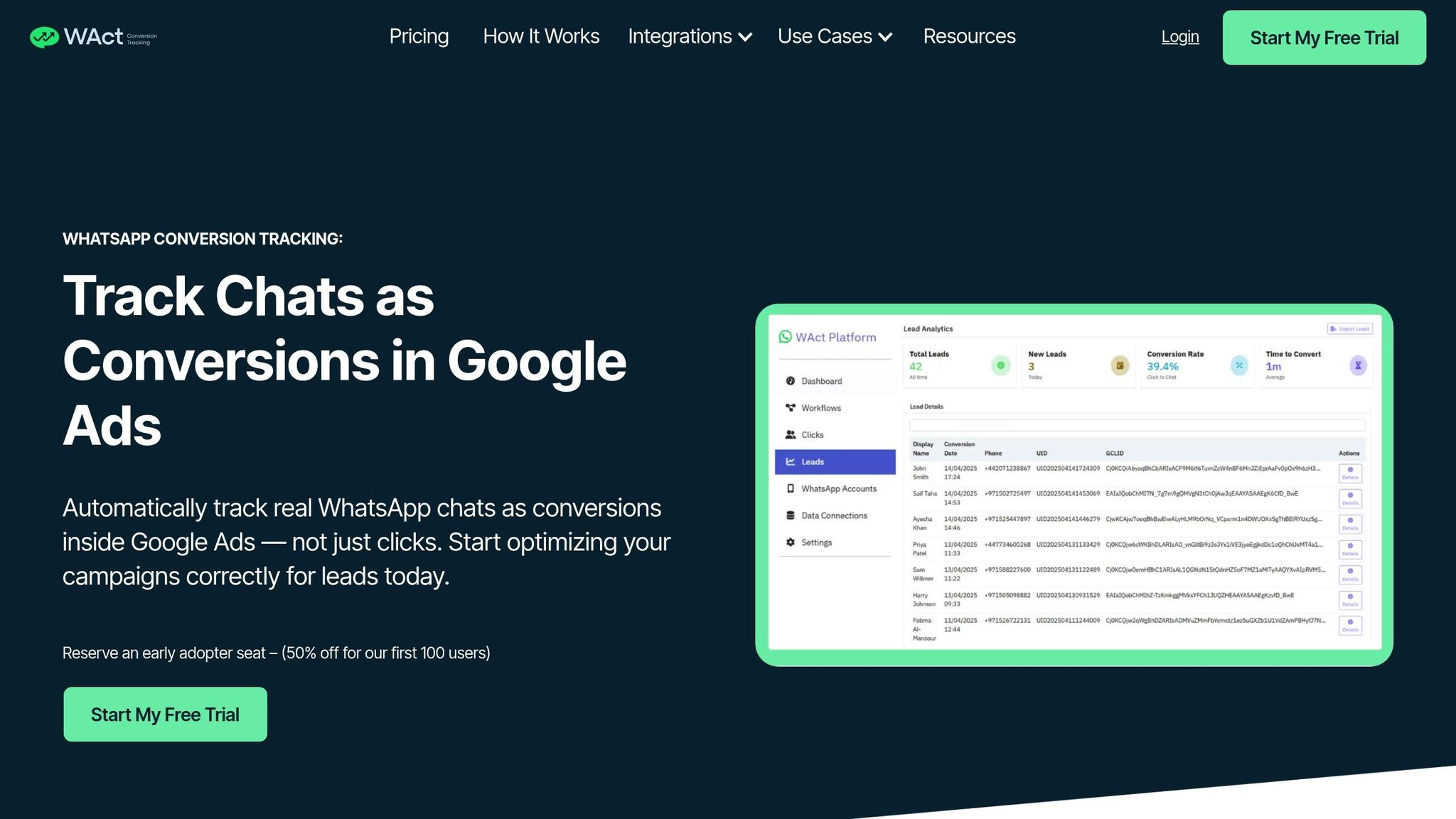
How WAConversionTracking Works
Once you've engaged leads through WhatsApp, the next step is to measure their journey effectively. WAConversionTracking makes this possible by capturing essential data when a user clicks your WhatsApp button. It records the Google Ads Click ID (GCLID) and UTM parameters (like source, medium, and campaign) before redirecting the user to WhatsApp. This clever workaround addresses the limitation of native WhatsApp links, which don’t support UTM parameters.
The system links the captured GCLID to a chat UID, allowing you to directly tie ad spend to WhatsApp conversations. As soon as a lead is identified - typically when they send the first message - WAConversionTracking uploads the conversion data to Google Ads automatically, saving you the hassle of manual updates.
To get started, you’ll need to connect your WhatsApp Business API, link your Google Ads account and a data sheet (like Google Sheets) using a workflow, and either install the tracking script or use the pre-built WhatsApp button. Before scaling your ad spend, test everything using the dashboard’s verification tool to ensure clicks and leads are being tracked accurately.
Benefits of Using WAConversionTracking
One of the standout features of WAConversionTracking is its ability to provide real-time attribution. You’ll know instantly which Google Ads campaigns are driving WhatsApp conversations, removing any guesswork. This data integrates directly into Google’s smart bidding algorithms, letting the platform fine-tune your campaigns based on actual lead quality instead of just clicks.
The impact can be game-changing. For instance, JU Productions managed to cut their cost per qualified lead by 47.2% after switching to automated tracking with the Meta Conversions API. Similarly, Automax® saw a 10% boost in conversions by feeding conversion data back to their ad platforms. These improvements come from eliminating wasted ad spend on clicks that don’t result in meaningful conversations.
"Meta uses the data to prioritise the ads most likely to convert. With respond.io and CAPI, you're not just tracking what happened - you're actively improving how Meta delivers your ads to maximise ROI." – respond.io
Unlike manual tracking methods - which often require building complicated attribution tables or asking customers to use specific keywords in their messages - WAConversionTracking simplifies the process. It automatically links web session data to WhatsApp chats, ensuring a seamless experience.
WAConversionTracking Plans and Features
WAConversionTracking offers three plans tailored to businesses of different sizes and needs. All plans require access to the WhatsApp Business API and include essential features like real chat tracking, automated conversion uploads to Google Ads, and CRM integrations.
| Plan | Best For | Key Features | Requirements |
|---|---|---|---|
| Basic | Small businesses starting with WhatsApp ads | Tracks real chats, auto-uploads conversion data, integrates with CRMs | WhatsApp Business API |
| Advanced | Growing businesses with multiple campaigns | All Basic features, advanced URL tracking, enhanced CRM integrations | WhatsApp Business API |
| Enterprise | Large organisations with high message volumes | All Advanced features, scalable architecture, enterprise support | WhatsApp Business API (tailored for enterprise needs) |
Each plan allows you to generate tracking scripts with a single click, requires no developer assistance for setup, and provides detailed lead logs that can be exported to Google Sheets. With these tools in place, you’ll have accurate conversion tracking ready to go. The next step? Integrating CRM tools to further refine your sales funnel.
sbb-itb-0a82e4d
Step 5: Use CRM and Analytics to Improve Results
Connect CRM Tools like respond.io
Once your WhatsApp funnel is up and running, integrating a CRM tool can take your lead management to the next level. Tools like respond.io function as messaging-first CRMs, consolidating conversations from platforms like WhatsApp, Facebook Messenger, and Instagram into a single inbox. This streamlined setup allows your team to handle thousands of leads efficiently, without the chaos of switching between apps or losing track of customer interactions.
Respond.io goes beyond just centralising messages. It automates lead qualification by asking targeted questions, ensuring prospects are routed to the right sales team member. For instance, Automax in the UAE handles an impressive 6,000–8,000 leads monthly using respond.io's AI Agents. The result? A staggering 42.5x ROI on their monthly broadcasts in 2024. The system also categorises contacts into lifecycle stages like New Lead, Hot Lead, and Paying Customer, giving your team a clear picture of where each prospect stands - no need for endless spreadsheets.
The integration process is smooth, with native connections to platforms like HubSpot, Salesforce, and Pipedrive. This ensures WhatsApp conversation histories sync seamlessly across your tools. Additionally, conversion events can be pushed back to Meta using the Conversions API, helping ad algorithms focus on users more likely to convert. With your CRM in place, the next step is to evaluate how effectively your chats are turning into conversions.
Measure Chat-to-Conversion Rates
Centralising conversations allows you to track key metrics that reveal how well your campaigns are performing. Start by monitoring operational metrics like Delivery Rate (aim for 95–99%), Read Rate (target 90–98%), and Response Rate (45% or higher). These numbers show whether your messages are reaching your audience and sparking interest.
To understand your return on investment, focus on deeper funnel metrics such as "Add to Cart", "Initiate Checkout", and "Purchase Value". For example, in 2023, Vyatta in Indonesia ran a six-week test comparing Facebook ads to Click-to-WhatsApp ads. The WhatsApp campaign generated five times more purchases at 79% lower costs per purchase. Similarly, Tata Cliq earned AED 1.8 million ($500,000) in revenue from a one-month WhatsApp campaign, achieving 10x the ROI of traditional marketing channels.
To tie revenue back to specific campaigns, use UTM parameters and Google Click IDs. This data feeds into Google's Smart Bidding algorithms, allowing you to optimise for high-value leads rather than just low-cost clicks. Keep an eye on opt-out rates, too - anything above 2% might indicate issues with your messaging frequency or relevance.
Adjust Campaigns Based on Data
Your CRM's reporting tools can help you pinpoint which ad campaigns or creative assets generate the best-quality leads. If certain campaigns consistently fail to convert, consider shifting your budget to ones that perform better.
Making data-driven adjustments can significantly reduce the cost of acquiring qualified leads. Experiment with A/B testing for message templates and calls-to-action. For instance, test phrases like "Shop Now" versus "Get 20% Off" to see which resonates more. You can also segment your audience using CRM tags based on purchase history or product preferences. This approach not only improves engagement but also reduces the risk of being flagged as spam. In 2023, Qobolak, an education placement company, sent 49,800 targeted WhatsApp broadcasts over eight months, leading to a 95% increase in lead conversions.
Automated alerts can also help you stay on top of things. Set notifications for delivery rates that drop below 90% or response times exceeding 15 minutes, so you can quickly address any technical issues. With a solid analytics system in place, businesses have reported ROI improvements of 300–600% on WhatsApp campaigns, and top performers have achieved returns as high as 10–30x. Use these insights to refine your strategies and keep your marketing funnel dynamic and effective.
Conclusion
Benefits of a WhatsApp Marketing Funnel
A WhatsApp marketing funnel creates a seamless and direct way to connect with customers. In the UAE, where WhatsApp is a go-to app for communication, residents of cities like Dubai, Abu Dhabi, and Sharjah often prefer chatting over filling out forms or sending emails. This preference translates into measurable success - Baro Cosmetics, for example, achieved a 700% increase in conversions on WhatsApp compared to email and a 300% boost compared to SMS. Similarly, Holiday Pirates saw 10 times more engagement on WhatsApp than through email campaigns.
Click-to-WhatsApp ads are particularly effective for industries that require high-touch customer interactions, such as real estate, healthcare, and automotive. These ads eliminate the need for forms, allowing businesses to qualify leads instantly through automated chatbots or live agents. From there, personalised broadcast messages can nurture those leads further.
Tools like WAConversionTracking add another layer of efficiency by linking WhatsApp chats directly to Google Ads campaigns. Instead of relying on button clicks as a measure of success, businesses can track actual conversations and sales. This data feeds directly into Smart Bidding algorithms, enabling better budget allocation toward ads that drive real results - paying customers, not just clicks.
Next Steps
To make the most of WhatsApp marketing, follow these actionable steps.
Start by setting up the WhatsApp Business API to unlock features like automation, multi-user access, and unlimited broadcast capabilities. Launch Click-to-WhatsApp ads with an initial budget of AED 3,000 to AED 10,000 per month. Use AI-powered chatbots to handle greetings and qualify leads around the clock.
Integrate WAConversionTracking to capture GCLID and UTM parameters, pushing conversion data back into Google Ads. Pair this with a CRM like respond.io to centralise customer interactions and monitor key metrics. Experiment with different message templates and ad creatives using A/B testing - small changes, like "Shop Now" versus "Get 20% Off", can significantly affect performance. Lastly, focus on quick responses during working hours. The UAE market places high value on immediate, personalised communication. By implementing these strategies, you’ll turn your ad spend into meaningful, revenue-generating conversations.
Meta Ads + AI WhatsApp Funnel [2025] – Get Better Leads & Faster Appointments
FAQs
How can I ensure my WhatsApp marketing complies with UAE regulations?
To align with UAE communication regulations, it's essential to start by leveraging official WhatsApp Business tools. One effective option is the click-to-WhatsApp ad format offered by Meta. These ads include a Send Message button that users must tap to initiate a chat, ensuring explicit opt-in as required by UAE law. Keep your campaign focused with a clear call-to-action, such as starting a chat, booking an appointment, or making a call. Make sure the ad's tone and response flow feel natural and meet user expectations.
After the conversation begins, streamline interactions by using a business-grade CRM like respond.io. This tool can automate responses, record user consent, and manage message routing efficiently. Always operate with a verified WhatsApp Business profile, include a link to your privacy policy, and provide an easy way for users to opt out. Customise your messaging to local preferences by using polite phrasing in Arabic or English, adhering to UAE-specific spelling norms. Avoid discussing sensitive or prohibited topics to stay compliant. By following these practices, you can build a WhatsApp marketing funnel that is both effective and compliant with UAE regulations.
What advantages does the WhatsApp Business API offer compared to the basic app?
The WhatsApp Business API offers businesses a powerful way to streamline and enhance their communication. Unlike the standard WhatsApp app, this tool integrates effortlessly with CRM systems and analytics platforms. This means businesses can manage customer interactions more effectively while keeping track of performance metrics with ease.
With the API, businesses can deploy AI-driven chatbots to respond to customer queries instantly, ensuring no time is wasted. It also enables routing messages to the appropriate team members and tracking conversions across the marketing funnel. These capabilities not only save time but also elevate the customer experience and fine-tune marketing strategies for stronger outcomes.
How does WAConversionTracking help improve the performance of your ad campaigns?
WAConversionTracking helps boost ad campaign performance by tracking WhatsApp conversations as conversions and syncing this information seamlessly with Google Ads. This means you can close attribution gaps and gain a clearer picture of how WhatsApp contributes to your marketing outcomes.
With this tool, businesses can make smarter use of their ad budgets, see better ROI, and reduce costs like cost-per-lead (CPL) or cost-per-purchase. For instance, some companies have achieved impressive results, such as cutting CPL by up to 24% and reducing overall costs by more than 50%, all while driving valuable actions like test-drive bookings or sales inquiries.




