


The WhatsApp Business API is a game-changer for businesses in the UAE looking to handle high volumes of customer communication efficiently. Unlike the standard WhatsApp Business app, the API offers advanced tools to automate messaging, integrate with CRMs, and track conversions from ads. With over 90% of UAE internet users actively on WhatsApp, this platform is key for businesses aiming to improve customer engagement and scale their operations.
Key Takeaways:
- Who is it for? Medium to large businesses and Google Ads agencies managing thousands of conversations daily.
- What does it do? Automates responses, supports multilingual templates, and integrates with tools like Google Ads and CRMs.
- Why is it useful? Tracks revenue from ads, improves customer service, and reduces costs with features like abandoned cart recovery and chatbots.
- Costs: Marketing messages cost around AED 0.21 per message, while utility messages are AED 0.084.
The API also supports advanced tracking through tools like WAConversionTracking, ensuring businesses can link WhatsApp conversations directly to ad campaigns for better ROI. For UAE businesses, bilingual support (Arabic and English) and compliance with local data protection laws make it an ideal solution for scaling customer communication.
All You Need to Know About WhatsApp Business API 2025
sbb-itb-0a82e4d
How to Set Up WhatsApp Business API

WhatsApp Business API Setup Guide: 3-Step Process for UAE Businesses
What You Need Before Getting Started
Before diving into the setup process, make sure you have everything in place. First, you'll need a dedicated phone number that's not already linked to any WhatsApp account. If it is, you'll need to remove the existing registration. This number must be capable of receiving SMS or voice calls for two-step verification.
You'll also need a Meta Business Manager account with all the necessary business documents on hand. These include a Certificate of Incorporation, Business Licence, or Bank Statements. Additionally, your business should have an SSL-enabled website that displays your legal business name. It’s crucial that the business name, address, and phone number on your documents match exactly with what you enter in Meta Business Manager. Even slight mismatches can lead to rejections.
Once you’ve submitted everything, Meta’s review process typically takes anywhere from 10 minutes to 14 business days. After approval, your account will allow higher messaging limits, increasing from 250 to 2,000 business-initiated conversations per day.
How to Choose a WhatsApp BSP in the UAE
Picking the right Business Solution Provider (BSP) is a critical step. Start by ensuring the BSP is a Badged Meta Business Partner. Since Meta discontinued the On-Premises API in October 2025, make sure your chosen provider supports the WhatsApp Cloud API.
For businesses in the UAE, look for a BSP that offers AED billing and pricing aligned with local market standards. You can also use a WhatsApp API cost calculator to estimate your monthly expenses. Arabic language support is another key factor - providers like Webotix, Digital Gravity, and YCloud offer localised features, including chatbots that can handle Arabic.
It’s also important to check whether the BSP integrates smoothly with popular CRMs like HubSpot, Salesforce, or Zoho. Many providers offer free trials, so take advantage of them to test platform features. For instance, YCloud (rated 4.9/5 on G2) and Wati (rated 4.6/5) allow you to evaluate dashboard usability and API latency before making a decision. Once you've picked the right BSP, you can move ahead with configuring your API account.
Setting Up Your WhatsApp API Account
After selecting a BSP, link your Meta Business Manager account using the Embedded Signup flow. Register your dedicated phone number and complete the two-step verification process. Then, set up your business profile by adding a Display Name, which usually takes 3–4 hours for approval.
Next, configure a webhook endpoint to receive updates such as incoming messages, delivery statuses, and template approvals in real time. Your webhook should be able to handle JSON payloads up to 3 MB and must return a 200 HTTP code to confirm receipt. For added security, Meta recommends using mutual TLS (mTLS). If the webhook fails, Meta will retry delivery with decreasing frequency for up to 7 days. Completing this step ensures seamless integration of your messaging system with marketing tools.
To optimise your setup, create Message Templates for marketing, utility, or authentication purposes and submit them for Meta’s review. Don’t forget to switch your app to "Live" mode in the Meta App Dashboard, as some webhooks won’t function if the app remains in "Dev" mode. Finally, integrate the API with your CRM or database to process webhook payloads effectively. This setup enables scalable messaging and precise tracking of ad conversions.
Using WhatsApp Business API to Grow Your Business
Building Conversation Flows That Convert
With WhatsApp Flows, you can create step-by-step forms directly within the chat to capture purchase intent, leads, or quotes. These flows can be initiated through ads, website buttons, or QR codes, providing an interactive experience with Quick Reply buttons to guide customers seamlessly. Additionally, the Marketing Messages API can boost delivery rates by up to 9% compared to the standard Cloud API.
The Conversions API for Business Messaging tracks key actions like "Purchase", "LeadSubmitted", and "AddToCart" by using the ctwa_clid (Click-to-WhatsApp Click ID). This allows businesses to accurately attribute conversions back to their marketing spend. For UAE businesses catering to a multilingual audience, message templates are available in both Arabic and English, ensuring smooth communication across diverse customer bases.
Once you’ve added your WhatsApp account and set up engaging conversation flows, you can further streamline operations by automating responses with chatbots to handle frequently asked questions and other routine tasks.
Setting Up Chatbots and Automation
Chatbots can be configured with pre-approved message templates featuring List Buttons, Reply Buttons, and Product Carousels to guide customer interactions effectively. By setting up webhooks, you can receive real-time JSON payloads for incoming messages and status updates, enabling your chatbot to respond instantly. To prevent spam, the platform enforces a rate limit of about 10 messages per minute to the same user.
It’s essential to monitor the quality scores of your message templates regularly. Poor ratings can result in paused templates or reduced messaging limits. For ad-triggered automation, capturing the ctwa_clid from the webhook allows you to link conversations and conversions to specific campaigns. Moreover, the first 1,000 marketing messages each month are free, giving you a chance to test and refine your automated flows without additional costs.
By implementing these automation tools, you not only improve the customer experience but also enhance the accuracy of your conversion tracking.
Using Images, Documents, and Catalogues
Rich media integration takes customer engagement to the next level. By sharing product catalogues, images, and videos directly within WhatsApp, you can turn chats into a powerful sales channel. In the UAE, where WhatsApp boasts open rates exceeding 90% and click-through rates between 20–30%, this approach far outperforms traditional email or SMS campaigns.
Media like product carousels make it easy to display multiple items in a structured format. For example, real estate agencies can share property brochures and virtual tour links, while restaurants can provide digital menus for quick ordering. Documents, such as PDFs, are ideal for sharing rental agreements, fee structures, or product manuals.
"Rich media is all about product catalogues, images, videos, and documents which can attach directly inside a chat for a richer and enough informative experience."
- Adam Wilson, Customer Success Manager
Pair catalogues with Quick Reply buttons to answer common inquiries about pricing or availability. For e-commerce, automated cart abandonment reminders featuring images of the abandoned items can help encourage customers to complete their purchases. During the 24-hour customer service window, you can send freeform messages - including media, locations, and documents - without incurring additional Meta conversation charges. Marketing conversations are priced at approximately AED 0.16 each, while utility conversations cost around AED 0.084.
Tracking WhatsApp Conversions in Google Ads
Why Click Tracking Doesn't Work
When using the WhatsApp Business API, precise conversion tracking becomes a key factor for success. Many businesses rely on tracking button clicks to measure WhatsApp conversions. But here's the problem: a click doesn't always result in a message. Accidental taps or users closing the app too soon are often counted as leads, which skews the data. To make matters worse, when users are redirected to WhatsApp, the GCLID (Google Click Identifier) is often lost. This disconnects the conversion from the ad that led to it. The result? Google Ads ends up optimising for clicks instead of actual leads, driving up costs and attracting low-quality traffic.
How WAConversionTracking Tracks Real WhatsApp Leads
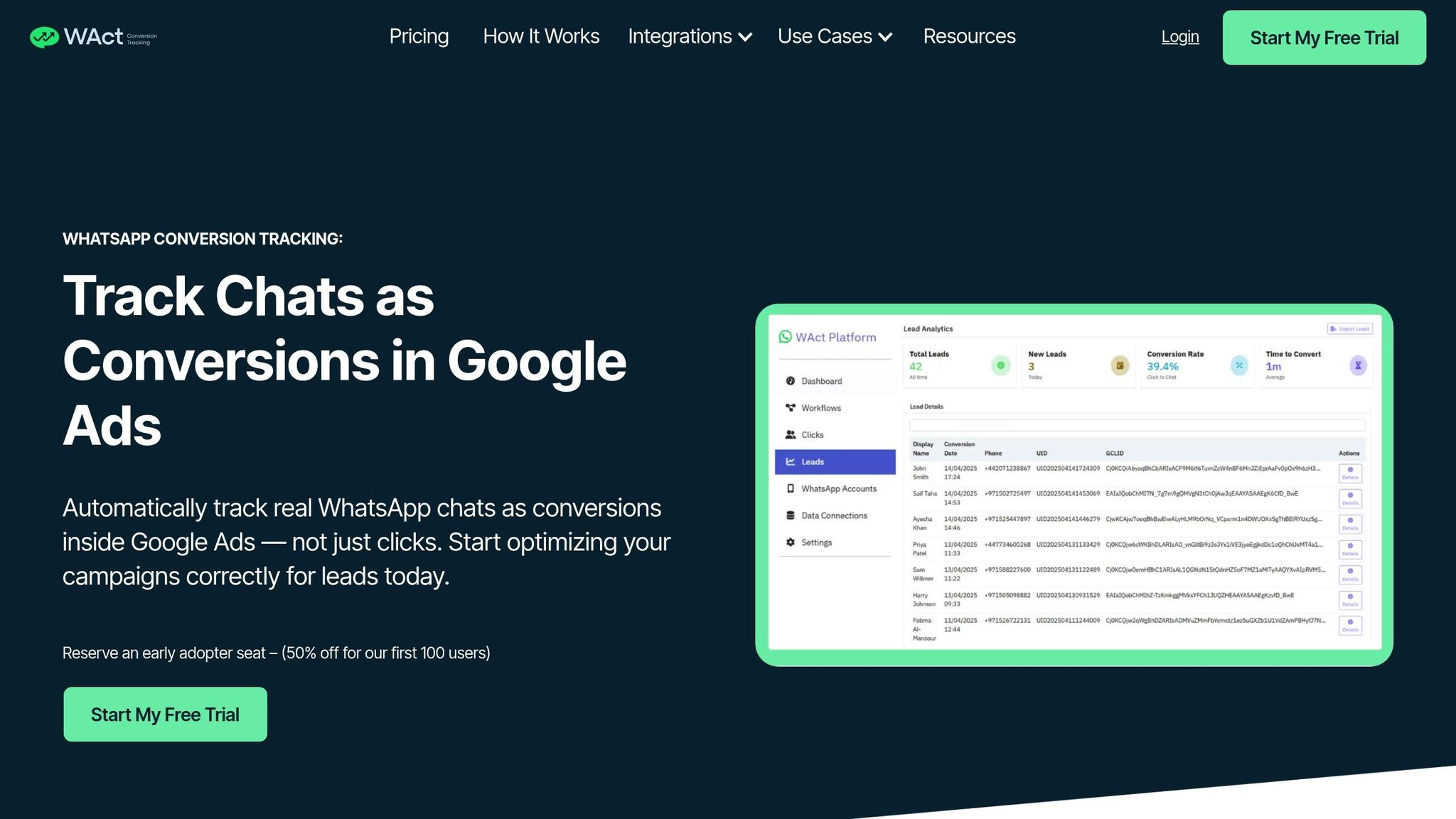
WAConversionTracking solves this issue by focusing on actual messages received through the WhatsApp Business API instead of just tracking clicks. Here's how it works: it captures the GCLID and UTM parameters before the user is redirected to WhatsApp. Then, when a real conversation begins, the tool logs the conversion and sends the data - including the original GCLID - back to Google Ads. This ensures that Smart Bidding receives accurate data based on actual leads, not just clicks.
| Feature | Standard Button Click Tracking | API-based Chat Tracking via WAConversionTracking |
|---|---|---|
| Data Accuracy | Tracks users who click but may never send a message | Tracks only users who start a real conversation |
| GCLID Handling | Often lost during the redirect to WhatsApp | Captured and sent back to Google Ads |
| Optimisation | Focuses on clicks, leading to poor-quality traffic | Focuses on real leads, improving campaign performance |
| Verification | No way to confirm if the user contacted the business | Verified through WhatsApp Business API webhooks |
The tool’s "Workflows" feature simplifies the process by linking your WhatsApp account, Google Ads account, and tracking system in one place. This eliminates the need for complex server-side tracking or hiring developers, making the setup process much easier.
Connecting WhatsApp to Google Ads: Step-by-Step
To get started, create a Workflow in WAConversionTracking and connect your WhatsApp API number with your Google Ads account. Then, either generate a tracking script or use the pre-built WhatsApp button - both options ensure the GCLID is captured. Add this to your website wherever your WhatsApp contact option is displayed.
Next, use the "Testing Your Setup" feature to send a test message and confirm that the lead appears in your dashboard. You can also apply the "Active Workflow Filter" to focus on data from specific campaigns or phone numbers, helping you analyse performance by channel.
Once you’ve verified that conversions are being tracked correctly, set up the conversion action in Google Ads and link it to Smart Bidding. This approach ensures your campaigns optimise for real WhatsApp conversations, not just clicks. The result? Less wasted ad spend and potentially lower costs per acquisition. For detailed instructions, check the WAConversionTracking documentation.
Using Data to Improve Your Marketing Results
Which Metrics to Track
Keep an eye on delivery and read rates through your BSP dashboard. These numbers give you a snapshot of how far your messages are reaching and how engaged your audience is. For businesses in the UAE, analysing metrics by phone number can help you compare performance across locations - like seeing how campaigns fare in Dubai versus Abu Dhabi.
Go beyond basic analytics and focus on conversion events that directly influence revenue. Metrics such as "Add to Cart", "Initiate Checkout", and "Purchase" can be tracked using tools like Meta Pixel or the Conversions API. Additionally, keep tabs on cost per conversation across the four key categories - Marketing, Utility, Authentication, and Service. This helps you identify where your budget is going and which types of conversations deliver the best returns.
| Metric Category | Key Data Points | What It Tells You |
|---|---|---|
| Messaging | Sent, Delivered, Received | Message reach |
| Engagement | Read Rate, Click-Through Rate | Content relevance and interest |
| Conversion | Add to Cart, Purchase, Purchase Value | Direct sales impact |
| Financial | Cost per Conversation, Total Charges | Ad spend efficiency |
These metrics provide a solid foundation for refining your marketing strategies.
How to Use Data to Improve Campaigns
Once you’ve established the metrics, use them to fine-tune your campaigns for better performance. In 2023, Mercedes Benz Turkey ran a test with three campaign strategies and discovered that combining social media ads with Click-to-WhatsApp ads produced the best results. This approach led to a 93% boost in incremental conversions and a 78% reduction in cost per qualified lead.
Take advantage of your tracking tool’s filters to dig deeper into campaign performance. For instance, if your Arabic-language campaigns are getting higher read rates but lower conversions than your English ones, it might be worth revisiting your message flows to address any points of friction. For Google Ads, you can integrate actual WhatsApp conversation data into Smart Bidding. This allows you to optimise for genuine leads and cut down on wasted ad spend, ultimately lowering your cost per acquisition.
Testing and Optimisation Tips
When testing, focus on one variable at a time to identify what’s driving results. For example, you could send out the same message template - one version with a discount code and one without - to see which performs better. Similarly, experiment with different call-to-action buttons to determine which generates more responses. Use half-hour granularity reports from your BSP to pinpoint when your UAE audience is most active. For instance, messages sent at 20:00 might get better engagement than those sent at 14:00.
A great example of this strategy in action is Tata Cliq’s 2023 campaign, which brought in AED 1.8 million. The campaign revealed that WhatsApp customers were 1.7 times more likely to make a purchase, delivering an ROI 10 times higher than traditional channels. Regularly monitor your attribution data and adjust targeting based on the keywords and ad groups that drive the most valuable WhatsApp conversations.
Conclusion
The WhatsApp Business API offers businesses in the UAE a powerful way to handle thousands of customer interactions simultaneously, all while preserving the personal touch that customers value. With over 8 million WhatsApp users in the UAE - representing a 79.6% penetration rate - and message open rates exceeding 90%, it’s clear that this platform is where customers are already engaged.
For performance marketers and small-to-medium businesses, precise conversion tracking can make all the difference. WAConversionTracking stands out by capturing the unique ctwa_clid from each ad click and linking it directly to WhatsApp conversations. This allows Google Ads Smart Bidding to focus on real conversions, not just clicks.
WhatsApp messages also boast impressive click-through rates, typically ranging from 20% to 30%. When combined with features like bilingual support for Arabic and English, rich media catalogues, and the credibility of Green Tick verification, the API becomes a robust tool for customer engagement that can grow alongside your business.
You can start small by automating essential touchpoints, such as order confirmations and shipping updates, and gradually move into conversational commerce. Whether you’re a small business managing a handful of enquiries or a larger enterprise dealing with thousands, the API scales effortlessly to meet your needs - all while ensuring your data remains secure and compliant with the UAE’s Personal Data Protection Law.
FAQs
What is the difference between the WhatsApp Business API and the WhatsApp Business app?
The WhatsApp Business API is tailored for medium to large businesses that need to manage a high volume of customer interactions efficiently. On the other hand, the WhatsApp Business app is more suitable for small businesses handling individual chats on a more personal level.
With the API, businesses can streamline communication by automating messages, integrating chatbots, and connecting seamlessly with tools like CRMs or marketing platforms. It supports multi-agent teams and can handle thousands of conversations programmatically. In contrast, the app is designed for basic use, limited to one phone or a few linked devices, and offers simple features such as quick replies and labels.
The API operates on a pay-per-conversation model, offering the first 1,000 conversations per month for free - making it a practical choice for enterprise-level operations. Meanwhile, the app is entirely free, making it a better fit for small businesses seeking a straightforward, manual messaging tool.
What are the main advantages of using the WhatsApp Business API for businesses in the UAE?
The WhatsApp Business API opens up a world of possibilities for UAE businesses by connecting their existing systems - like CRMs, e-commerce platforms, and chatbots - with the region's favourite messaging app. With over 8 million users in the UAE and a high rate of smartphone usage, this tool allows businesses to deliver secure, automated, and personalised communication in both Arabic and English. It’s designed to meet the growing demand for fast, mobile-friendly customer support.
Here’s what makes the WhatsApp Business API a game-changer:
- Streamlined efficiency: Automate key workflows, such as sending order confirmations or appointment reminders. Handle thousands of conversations at once, assign chats to the right agents, and drastically cut down response times.
- Stronger customer connections: Use rich media - like images, videos, and product catalogues - to transform chats into an engaging sales experience that drives conversions.
- Top-notch security: With end-to-end encryption and Meta-approved templates, the API ensures data privacy and compliance with UAE regulations.
By integrating this API, businesses can deliver quicker, more tailored support, strengthen customer trust, and refine their communication strategies in a market where WhatsApp plays a central role in digital interactions.
How can I set up the WhatsApp Business API for my company to streamline communication and scale effectively?
Setting up the WhatsApp Business API for your company is a straightforward way to streamline communication and manage customer interactions efficiently. Here’s a step-by-step guide to get started:
-
Set Up a Meta Developer Account
Begin by creating a Meta Developer account and registering an app to host your WhatsApp integration. Next, establish a WhatsApp Business Account (WABA) through Meta Business Manager to represent your business officially. -
Add and Verify Your Phone Number
Link a phone number to your WABA. You can use an existing number or a test number. Verification is done via SMS or a voice call to ensure the number is active and ready for use. -
Configure Webhooks for Notifications
Set up Webhooks on your server to receive notifications about messages and delivery updates. This step ensures that communication flows smoothly between your business and your customers. -
Generate a Long-Term Access Token
Create a long-term access token to authenticate API calls. This token is crucial for maintaining a secure and reliable connection with the WhatsApp API. -
Submit Message Templates for Approval
Design and submit message templates that follow Meta's guidelines. These templates are necessary for sending outbound messages like notifications, updates, or reminders to your customers.
After completing these steps, test your setup using a test number. Once everything functions as expected, switch to your production number to begin scaling your communication efforts. By leveraging the WhatsApp Business API, you can enhance customer engagement and improve operational workflows.




