


Struggling to track which Microsoft Ads clicks convert into paying customers? Whether you're running campaigns in the UAE or elsewhere, proper conversion tracking is the key to maximizing your ad spend. Here's what you need to know:
- Universal Event Tracking (UET): A single tag tracks user actions across your website, helping you measure conversions like purchases or form submissions.
- WhatsApp Lead Tracking: Standard UET tags miss WhatsApp chats, a common lead source in the UAE. Tools like WAConversionTracking solve this by logging actual chats as conversions.
- Smart Bidding Strategies: Accurate tracking improves automated bidding (e.g., Target CPA or Target ROAS), ensuring your budget focuses on high-value leads.
- Enhanced Conversions: Use hashed first-party data (like email or phone) for better attribution in a world moving away from third-party cookies.
This guide explains how to set up UET, track WhatsApp leads, and optimize campaigns for better ROI in AED. Learn how to integrate tools, configure settings, and troubleshoot common issues to make every dirham count.
Microsoft Ads Conversion Tracking (2026), including Enhanced Conversions (with Google Tag Manager)
sbb-itb-0a82e4d
Conversion Tracking Basics for Microsoft Ads
Conversion tracking is like keeping a digital log of what happens after someone clicks on your ad. Think of it as a receipt that helps you figure out which ads are pulling their weight and which ones aren’t driving revenue.
This process relies on Universal Event Tracking (UET). By placing a single tag across your website, you can collect data on how users interact with your site. Once the tag is in place, you can set up conversion goals - these could be as straightforward as reaching a specific URL (like a thank-you page) or as specific as tracking button clicks. For businesses in the UAE, especially those tracking WhatsApp leads, additional parameters are captured to provide deeper insights. Using a WhatsApp lead tracking planner can help organize these parameters before implementation. More details about WhatsApp-specific tracking are covered in later sections.
What is a UET Tag?
The UET tag is a small JavaScript snippet that you add to every page of your site. Its job? To track user behavior and log the conversion events you’ve defined. As BingAdsExperts puts it:
"UET (Universal Event Tracking) is the data backbone for Microsoft Advertising. Clean UET signals unlock accurate conversion reporting and bidding."
Once installed, the tag can track a variety of conversions - whether it’s a purchase, a form submission, or even a click on a WhatsApp button. It also supports Enhanced Conversions, which use hashed first-party data (like email addresses or phone numbers) to improve attribution accuracy. Microsoft Advertising explains:
"Enhanced conversions improves the accuracy of conversion tracking because first-party data is more reliable than third-party data."
After installing the UET tag, it might take up to 24 hours for Microsoft Advertising to verify it. During this time, the tag’s status may show as "Unverified".
Now, let’s dive into why precise conversion tracking is such a game-changer.
Why Conversion Tracking Matters
Conversion tracking offers three main advantages: better campaign performance, smarter bidding strategies, and accurate ROI measurement.
First, it helps identify which ads and audiences are driving results, allowing you to allocate your budget more effectively. Second, the data is crucial for automated bidding strategies like Target CPA (Cost Per Acquisition) and Target ROAS (Return on Ad Spend). These strategies adjust bids in real time to maximise either the number of conversions or their value. To make the most of this, it’s key to separate high-value actions - like completed purchases or qualified WhatsApp chats (classified as Primary goals) - from lower-priority actions like newsletter signups (classified as Secondary goals). This differentiation helps Microsoft’s AI optimise bids more effectively.
Finally, tracking revenue in local currency (like AED for the UAE) ensures precise calculations of return on ad spend. For UAE businesses, integrating WhatsApp conversion tracking data can take bid optimisation to the next level, ensuring campaigns are as effective as possible.
How to Set Up Conversion Tracking in Microsoft Ads

Microsoft Ads Conversion Tracking Setup: 5-Step Implementation Guide
To track actions like purchases or WhatsApp button clicks, you'll need to set up conversion tracking in Microsoft Ads by creating a UET tag and adding it across your site.
Creating Your UET Tag
Start by creating your UET tag in Microsoft Ads. Log in to your account and go to Tools > UET (or Conversions > UET tag), then click Create UET tag. Give your tag a Name (up to 100 characters, and it must be unique within your account). You can also add a description to help identify the tag later, especially if you're managing multiple websites.
Choose the JavaScript version of the tag. This version allows for advanced features like custom events, variable revenue tracking, and dynamic remarketing - key tools if you're running e-commerce campaigns or tracking WhatsApp conversions. For online product sales, set the goal to "Conversion action value may vary" and specify your default currency in uppercase (e.g., 'AED' for UAE).
You can also enable Enhanced Conversions during the setup process. This feature uses hashed first-party data, such as email addresses or phone numbers, to improve tracking accuracy as third-party cookies become less effective. To enable it, accept the privacy statement and check the "Turn on Enhanced conversions" box. Microsoft retains this hashed data for 30 days.
Once your UET tag is ready, the next step is to install it on your website.
Installing the UET Tag on Your Website
Copy the JavaScript snippet provided and add it to every page of your website. Place it in the <head> or <body> section using a site-wide layout or header template for automatic inclusion. If you’re using tools like Google Tag Manager, Tealium, or Adobe Launch, these can simplify the deployment process.
It may take up to 24 hours for the tag to verify. To check its status more quickly, use the UET Tag Helper extension (available for Edge and Chrome). The extension provides real-time feedback: Green indicates the tag is active, Yellow suggests there are areas to improve, and Red signals issues.
After installation, test your conversion goals. Go to Conversions > Conversion goals, select the goal, and click Test this conversion goal. The UET Tag Helper will guide you through the process, and you can use the "Events" tab to confirm that parameters like gv (for variable revenue) or em (for hashed email in enhanced conversions) are working properly.
Be mindful of potential issues, such as server redirects that strip the MSCLKID (Microsoft Click ID) from your landing page URL. This ID is essential for accurate attribution. Also, ensure conversions don’t fire multiple times if someone refreshes the thank-you page, as this can lead to inflated data.
Proper installation is key to capturing detailed WhatsApp conversion data and ensuring your tracking is accurate.
Tracking WhatsApp Conversions from Microsoft Ads
In the UAE, WhatsApp is a go-to platform for turning ad clicks into meaningful customer interactions. The tricky part? Pinpointing which campaigns, keywords, or ad groups are driving these conversations. You can’t just rely on counting button clicks as conversions - it’s about tracking actual chats. Accurate WhatsApp conversion tracking is key to fine-tuning your Microsoft Ads campaigns. Let’s dive into how you can capture crucial parameters, automate tracking, and connect the dots with the WhatsApp Business API.
Capturing MSCLKID and UTM Parameters
When someone clicks on your Microsoft Ads, a unique identifier called MSCLKID (Microsoft Click ID) is automatically added to your landing page URL. This identifier is crucial for tying WhatsApp chats back to the specific click that initiated them. To keep tracking consistent, make sure to enable auto-tagging in "Account level options" and select "Add UTM tags to my destination URLs".
A tracking template can help you gather all necessary parameters. Here’s an example:
{lpurl}?msclkid={msclkid}&utm_source=bing&utm_medium=cpc&utm_campaign={Campaign}&utm_term={Keyword}.
Your landing page should be equipped with JavaScript to grab these values from the URL and save them in browser cookies or local storage. Then, when a visitor clicks your WhatsApp button, these parameters can either be included in the pre-filled message or tracked via a session ID that links the click to the eventual chat.
| Parameter | Purpose | Example Value |
|---|---|---|
{msclkid} |
Unique ID for click attribution | 9a8b7c6d5e4f3g2h1i0j |
utm_source |
Identifies the traffic source | bing |
utm_medium |
Identifies the marketing medium | cpc |
utm_campaign |
Identifies the specific campaign | Summer_Sale_2026 |
utm_term |
Identifies the keyword used | whatsapp_consultation |
Next, let’s look at how WAConversionTracking simplifies this process.
Automating WhatsApp Conversion Tracking with WAConversionTracking
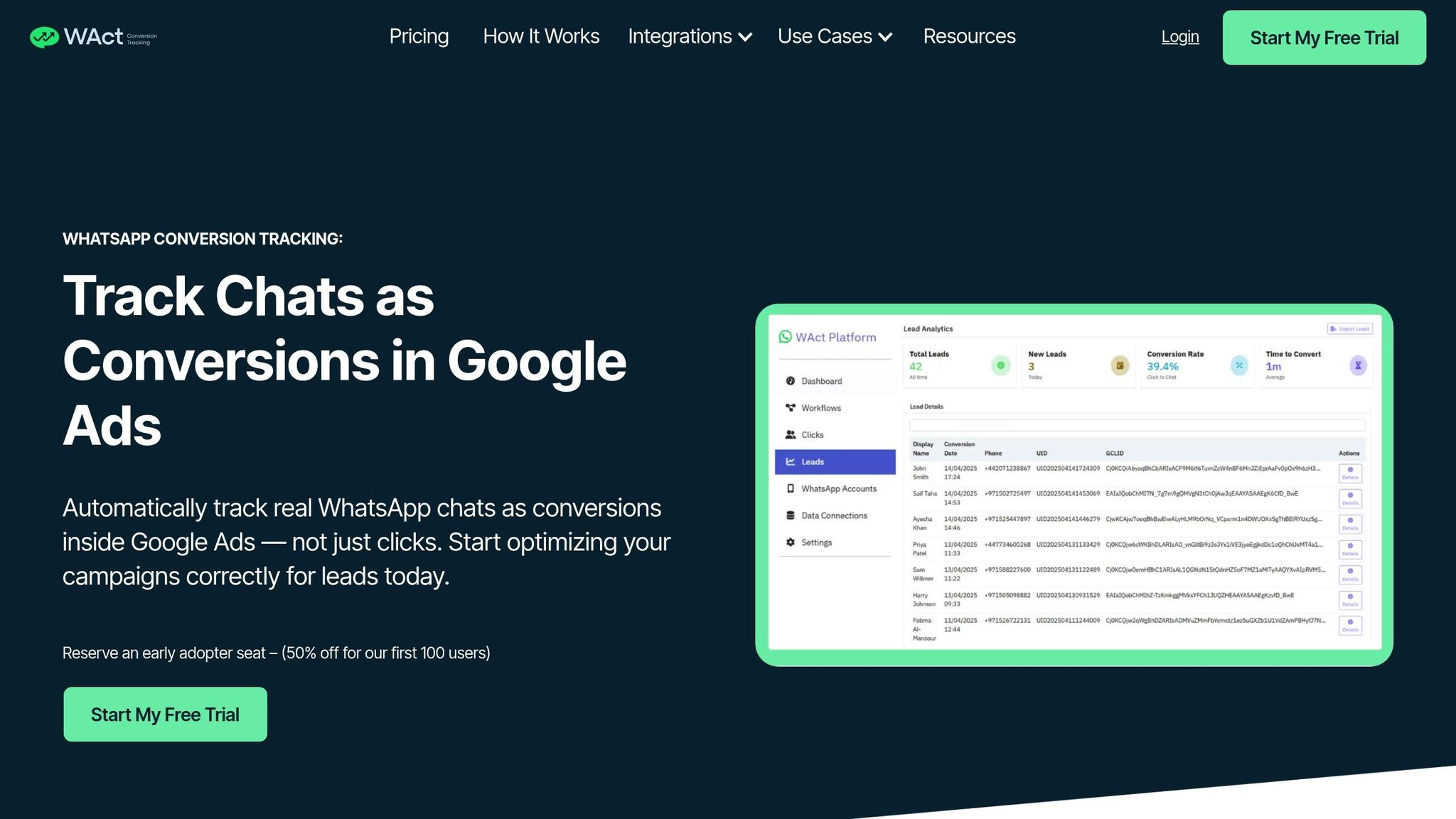
Tracking WhatsApp leads manually can be a hassle. That’s where WAConversionTracking steps in. This tool automates the process by capturing actual WhatsApp chats - not just button clicks - and sending conversion data to Microsoft Ads. It links each session ID with the MSCLKID and only logs a conversion when a customer responds.
This automation feeds reliable conversion data into Microsoft’s Smart Bidding algorithms, helping the platform focus on leads that engage rather than mere clicks. WAConversionTracking also integrates with tools like Google Sheets and CRMs, making it easier to manage your lead data across platforms. Plus, there’s an added bonus: the tool offers a 50% discount for its first 100 users.
Now, let’s explore how the WhatsApp Business API fits into the picture.
Setting Up WhatsApp Business API for Tracking
To unlock advanced tracking features like WAConversionTracking, you’ll need the WhatsApp Business API instead of the basic WhatsApp Business App. The API offers automation capabilities, CRM integration, and webhook access - everything you need for professional-grade conversion tracking. For UAE businesses, it also ensures better compliance and smoother workflows.
When setting up, make sure your phone numbers follow the E.164 standard (e.g., +971501234567 for UAE numbers). If you’re uploading conversions manually to Microsoft Ads, hash phone numbers using the SHA-256 algorithm to ensure privacy compliance. Don’t forget to enable Enhanced Conversions in your Microsoft Ads account. This feature uses first-party data like phone numbers to improve tracking accuracy, especially as third-party cookies become less reliable. Microsoft retains this hashed data for up to 30 days.
Using Conversion Data to Improve Campaign Performance
Conversion data is the key to smarter bidding and better campaign results. It not only refines bidding strategies but also provides a clearer picture of your ROI, aligning with the goal of maximising campaign performance. Universal Event Tracking (UET) plays a critical role here - it’s not just about counting conversions. UET serves as the foundation for automated bidding, audience targeting, and ROI analysis. For advertisers in the UAE, using these conversion signals allows Microsoft’s algorithms to handle bid adjustments and audience segmentation, freeing you up to focus on broader strategies.
Applying Smart Bidding Strategies
Smart bidding thrives on high-quality conversion data, enabling real-time bid adjustments. To make the most of it, differentiate between high-value (Primary) and lower-intent (Secondary) actions. For example, mark completed purchases or qualified WhatsApp leads as "Primary" goals, while less impactful actions like newsletter signups can remain "Secondary." This ensures bidding algorithms prioritise actions that drive tangible business value.
Microsoft Ads offers various automated bidding strategies tailored to your objectives:
- Target CPA (tCPA): Ideal for maintaining consistent lead costs, this strategy optimises for conversion volume at a specific cost per acquisition.
- Target ROAS (tROAS): Designed for e-commerce, it focuses on maximising revenue by targeting a specific return on ad spend. This is particularly effective for businesses offering products with varying price points.
For WhatsApp campaigns, integrating verified chat data (rather than just tracking button clicks) can significantly improve performance. Tools like WAConversionTracking automate this process by capturing real conversation events, ensuring the bidding algorithms receive accurate signals for optimisation.
| Bidding Strategy | Primary Objective | Best Used For |
|---|---|---|
| Maximise Conversions | Achieving the highest volume | Lead generation and building brand awareness |
| Target CPA (tCPA) | Conversions at a set cost | Controlling cost-per-lead |
| Maximise Returns | Generating the most revenue | E-commerce with diverse product pricing |
| Target ROAS (tROAS) | Revenue at a specific return | Boosting profit margins and ROI |
Leveraging hashed first-party data, such as phone numbers for WhatsApp tracking, further sharpens bidding precision. Kevin Salat, Product Marketing Manager at Microsoft Advertising, emphasises the importance of accurate tracking:
"With precise conversion tracking that truly reflects your campaign performance, we'll now connect the dots between ad interactions and conversions like never before".
For industries with longer sales cycles, such as UAE real estate or automotive, importing offline conversions from your CRM can enhance bidding models. By focusing on "won" deals instead of just initial leads, you shift optimisation from quantity to quality.
Tracking ROI with UAE-Specific Metrics
Accurate ROI measurement starts with proper AED configuration. When setting up conversion goals or UET scripts, ensure that AED (United Arab Emirates Dirham) is selected as your currency. For variable revenue tracking, use capital letters for the currency code ('currency': 'AED') and a period for decimals (e.g., 12.34) instead of a comma.
Assigning specific values to different transactions is crucial for calculating true ROAS. For example, WhatsApp leads can be assigned varying values based on the type of enquiry, providing more detailed ROI insights.
In December 2022, ICICI Direct implemented a Microsoft Advertising strategy that reduced their customer acquisition costs by 63%. Although this example is from a different market, the lesson is clear: combining precise conversion tracking with smart bidding leads to measurable cost savings.
To ensure your AED currency and revenue values are correctly tracked, use the UET Tag Helper browser extension. Even minor formatting mistakes can skew ROI calculations, so regular validation is essential. For accounts with lower traffic - typically fewer than 20 clicks per day - Microsoft’s Smart Goals feature can step in. Using machine learning, it identifies high-quality sessions as conversion signals, offering optimisation opportunities even before you achieve high conversion volumes.
Troubleshooting Common Conversion Tracking Issues
Tracking conversions can sometimes feel like untangling a web of hidden issues. Microsoft Ads provides status indicators to help pinpoint problems, but understanding what they mean is key to resolving them effectively.
If you see a "Tag Unverified" status, it simply means that no data has been received yet. This can take up to 24 hours after installation, so patience is necessary here. On the other hand, "Tag Inactive" indicates that no activity has been recorded in the last 24 hours, which could happen if the tag was accidentally removed or broken during a website update. Another common status is "No Recent Conversions", which suggests the tag is working, but no conversions have been logged in the last 7 days. This could point to a misconfigured goal or genuinely low conversion activity.
Diagnosing Issues with UET Tag Helper

The UET Tag Helper browser extension, available for Edge and Chrome, is your go-to tool for diagnosing tag issues. Here's how it works:
- A green badge signals that everything is functioning as expected.
- A yellow badge means the tag requires attention but isn't critically broken.
- A red badge indicates a major issue that needs immediate fixing.
If no badge appears, the tag might not be installed correctly or could be formatted improperly. Common installation mistakes include placing tags inside iFrames (which can distort the Referrer URL), failing to deploy tags from Google Tag Manager to production, or having both a hard-coded tag and a Tag Manager tag firing simultaneously, which can lead to duplicate conversions.
Common Issues with WhatsApp and Privacy Settings
For WhatsApp conversion tracking for agencies, a frequent issue is the loss of the Microsoft Click ID (MSCLKID) during server-side redirects. If this parameter doesn't make it to your landing page, conversions can't be attributed to the original ad click. Privacy settings can also interfere - Consent Management Platforms might block the UET tag until users accept cookies, delaying or entirely preventing tracking.
Excessive or Incorrect Conversions
If you're seeing more conversions than expected, the problem may lie in your "Thank You" page setup. For example, a conversion might be triggered every time someone refreshes the page. Alternatively, an event goal could be tied to both a "click" and a "form submit" action, leading to duplicate counts. For offline or enhanced conversions, ensure that email addresses are in lowercase and free of whitespaces before hashing with SHA-256. Phone numbers should follow the E.164 standard (e.g., +971501234567) to avoid errors.
As Vahid, a Microsoft Advertising Support Specialist, explains:
"It can take up to 24 hours for Microsoft Advertising to receive data from a new UET tag or conversion goal".
Quick Reference Table
| Tracking Status | Meaning | Recommended Action |
|---|---|---|
| Tag Unverified | No data received yet; verification can take 24 hours | Wait 24 hours; if it persists, confirm the UET tag is installed |
| Tag Inactive | No user activity data received in the last 24 hours | Use UET Tag Helper to check if the tag is still firing on the website |
| No Recent Conversions | Tag is active, but no conversions recorded in 7 days | Check if the goal is configured correctly or if the conversion page is tagged |
| InactiveDueToTagUnavailable | Account lost access to the UET tag | Verify manager account permissions or tag ownership |
Conclusion
Conversion tracking serves as the backbone of your Microsoft Ads campaigns. Without accurate UET signals, you're essentially navigating without a map, missing out on automated bidding strategies like Target CPA or Target ROAS - both of which are designed to optimise your campaigns for better returns.
In the UAE, there's an added complexity: WhatsApp dominates as the go-to communication platform for leads. However, standard UET tags fall short when it comes to tracking post-click interactions in WhatsApp chats. By leveraging strong UET data, advanced tools can bridge this gap. For instance, WAConversionTracking captures MSCLKID and UTM parameters directly from WhatsApp chats, linking each high-intent conversation back to the specific ad that initiated it. This transforms ambiguous metrics into actionable insights, enabling more refined campaign strategies.
As Rachel Billick-Smith, Senior Digital Strategist at Gravitate Design, aptly notes:
"Microsoft Ads can quietly deliver a stronger return on ad spend (ROAS) when managed strategically".
To achieve this, start by ensuring your tracking focuses on meaningful results. Mark only high-value outcomes - like completed purchases, qualified WhatsApp leads, or CRM-closed deals - as "Primary." This ensures your bidding strategies are aligned with real revenue drivers. Additionally, make sure your UET tag captures dynamic revenue values in AED to calculate precise ROAS.
Looking ahead, enhanced conversions and server-side tracking are becoming non-negotiable as third-party cookies phase out. By sending hashed first-party data (e.g., email addresses or phone numbers formatted in E.164, such as +971501234567), you can improve match rates and maintain accurate attribution even as privacy regulations evolve. These steps tie together the strategies outlined in this guide, ensuring your campaigns stay effective in a changing digital landscape.
FAQs
How do I avoid duplicate conversions in Microsoft Ads?
To avoid counting duplicate conversions in Microsoft Ads, it's essential to have a well-organised tracking setup. Start by checking that there are no duplicate tags on your website or within Google Tag Manager. Also, make sure you haven't accidentally repeated any conversion goals in your Microsoft Ads account. Regularly review and validate your UET (Universal Event Tracking) tags and goals to ensure everything is functioning as intended. For more accurate tracking, you might also want to explore options like enhanced conversions or server-side tracking. These steps help ensure that each conversion is counted just once, providing you with reliable data.
How can I track real WhatsApp chats (not just button clicks)?
Tracking actual WhatsApp chats directly - beyond just tracking button clicks - is not something Microsoft Ads tools currently support out of the box. The existing solutions, like Universal Event Tracking (UET), are designed to monitor actions on websites rather than interactions on messaging platforms. To monitor WhatsApp chats, you’d need a custom setup that integrates the WhatsApp Business API with your CRM system. However, detailed methods for implementing this are scarce in existing resources. Most tools available today focus more on tracking website activity or overall engagement rather than the specific content of individual chats.
Why is my UET tag still showing “Unverified” or “Inactive”?
If your UET tag displays as “Unverified” or “Inactive”, it could be due to two reasons: either it hasn’t been active for more than 24 hours since setup, or its status hasn’t been confirmed yet. To address this, use the UET Tag Helper tool to inspect and validate its implementation.




