


WhatsApp Business is becoming a go-to tool for small businesses in the UAE to manage customer relationships. With features like labels, quick replies, and automated messages, it offers a simple way to handle leads without traditional CRM complexity. Businesses can instantly capture customer details, organise contacts, and track sales stages and ROI - all within the app.
Key points:
- 98% open rate for messages, with 80% read within 5 minutes.
- Tools like labels and catalogues help organise leads and showcase products.
- Automax, a UAE car dealership, achieved 42.5x ROI by managing leads and broadcasts through WhatsApp.
- For advanced needs, platforms like respond.io integrate WhatsApp with CRMs, enabling multi-channel support, automation, and detailed analytics. This often requires a WhatsApp Business API setup to unlock full tracking capabilities.
Whether you're running ads or managing customer queries, WhatsApp Business simplifies communication and boosts engagement.
Free WhatsApp CRM | Best WhatsApp, Facebook & Instagram CRM (Meta CRM Tutorial)
Setting Up WhatsApp Business for CRM
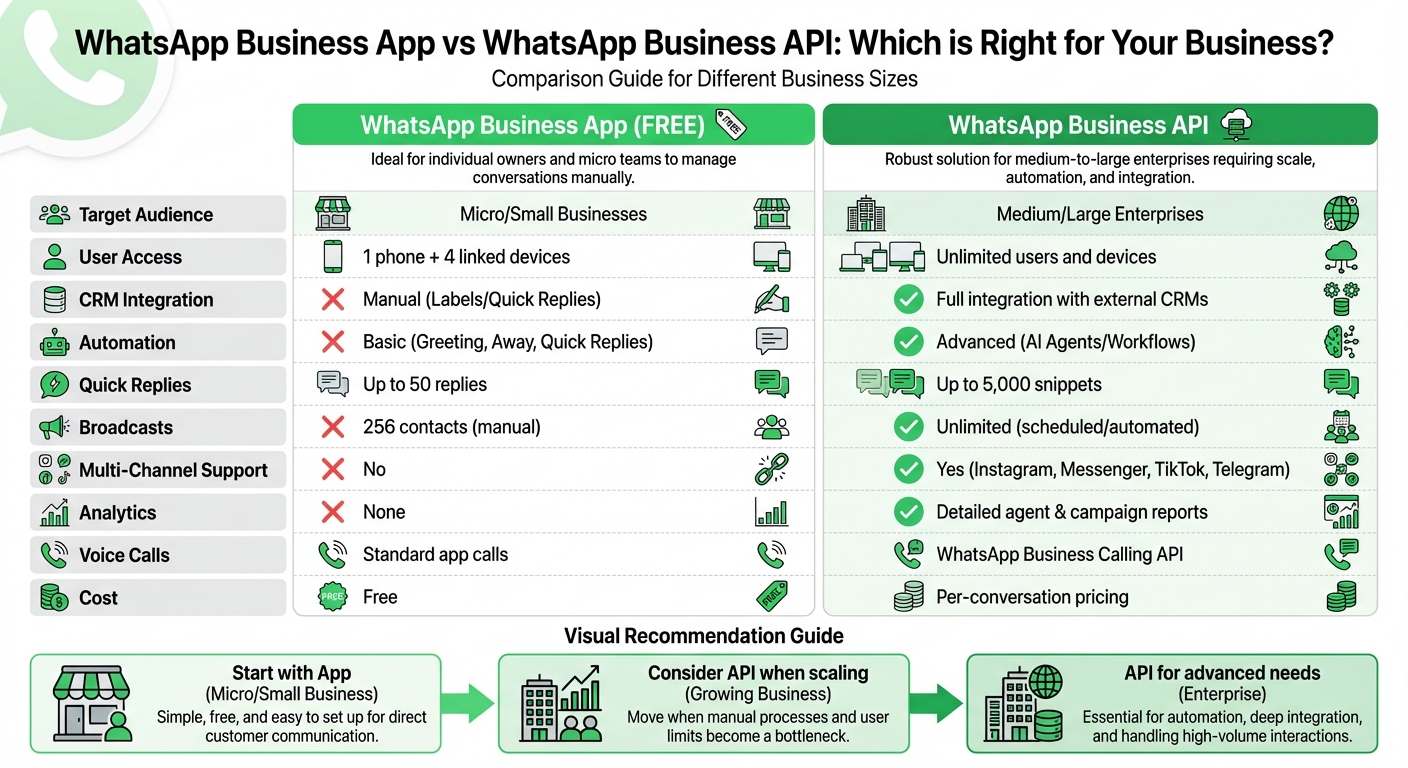
WhatsApp Business App vs API: Complete Feature Comparison for UAE Businesses
Creating Your WhatsApp Business Profile
Start by selecting the right version for your needs: the free WhatsApp Business App is ideal for smaller operations, while the WhatsApp Business API is better suited for larger businesses with multiple users.
Use a dedicated phone number - either mobile or landline - that isn't tied to a personal WhatsApp account. You'll need to verify this number through an OTP, which can be sent via SMS or voice call. Once verified, complete your profile with the following details:
- Business Name: Ensure it reflects your brand identity.
- Logo: Use a high-quality image (minimum 192×192 pixels, but 640×640 is preferred).
- Description: Keep it concise (maximum 256 characters) while clearly outlining your offerings. For example, instead of "We sell cars", you could say, "Luxury pre-owned vehicles in Dubai with 0% finance options."
- Category: Choose the most relevant category for your business.
- Contact Information: Include your address, email, and website.
Customers in the UAE value professionalism, so completing all fields helps build trust and credibility. You can also set custom working hours, which is particularly useful during non-operational times like UAE public holidays or Ramadan. This ensures that away messages are activated automatically, helping manage customer expectations.
Once your profile is set up, you’re ready to configure essential automation tools that will turn WhatsApp Business into a powerful CRM. To stay organized during this transition, use a WhatsApp lead tracking planner to manage your sales pipeline.
Configuring Basic CRM Settings
To streamline customer interactions, make use of these automation features:
- Greeting Messages: Automatically welcome first-time customers or those who haven’t interacted with your business in over 14 days.
- Away Messages: Set these to activate during non-working hours, ensuring they align with UAE-specific schedules, including public holidays and Ramadan.
- Quick Replies: Create up to 50 shortcuts to address frequently asked questions instantly.
These tools save time by automating routine interactions, allowing your team to focus on closing deals and building relationships.
| Feature | WhatsApp Business App | WhatsApp Business API |
|---|---|---|
| Target Audience | Micro/Small Businesses | Medium/Large Enterprises |
| User Access | 1 phone + 4 linked devices | Unlimited users and devices |
| CRM Integration | Manual (Labels/Quick Replies) | Full integration with external CRMs |
| Automation | Basic (Greeting, Away, Quick Replies) | Advanced (AI Agents/Workflows) |
| Cost | Free | Per-conversation pricing |
Organising Contacts with WhatsApp Labels
Creating Custom Labels
WhatsApp Business offers five default labels - New customer, New order, Pending payment, Paid out, and Order completed - and allows you to create up to 20 additional labels tailored to your business needs. To set up a new label, go to Settings > Business Tools > Labels > Add new label (+), then enter a label name and choose a colour. For instance, a real estate agency in Dubai might use labels like "Villa Enquiry", "Apartment Viewing Scheduled", "Mortgage Approved", and "Contract Signed." Colour coding can make things even clearer - use shades of blue for "In Process" stages or red for urgent tasks.
You can assign more than one label to a single chat, which is especially helpful for managing intricate customer relationships. To do this, either long-press a chat in the main list and tap the label icon, or open the conversation, tap the three-dot menu, select More > Tag chat, and pick your labels.
| Label Category | Example Custom Labels | Purpose |
|---|---|---|
| Client Type | VIP, Returning, Partner, Lead | Segment customers by value or relationship |
| Order Status | In Process, Shipped, Abandoned Cart | Track sales progress and logistics |
| Action Needed | Request Feedback, Urgent, Follow-up | Prioritise tasks and responses |
| Internal | Suppliers, Employees, Distributors | Manage non-customer communications |
These labels create a solid framework for keeping track of your customers and their progress.
Managing Leads with Labels
Once your custom labels are in place, they can help you track customer journeys and streamline your workflow. Think of WhatsApp Business as a lightweight CRM: design a label flow that mirrors your sales funnel, such as New Lead > Interested > Proposal Sent > Pending Payment > Paid > Completed. This ensures that no customer slips through the cracks and every opportunity is addressed.
Labels can also help you create highly targeted broadcast lists (up to 256 recipients). For example, you could send a Ramadan promotion to customers tagged as "VIP" or "Returning Customer", instead of blasting it to everyone in your contact list. Regularly review and update labels as customers progress through your sales funnel to keep your communications relevant and avoid sending outdated or irrelevant messages. Keep in mind, deleting a label won’t erase the associated chats - it simply removes the classification.
Automating Customer Messages
Setting Up Quick Replies
Quick Replies are a handy feature that allows you to respond instantly to frequently asked questions, such as pricing details, business hours, or refund policies. The WhatsApp Business app supports up to 50 quick replies, while the API via respond.io expands this capacity to 5,000 [17, 19].
To set up Quick Replies, navigate to Business Tools > Quick Replies > Add (+). Write your message and assign it a shortcut for easy access [17, 19]. For example, a real estate consultant in Dubai might create shortcuts like "/price" to share villa pricing or "/viewing" to confirm appointments. When chatting, simply type a forward slash (/) to see your list of saved replies [17, 19].
The app automatically generates default quick replies - like your business address and operating hours - once your profile is fully set up. If you're using the API through respond.io, you can take it a step further by adding dynamic variables like $contact.firstname to personalise responses [17, 18]. For teams handling a large number of replies, categorising them into groups like Sales, Support, or Shipping helps streamline the selection process.
For more structured communications, message templates can complement Quick Replies by managing outbound messages efficiently.
Creating Message Templates
Message templates are designed for proactive communication, especially in scenarios like follow-ups or post-24-hour interactions. Unlike Quick Replies, templates are ideal for initiating conversations and fall into three main categories: Utility (e.g., order updates), Authentication (e.g., one-time passwords), and Marketing (e.g., promotions).
Templates offer flexibility, allowing you to include a header (text or media), a body of up to 1,024 characters with placeholders (e.g., {{1}} or {{2}}), an optional footer, and interactive buttons like Quick Replies or Call-to-Action links. For instance, Automax leveraged respond.io to manage 6,000–8,000 monthly leads in 2026. By combining broadcasts with message templates, they achieved a 42.5x ROI from over 80,000 monthly broadcasts and boosted ad conversions by 10% using Meta's Conversion API. Similarly, Homage, a home-care provider, automated WhatsApp notifications and follow-ups, saving 50 hours monthly while increasing care-visit success rates by 9%.
When crafting templates, avoid using URL shorteners like bit.ly in the message body, as this can lead to rejection. Instead, use full URLs or embed shorteners within placeholders. Ensure placeholders are sequential (e.g., {{1}}, {{2}}) and avoid "floating placeholders" (lines with only a variable and no surrounding text). Lastly, always obtain active consent before sending marketing messages to prevent spam complaints, which can harm your phone number's quality rating [20, 4].
| Feature | WhatsApp Business App | WhatsApp API (respond.io) |
|---|---|---|
| Storage Limit | Up to 50 replies [17, 19] | Up to 5,000 snippets |
| Personalisation | Manual | Dynamic variables |
| Categorisation | None | By topic |
| Automation | Basic (Greeting/Away) | Advanced Workflows & AI Agents |
sbb-itb-0a82e4d
Tracking Leads Manually in WhatsApp Business
Building a Lead Tracking System
WhatsApp Business offers a simple yet effective way to organise your sales funnel using its built-in labelling feature. You can create up to 20 custom labels in addition to the five default ones, and even assign multiple labels to a single chat. This flexibility allows you to track leads through various stages, such as "Interested", "Proposal Sent", and "Closed-Won".
A standout feature is multi-tagging. For instance, you can label a contact as both "VIP Customer" and "Pending Payment". This lets you categorise leads across multiple dimensions and tailor your follow-ups accordingly. Assigning labels is straightforward: press and hold a chat in your main list and tap the label icon, or open the conversation, tap the three dots in the top-right corner, and select More > Tag chat. To view all leads under a specific category, head to the Labels menu in Business Tools. For example, you can filter all "Pending Payment" leads to focus on daily follow-ups.
To make your system visually intuitive, use similar colours for related phases - like green for payment-related labels. This helps you quickly spot urgent tasks or high-value opportunities. If you're handling a large number of leads, use the Notes feature in customer profiles to keep track of key details.
Once your labelling system is set up, the next step is to analyse your chat data and turn it into actionable insights. You can find more B2B lead generation guides to help optimize your sales funnel.
Analysing Chat Data for Sales
With your labels in place, you can review chats to identify patterns and address bottlenecks in your sales process. Use filters like "Pending Response" or "Lost Leads" to revisit stalled conversations and uncover common objections. This can help you improve sales scripts or refine your Quick Replies.
Labels such as "Abandoned Cart" or "Feedback Requested" are particularly useful for segmenting chats. You can then send targeted broadcasts or schedule systematic follow-ups. However, keep in mind that WhatsApp Business does not offer automated reminders, so it's essential to check your labelled folders regularly to ensure no leads slip through the cracks.
| Label Category | Example Custom Labels | Purpose |
|---|---|---|
| Lead Status | Interested, Qualified, Unresponsive | Track where the lead is in the initial contact phase |
| Sales Stage | Proposal Sent, Negotiation, Pending Payment | Manage the active sales pipeline |
| Customer Value | VIP, Frequent Buyer, Wholesale | Identify high-priority or high-volume accounts |
| Post-Sales | Feedback Requested, Support Needed, Completed | Manage retention and customer satisfaction |
Connecting WhatsApp Business with respond.io
WhatsApp Business is a great starting point for small-scale operations, but as businesses in the UAE grow, they often encounter limitations in scalability. That’s where respond.io steps in. As an official WhatsApp Business Solution Provider, respond.io enhances WhatsApp’s simplicity with powerful CRM tools, making it easier for businesses to manage customer interactions on a larger scale.
Benefits of respond.io Integration
Respond.io addresses the challenges of WhatsApp Business by offering advanced CRM features that go beyond WhatsApp’s basic functionalities. For example, while WhatsApp Business has basic labelling and automation options, respond.io takes it further by centralising communications across multiple channels like WhatsApp, Instagram, Facebook Messenger, TikTok, and Telegram - all within a single inbox. This eliminates the need for your team to juggle multiple apps, improving efficiency.
With respond.io, you also get unlimited user access, a significant upgrade from WhatsApp Business’s restriction of one phone and four additional devices. This makes it an excellent solution for growing teams.
"WhatsApp is where the conversation starts. Your CRM is where customer data lives. Respond.io brings them together in one connected workspace." - respond.io
Let’s look at real-world examples from the UAE. Automax, a well-known automotive retailer, used respond.io to scale their WhatsApp operations effectively. With advanced automation and workflows, they streamlined their customer interactions. Another example is iMotorbike, which automated 70% of routine enquiries through respond.io. This not only doubled their daily lead-handling capacity but also reduced response times by 67%.
Respond.io also supports the WhatsApp Business Calling API, allowing teams to make and receive voice calls directly within the messaging thread - something the standard WhatsApp Business App doesn’t offer. Additionally, the WhatsApp Coexistence feature lets businesses use both the native WhatsApp Business app and respond.io simultaneously. Just make sure to open the Business App at least once every 14 days to keep the connection active.
WhatsApp Business vs. respond.io: Feature Comparison
Here’s a side-by-side comparison of WhatsApp Business’s native features and what you get with respond.io integration:
| Feature | WhatsApp Business Native | With respond.io Integration |
|---|---|---|
| User Access | Limited (1 phone + 4 devices) | Unlimited users |
| Multi-Channel Support | No | Yes (Instagram, Messenger, TikTok, Telegram) |
| Analytics Dashboard | None | Detailed agent & campaign reports |
| Team Collaboration | Basic (shared device access) | Advanced (internal notes, assignments, routing) |
| Automation | Basic (Quick replies, Away messages) | Advanced workflows & AI Agents |
| CRM Integration | None | Native sync with HubSpot, Salesforce, and others |
| Voice Calls | Standard app calls | WhatsApp Business Calling API |
| Broadcasts | 256 contacts (manual) | Unlimited (scheduled/automated) |
The platform ensures 99.999% uptime, with no setup fees or hidden cost markups. Pricing for the Growth Plan starts at approximately AED 730 per month for up to 10 users. This includes access to all messaging channels, advanced automation, and detailed reporting. Keep in mind, Meta’s per-conversation fees are billed separately and vary depending on the message category and the recipient’s country.
Tracking WhatsApp Conversions from Paid Ads with WAConversionTracking
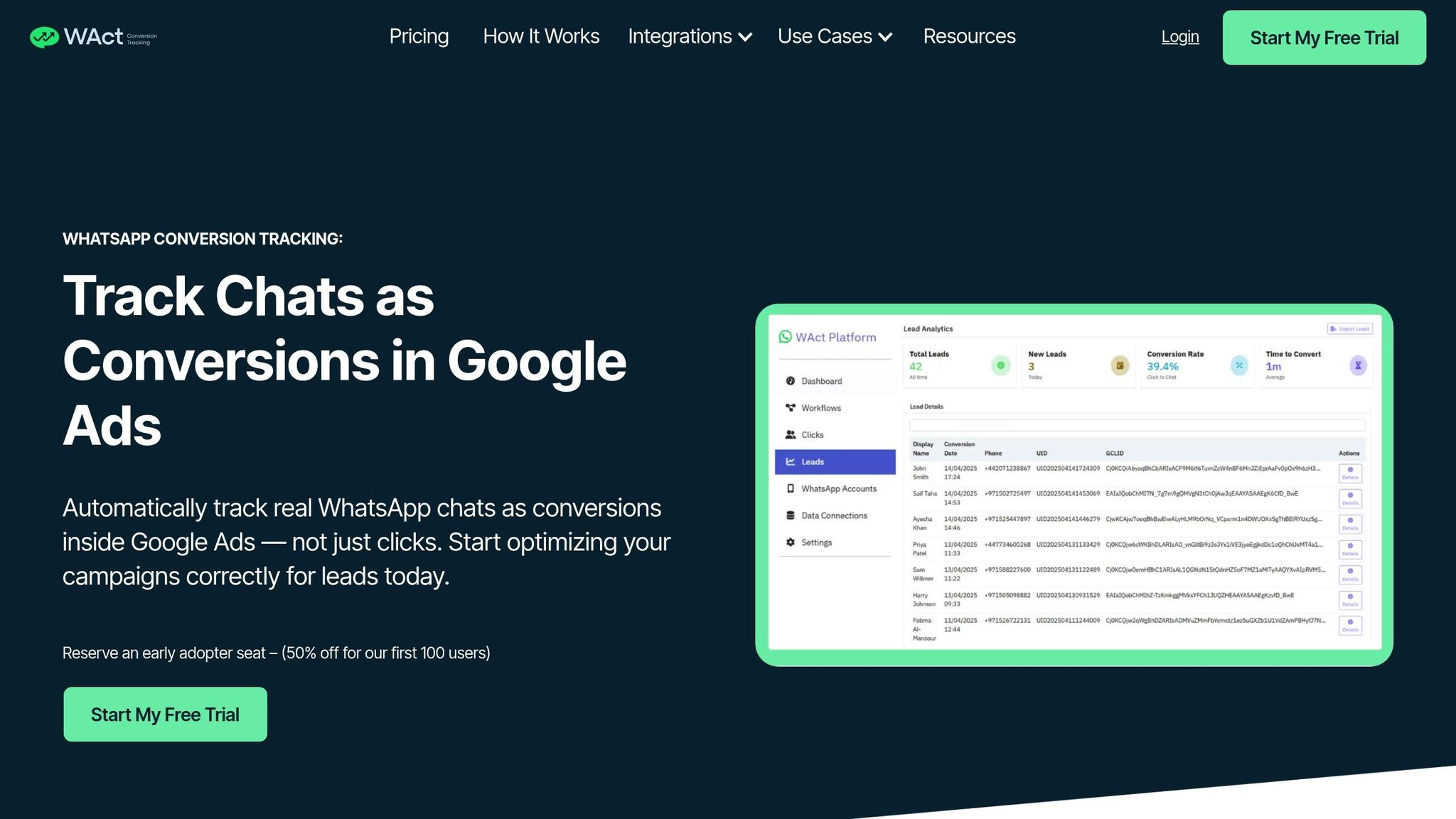
In the UAE, it’s common for businesses to use paid ads that direct leads to WhatsApp. However, figuring out which ads actually lead to meaningful conversations can be a challenge. For example, Google Ads might show plenty of clicks on your Click-to-WhatsApp ads, but not every click turns into a conversation or a conversion. That’s where WAConversionTracking comes in. It fills this gap by helping businesses track real interactions. Here’s a quick look at how it works.
How WAConversionTracking Works
When someone clicks on a Google ad and opens WhatsApp, WAConversionTracking captures key data like the GCLID, UTM parameters, and chat details. Setting it up is simple: connect your WhatsApp Business API to WAConversionTracking, link your WhatsApp number to your Google Ads account, and either use the built-in WhatsApp button or embed the tracking script. Once it’s configured, every WhatsApp lead is uploaded to Google Ads as an offline conversion, matching the user’s unique ID with their GCLID.
This closed-loop tracking system doesn’t just confirm which ads lead to real conversations - it also improves Google’s Smart Bidding algorithms, helping you target customers who are more likely to engage. Plus, it enhances the CRM functionality of WhatsApp Business, as previously discussed.
WAConversionTracking vs. Other Tracking Tools
Most ad attribution tools focus on tracking clicks, impressions, and website conversions. But WAConversionTracking goes a step further by capturing what happens inside WhatsApp chats. While Google Ads Manager can show you how many people clicked on an ad, it doesn’t tell you if those users started a conversation, asked about pricing, or made a purchase.
WAConversionTracking solves this by instantly sending chat event data to Google Ads. Unlike traditional CRMs with WhatsApp integrations, which often fail to connect individual leads back to their original ad campaigns, WAConversionTracking creates a direct link between the two. This makes it invaluable for businesses looking to measure the real impact of their ads.
Benefits for UAE Businesses
With over 9 million WhatsApp users in the UAE and 80% of messages being read within five minutes, accurate tracking is essential for staying ahead. WAConversionTracking allows businesses to directly link ad performance to WhatsApp conversations, maximising the CRM benefits of WhatsApp Business. For instance, JU Productions managed to cut its cost per qualified lead by 47.2% after implementing effective conversion tracking.
"It's essential to start with a clear business objective and craft a tailored workflow to reach that goal. This workflow might need adjustments based on specific factors like your target audience or geographical location."
- Ahmed Nassar, Technical Product Manager, respond.io
One of the best parts? You don’t need a developer to set it up. WAConversionTracking automatically generates tracking scripts with a single click and integrates smoothly with tools like Google Sheets and popular CRMs. This makes it a perfect solution for small businesses and agencies managing multiple clients. By simplifying conversion tracking, it complements your WhatsApp CRM strategy, working alongside the automation and integration features highlighted earlier.
Conclusion
WhatsApp Business provides UAE businesses with a practical and affordable way to manage customer relationships without the complexity of traditional CRM systems. Features like labels for organising contacts, quick replies for faster communication, and message templates for consistent responses allow even small teams to efficiently handle leads and build stronger customer connections.
For businesses running paid ads, the gap between clicks and actual conversations has always been a hurdle. WAConversionTracking bridges this gap by directly linking Google Ads to WhatsApp chats, enabling businesses to track real conversions instead of just button clicks. This closed-loop tracking offers insights into which campaigns genuinely engage customers - a vital advantage in the UAE's competitive market. This integration not only connects ad clicks to meaningful conversations but also streamlines CRM processes.
Take Automax, for instance, which achieved impressive ROI through WhatsApp broadcasts. Similarly, Noonmar grew its new customer base by 40% in just one month by integrating WhatsApp ads with accurate conversion tracking. These examples highlight WhatsApp's potential as a versatile business tool.
By tying ad performance directly to customer interactions, businesses can fine-tune both their marketing efforts and CRM strategies. Whether you're a small business using the free WhatsApp Business App or leveraging advanced tools like the API and respond.io as you scale, WhatsApp adapts to your needs. Start with the basics and incorporate conversion tracking as your requirements grow.
"It's essential to start with a clear business objective and craft a tailored workflow to reach that goal."
This combination of communication features and conversion tracking cements WhatsApp's position as a dynamic CRM solution for businesses in the UAE.
FAQs
How can small businesses in the UAE use WhatsApp Business as an effective CRM tool?
Small businesses in the UAE have a great opportunity to use WhatsApp Business as an easy-to-use tool for managing customer relationships and tracking leads. By setting up the WhatsApp Business app or API, businesses can take advantage of features like real-time messaging, automated responses, and customer segmentation through labels. Labels are particularly handy for organising customers based on their status, preferences, or where they are in the sales process. This makes follow-ups and communication much more streamlined.
To take things up a notch, integrating WhatsApp Business with third-party tools can simplify workflows and centralise data from various channels, such as social media or websites. Features like quick replies, message templates, and Arabic language support make it easier to personalise interactions and connect with UAE customers on a deeper level. Additionally, tools like WAConversionTracking can offer insights into chat conversions, allowing businesses to measure the success of their campaigns and fine-tune their marketing strategies.
With these features, small businesses in the UAE can turn WhatsApp Business into an affordable and efficient way to manage customer relationships while staying competitive in the market.
What advantages does integrating WhatsApp Business with respond.io offer for larger enterprises?
Integrating WhatsApp Business with respond.io gives large enterprises a centralised platform to handle customer interactions effortlessly. By bringing together WhatsApp calls, chats, and CRM tools in one place, it eliminates the hassle of switching between systems and reduces the chances of mistakes.
This setup simplifies workflows, speeds up response times, and ensures consistent communication - key factors for delivering top-notch service on a large scale. Additionally, it provides advanced tools like lead tracking, automation, and analytics, empowering businesses to enhance customer engagement and drive sales more effectively.
How does WAConversionTracking improve ad performance on WhatsApp Business?
WAConversionTracking empowers businesses to get the most out of WhatsApp Business by offering accurate conversion tracking for advertising campaigns. It records WhatsApp interactions as conversions in Google Ads, providing clear insights into how these chats impact campaign performance. This means businesses can make smarter decisions about ad spending and boost their ROI - especially in the UAE, where WhatsApp plays a central role in daily communication.
On top of that, WAConversionTracking streamlines CRM updates by integrating WhatsApp data directly into the system. This automation eliminates the need for manual data entry, ensures data consistency, and simplifies lead management. By doing so, it enhances marketing efficiency and makes WhatsApp Business an even more effective tool for both advertising and managing customer relationships.




