


WhatsApp Business is transforming how UAE businesses engage with customers. With nearly 99% internet penetration and WhatsApp as the most-used app in the region, it’s a powerful tool for driving sales and improving customer service. Whether you’re a small shop in Sharjah or a large enterprise in Dubai, leveraging WhatsApp Business features can help you streamline operations and boost conversions.
Here’s a quick rundown of the 10 WhatsApp Business features every UAE business should use:
- Quick Replies: Save time by creating up to 50 pre-saved responses for FAQs like AED pricing or delivery options.
- Greeting Messages: Automatically welcome new customers or re-engage after 14 days of inactivity.
- Away Messages: Inform customers of your availability and expected response times.
- Labels: Organize chats with color-coded tags like "New Lead" or "Pending Payment."
- Business Profile: Showcase key details like operating hours, location, and services in Arabic and English.
- Catalogs: Display up to 500 products with AED pricing directly in the app.
- Automated Messaging: Handle routine queries and send confirmations instantly, even outside business hours.
- Multi-Device Access: Allow teams to manage chats across up to 10 devices for better collaboration.
- Conversion Tracking: Measure ROI from WhatsApp interactions and ad campaigns using WAConversionTracking.
- CRM Integrations: Centralize customer interactions and automate workflows for better lead management.
These tools are free or affordable, easy to set up, and designed to fit the UAE’s bilingual and fast-paced market. Start by setting up your Business Profile, then gradually explore features like labels, catalogs, and automated messaging. Businesses using these tools have reported a 20% increase in conversion rates and a 27% rise in sales. Use a WhatsApp lead tracking planner to organize your campaigns and hit these targets. Don’t miss out on WhatsApp’s potential to improve customer engagement and grow your business.

10 Essential WhatsApp Business Features for UAE Companies
The Only WhatsApp Business Tutorial You Will Ever Need (For Beginners)
sbb-itb-0a82e4d
1. Quick Replies
Quick Replies are like shortcuts for your most-used messages. Instead of typing out the same responses over and over, you just type "/" followed by a shortcode, and your pre-saved message pops up instantly.
With this feature, you can store up to 50 templates that include text, images, or videos. Each template can be tagged with a shortcode and up to three keywords (15 characters max), making it super easy to find and send things like product brochures or how-to guides without digging through your files. This simple tool can save you time and help you connect with customers more efficiently.
"Quick replies simplify frequent queries so your team can focus on complex issues." - Ram Shengale, Founder & CEO, WANotifier
To get started, look at your chat history and identify 10–15 recurring questions - like AED pricing, delivery options for Dubai and Abu Dhabi, or accepted payment methods. Then, create Quick Replies for these topics using placeholders like {order_id} or {customer_name} to personalise responses. If your business caters to both Arabic and English speakers, consider organising replies with prefixes like "EN_" or "AR_" to make it easier for your team to find the right language version quickly.
Quick Replies also help you stay within WhatsApp's 24-hour messaging window, allowing you to maintain its impressive 98% open rate. By using pre-formatted messages, you can avoid the need for paid, pre-approved templates once that window closes.
2. Greeting Messages
Greeting Messages add a warm, personal touch to your customer interactions, showing that you're attentive and ready to help.
These automated messages welcome customers when they first contact your business or after 14 days of inactivity. This ensures no message slips through the cracks, keeping your engagement timely and consistent.
Why does that first message matter? In 2026, a staggering 82% of users will expect immediate responses. Combine that with WhatsApp's impressive 98% open rate, and you've got the perfect chance to make a great first impression and guide customers towards their next step.
To set up your Greeting Message, head over to Settings > Business tools > Greeting message. Craft a message that matches your brand's tone and style. You can include details like your typical response time (e.g., "We usually respond within 2 hours"), links to your catalogue or FAQs, or even a special offer (e.g., 20% off for new customers in Dubai and Abu Dhabi). These elements not only keep customers engaged but can also encourage immediate purchases.
"WhatsApp is increasingly becoming the commerce layer for brand engagement... Customers don't just browse - they consult, request support, complete transactions, and revisit brands all within messaging threads." – Vicky Yiu, APAC Strategic Partnership Manager, Business Messaging at Meta
The best part? This feature comes included in the standard app at no additional cost. However, the default greeting applies to all customers equally. If you need tailored messages for specific customer groups, upgrading to the WhatsApp Business API is necessary.
3. Away Messages
Away Messages are a great way to keep conversations active, even when your team isn’t available. These automated messages let your customers know you’re currently unavailable and when they can expect a response.
This feature is especially important in the UAE, where over 8 million people actively use WhatsApp and expect timely replies. Considering that businesses are 8 times more likely to convert leads if they respond within 5 minutes, an away message ensures that customers feel acknowledged while waiting for a reply.
You can schedule away messages in three ways:
- Always send: Ideal for extended closures, such as during holidays.
- Custom schedule: Perfect for specific dates and times.
- Outside business hours: Automatically activates based on your Business Profile hours.
To make your away message more effective, include links to your FAQ page, product catalogue, or booking calendar. Given the UAE’s multilingual market, it’s a good idea to offer messages in both Arabic and English for broader accessibility.
"Even when you are not available, an away message keeps the conversation going. It assures customers that their message has been received and will be attended to." – Saurabh Yadav, Chatbot.team
Setting up an away message is straightforward. Go to Settings > Business tools > Away message, and customise it to suit your business hours - whether that’s Monday–Friday or Sunday–Thursday. Don’t forget to adjust for local holidays like Ramadan, Eid al-Fitr, Eid al-Adha, and UAE National Day. This proactive approach prevents enquiries from being ignored and builds trust through clear communication.
4. Labels
Labels in WhatsApp Business act as a built-in CRM tool, helping you organise and track customer interactions effortlessly. By using colour-coded tags, you can categorise conversations and monitor the progress of leads or orders through your sales pipeline. This feature provides a clear visual representation of where each customer stands - from initial enquiry to completed purchase.
You can apply labels to entire conversation threads or specific messages, making it easier to manage and categorise interactions. The standard WhatsApp Business app allows up to 20 custom labels, while the WhatsApp Business API provides unlimited labelling options for businesses requiring more advanced organisation. Common label categories like "New Lead", "Payment Pending", "Order Complete", and "VIP" can align perfectly with your workflow.
"Labels help you organise the chaos and keep your customer interactions smooth and simple." – Ram Shengale, Founder & CEO of WANotifier
For businesses in the UAE, especially those dealing with high enquiry volumes during busy periods like Ramadan or the Dubai Shopping Festival, labels are a game-changer. Assign colours based on urgency to streamline operations - for example, green for "New Lead", orange for "Pending Payment", and blue for "Order Complete". You can also use labels to indicate team ownership, such as "Handled by Ahmed" or "Handled by Fatima."
To stay on top of things, make it a habit to review "Payment Pending" labels daily and archive completed conversations to keep your inbox tidy. With WhatsApp boasting a 98% open rate, you can send highly targeted broadcast messages to specific label groups like "Past Clients" or "Free Trial Users." These targeted campaigns are far more effective than generic ones, helping you re-engage customers and drive results. Organising your labels also sets the stage for seamless CRM integration, enhancing your overall communication strategy.
5. Business Profile
Your Business Profile on WhatsApp acts as your digital storefront, offering customers their first impression of your business before they even reach out. By including key details like your company name, description, address, operating hours, email, website, and logo, you establish a recognisable and trustworthy presence right from the start. In the UAE, where WhatsApp is a dominant communication tool and internet usage is nearly universal at 99%, this profile often serves as the initial touchpoint for customers - whether they’re planning to visit your store, browse your website, or simply learn more about what you offer. It’s a foundation for building credibility and sets the tone for deeper customer engagement.
"A business profile gives the company a familiar 'face' and identity." – BotsCrew
Make sure your profile eliminates unnecessary barriers for customers. By displaying operating hours and location directly within WhatsApp, you reduce the need for them to leave the app to find basic information, speeding up their decision-making process. Use a clear and recognisable company logo as your profile picture, and consider adding a professional cover photo that includes secondary contact details like your email or links to your social media accounts. With a 5,000-character limit for your business description, you have ample room to effectively communicate your value, but aim to keep it concise and focused.
In the UAE, it’s vital to provide all key details - such as your description, address, and contact information - in both English and Arabic. This ensures you cater to the country’s diverse audience, which includes both expatriates and local Emiratis. Keep your operating hours accurate and aligned with your Google Business Profile. This is especially important during periods like Ramadan when schedules may vary. Additionally, linking your profile to Facebook and Instagram allows you to leverage "Click-to-WhatsApp" ads, driving high-intent users directly to your business.
A complete and well-maintained profile can also integrate seamlessly with your product catalogue, enabling customers to browse your offerings directly within the app. This creates a smooth, mobile-first shopping experience that aligns perfectly with the UAE’s fast-paced, commerce-oriented culture. With over 200 million businesses globally using WhatsApp Business, having a polished and reliable profile is essential to stand out in the crowd.
6. Catalogs
The WhatsApp Catalog acts as your business's mobile storefront, allowing you to showcase up to 500 items. Each product listing can include detailed descriptions (up to 5,000 words), AED pricing, and is hosted directly on WhatsApp - saving storage space on your device. This feature integrates seamlessly with your business profile, making it easy for customers to explore your offerings without ever leaving the app.
"Catalogs allow your company to showcase your goods so people could easily browse and check out products they are interested in... without having to redirect your customers to the website or elsewhere." – BotsCrew
A well-structured catalog not only draws in customers but also simplifies their shopping experience. To make browsing easier, you can group products into Collections, much like e-commerce categories such as "New Arrivals", "Sale", or "Best Sellers." Each product entry can include a name, AED price, description, website link for additional information, and a unique product code. Customers can even add multiple items to an in-chat cart and send their selection in one message - making it easy to start a conversation or place an order.
For better results, focus on these tips:
- Use 3–5 high-quality images for key products to grab attention.
- Keep product titles short and mobile-friendly.
- Highlight your bestsellers by pinning them at the top of the catalog.
- Share direct links to specific products or entire collections during chats.
- Print QR codes linked to your catalog on product packaging for easy access.
Every product you upload is reviewed by WhatsApp within minutes to ensure it meets their guidelines.
The Catalog feature is free to use on WhatsApp Business, making it a budget-friendly alternative to building a full e-commerce site. Plus, with WhatsApp's impressive 90%+ open rate, it’s an excellent tool for turning casual browsers into loyal buyers.
7. Automated Messaging
Automated messaging takes care of routine customer interactions by providing instant responses to common queries, sending confirmations, and keeping conversations flowing - even when your team is offline. With an impressive 98% open rate, it ensures customers receive timely and reliable replies, no matter the time of day.
This feature doesn’t just enhance efficiency; it also allows your team to focus on more complex customer needs. For instance, Flamingo, a financial services provider, introduced a self-service chatbot on WhatsApp to handle tasks like checking account balances and generating tax certificates. The result? An 11% boost in conversions and a 21% increase in Net Promoter Score (NPS). Similarly, Nissan Saudi Arabia implemented a rule-based chatbot for 24/7 customer care and lead nurturing outside dealership hours, leading to a staggering 138% rise in leads.
Automation works seamlessly alongside your existing messaging setup, managing repetitive questions with consistency. For larger teams, automated routing rules can help by distributing incoming messages evenly among agents, reducing delays and ensuring a smooth workflow.
The standard app includes essential automation tools, while the API unlocks advanced features like AI-driven chatbots and event-triggered notifications. A standout example is Unilever’s "MadameBot" campaign, which achieved sales that were 14 times higher than traditional methods.
8. Multi-Device Access
Managing customer interactions effectively becomes challenging as your team grows, especially when relying on a single phone. That’s where multi-device access steps in, enabling teams to handle conversations collaboratively. With this feature, up to four additional devices can connect and sync in real time. For Premium accounts, this number increases to 10 devices. Even if the primary phone goes offline, messages, contacts, and media remain updated across all connected devices. In a fast-paced market like the UAE, where customers expect quick responses, this setup can make all the difference.
For teams, this means multiple agents can monitor the same inbox without stepping on each other’s toes. Using Labels - like "Handled by Priya" - you can assign chats to specific agents, reducing the risk of duplicate responses. This ties back to the Labels strategy discussed earlier in Section 4, where assigning agent names in multi-device setups ensures smoother communication.
If your team is small (1–2 agents), the standard multi-device access should suffice. For larger teams (5–10 agents), upgrading to Premium is recommended. And for teams exceeding 10 agents, the WhatsApp Business API offers unlimited access along with advanced routing capabilities. Just remember to open your primary phone at least once every 14 days to keep all devices connected.
9. Conversion Tracking with WAConversionTracking
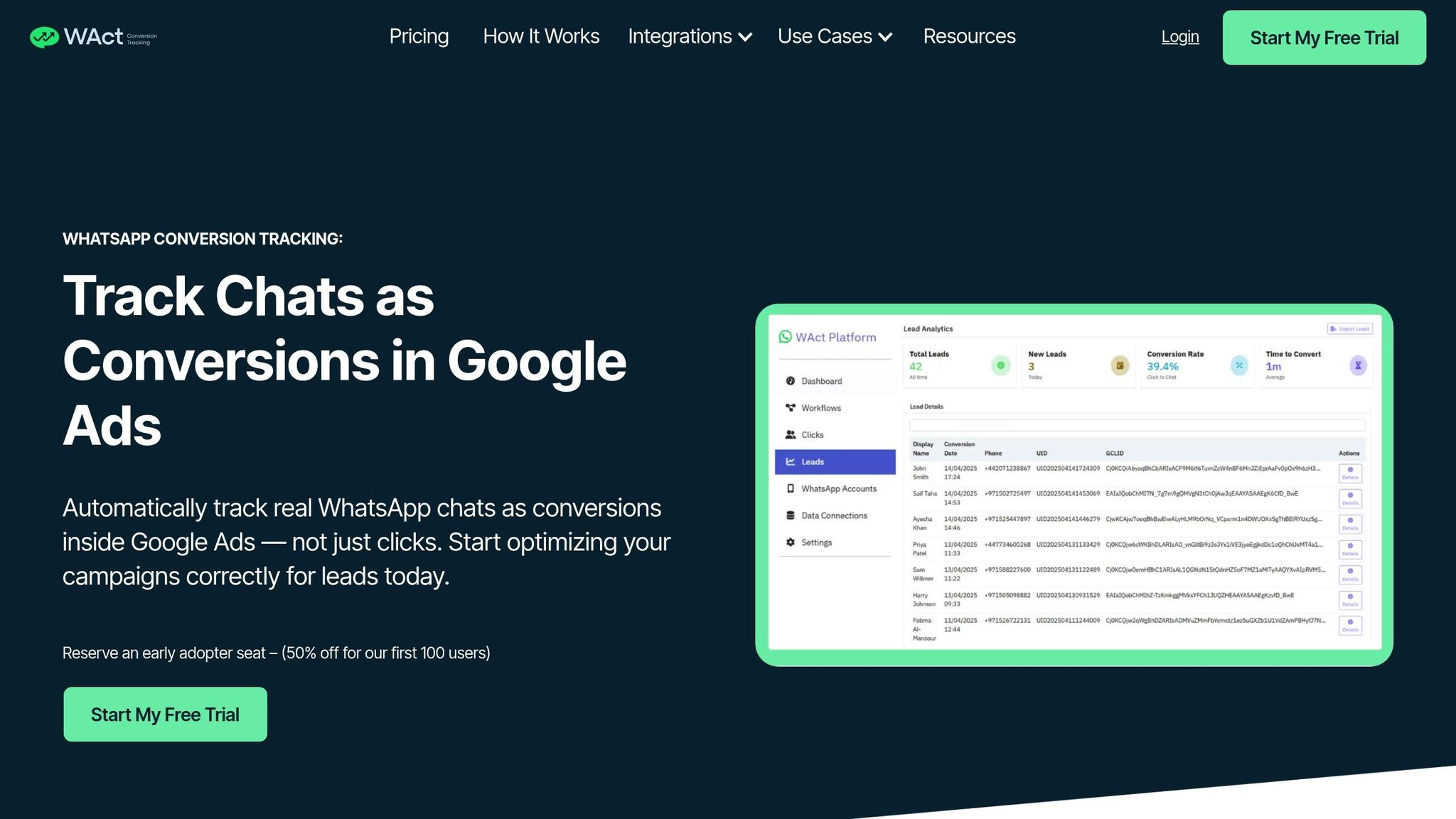
Tracking conversions from WhatsApp interactions is a game-changer for understanding the return on investment (ROI) of your ad campaigns. When users are directed to WhatsApp via Google Ads, simply tracking button clicks doesn’t tell the full story. WAConversionTracking fills this gap by monitoring actual WhatsApp chats as conversions and sending that data back to Google Ads. This gives you clear insights into which ads are driving qualified leads and revenue. It goes a step further by capturing both in-thread and off-thread events to provide a complete picture.
The tool logs in-thread actions like "show product" and off-thread actions like "checkout initiated", tying these events directly to your ad campaigns through attribution tables. These tables link message templates, phone numbers, and timestamps, making it easy to pinpoint the exact Google Ads campaign that led to a purchase.
For businesses in the UAE, this level of tracking is critical. In September 2023, Mercedes Benz Turkey used Click-to-WhatsApp ads combined with conversion tracking and saw a 93% boost in incremental conversions, while slashing the cost per qualified lead by 78%. Tata Cliq also ran a one-month WhatsApp campaign that brought in nearly AED 1,800,000 in revenue. Customers who came through WhatsApp were 1.7 times more likely to make a purchase.
"customers who visited our website from a WhatsApp notification were 1.7 times more likely to make a purchase." – Tata Cliq
What’s more, WAConversionTracking doesn’t require a developer. It automatically generates tracking scripts, captures GCLID and UTM parameters, and syncs conversion data in real time. This ensures that Google’s Smart Bidding receives accurate data, allowing it to optimise for actual sales. This is particularly valuable for Google Ads agencies managing complex client portfolios. For businesses spending over AED 10,000 per month on ads, this tool can dramatically reduce the cost per acquisition while scaling campaigns aimed at high-intent customers.
10. CRM Integrations
Integrating your CRM with WhatsApp Business takes customer management to a whole new level. By linking these systems, you centralise every customer interaction - whether it’s a WhatsApp chat, email, phone call, or purchase history - into a single, unified view. This means your sales team can instantly access details like what a customer enquired about last week, their past purchases, and their current stage in the sales funnel, all without jumping between multiple platforms.
This integration has a direct impact on how leads are managed. For instance, when a customer sends a message on WhatsApp, the CRM can automatically create a lead, assign it to the right person, and track its progress. No more manual data entry or missed follow-ups. Research shows that 70% of customers expect service agents to have their information ready, and 56% get frustrated when they have to repeat themselves to different representatives. With CRM integration, every agent has instant access to the full chat history, ensuring smoother and more personalised interactions.
For businesses in the UAE, where managing large volumes of enquiries is common, this level of organisation is essential. WhatsApp messages boast an impressive 98% open rate, and 65% of consumers now rely on messaging apps like WhatsApp to connect with businesses. This high engagement, combined with CRM and conversion tracking tools, enables businesses to monitor key metrics like response times, conversion rates, and sales performance in real time. Some companies have even reported that integrating WhatsApp with their CRM has led to conversion and purchase rate increases of up to 300%.
The benefits don’t stop at messaging. Automation through CRM integration opens up a world of possibilities. You can set up workflows to send abandoned cart reminders, provide order updates, or schedule follow-up messages based on customer activity. For e-commerce businesses, syncing inventory and order systems with WhatsApp allows for automatic shipping notifications and delivery confirmations. Teams managing multiple customers can also benefit from features like internal notes and tags, making team handoffs seamless.
On top of everyday communication, CRM integration enhances marketing efforts. By pairing your CRM with WAConversionTracking, you can close the loop on ad campaigns. This setup automatically tracks leads, sales, and ad performance, helping you optimise campaigns and improve ROI on WhatsApp ad campaigns.
Comparison Table
WAConversionTracking offers three tailored plans to meet the needs of businesses across the UAE. Whether you’re a local shop in Dubai using the free WhatsApp Business App, an expanding e-commerce brand managing a team of agents, or a large enterprise handling a flood of enquiries, there’s an option designed for you.
Here’s a closer look at what each plan offers:
The Basic Plan is perfect for businesses just getting started with conversion tracking. Instead of tracking WhatsApp button clicks, it captures actual WhatsApp chats and sends precise conversion data back to Google Ads, including GCLID and UTM parameters. This ensures your campaigns using Smart Bidding get accurate insights into which ads spark real conversations. For small retailers, this plan takes the guesswork out of ad spending, helping you focus your budget on ads that truly engage customers.
The Advanced Plan steps things up with powerful tracking and CRM integration capabilities. It’s great for mid-sized businesses that handle more conversations. Advanced URL tracking lets you follow customer journeys across multiple touchpoints, helping you see which ad creatives, keywords, or audience segments lead to WhatsApp chats. This is especially useful for UAE businesses running campaigns in both Arabic and English, where performance often varies based on language and messaging.
The Enterprise Plan is designed for large-scale operations. It supports businesses and agencies managing multiple WhatsApp Business API accounts, handling high daily conversation volumes without missing a beat. This plan includes complex attribution modelling, allowing you to compare WhatsApp’s performance against other channels. For enterprises with large Google Ads budgets, this plan ensures every conversion is tracked and campaigns are fine-tuned for maximum efficiency.
All plans require access to the WhatsApp Business API to enable automated conversion tracking.
Conclusion
WhatsApp Business has become an essential tool for businesses across the UAE to strengthen customer engagement. The ten features discussed earlier work in harmony to provide a streamlined experience. Automated messages ensure customer queries are addressed 24/7, catalogues simplify the buying process, labels help teams stay organised, and conversion tracking ensures every dirham spent on ads delivers measurable returns. Together, these features create a system that drives both efficiency and results.
The numbers speak for themselves. WhatsApp can boost customer service efficiency by 225%, outperforming traditional methods like email or phone support. Businesses adopting these features have reported a 20% increase in conversion rates and a 27% rise in sales. With over 135 million users worldwide messaging businesses daily, the potential for UAE companies to expand their market reach is undeniable.
Getting started is simple. Begin by setting up your Business Profile and configuring automated responses. From there, scale up by adding catalogues, using labels for organisation, and leveraging conversion tracking. For businesses running paid campaigns, tools like WAConversionTracking can help turn data into actionable insights, making your Google Ads campaigns more effective. This step-by-step approach ensures your business is ready to take advantage of advanced integrations and campaign optimisation.
In a competitive market like the UAE, where customer expectations are constantly rising, quick action is critical. A staggering 67% of customers believe the standard for a positive experience has increased. Whether you're a small shop in Sharjah or a large enterprise in Dubai, WhatsApp Business levels the playing field. The free app meets the needs of most small businesses, while the API provides enterprise-level automation for those ready to scale up. These strategies and metrics align perfectly with the features outlined throughout this article.
Don’t wait to adapt. Start implementing these features now, analyse your conversion data, and refine your approach. Businesses that embrace WhatsApp today will lead the way in building stronger customer relationships tomorrow.
FAQs
How can UAE businesses use WhatsApp Business to boost sales?
WhatsApp Business equips UAE businesses with practical tools to improve customer communication and boost sales. With features like automated messaging, quick replies, and labels, businesses can respond to inquiries faster, organise customer interactions, and nurture leads more effectively. Automated greetings and away messages help create a friendly and professional first impression, keeping customers engaged. Meanwhile, transactional notifications - such as order confirmations or appointment reminders - enhance trust and encourage conversions.
The catalog feature stands out for its ability to showcase products directly within the app. This allows customers to browse and shop without ever leaving WhatsApp, streamlining the buying process and reducing the chances of drop-offs. For businesses looking to expand their reach, advertising options in WhatsApp Status and Channels offer a way to connect with more potential customers and turn conversations into sales. By tapping into these tools, businesses in the UAE can build stronger customer relationships, boost engagement, and drive revenue in a mobile-focused market.
What advantages does integrating WhatsApp Business with a CRM system offer for businesses?
Integrating WhatsApp Business with a CRM system offers businesses an opportunity to revolutionise how they connect with their customers. By bringing communication data into one centralised platform, businesses can deliver tailored and efficient interactions, making customers feel genuinely valued and understood.
This setup also simplifies daily operations by automating repetitive tasks like quick replies, follow-ups, or reminders. The result? Faster response times and happier customers. On top of that, the integration strengthens lead generation and conversion tracking. With all customer insights housed in the CRM, businesses can analyse interaction history, preferences, and behaviour to make smarter, data-backed decisions that maximise marketing returns.
In short, this integration doesn’t just save time - it helps businesses focus on what truly matters: building better customer relationships and driving growth.
How can WAConversionTracking help improve the performance of my ad campaigns?
WAConversionTracking takes your ad campaigns to the next level by tracking WhatsApp interactions and logging them as conversions in Google Ads. This means businesses can see exactly how WhatsApp conversations contribute to generating leads and driving sales. It’s a game-changer for understanding the direct impact of WhatsApp on your marketing efforts, offering clearer attribution and sharper campaign insights.
On top of that, the tool automates updates to your CRM by capturing customer interactions on WhatsApp and syncing them seamlessly with your system. This automation simplifies customer management, makes personalised follow-ups easier, and boosts the overall effectiveness of your marketing. With these insights in hand, businesses can fine-tune their ad strategies, improve ROI, and get more out of their advertising budgets.




